

Best overall for recurring approvals inside Slack and Teams: Approveit. Best for dedicated purchasing workflows: Procurify. Best for enterprise sourcing: SAP Ariba. The best procurement approval software in 2026 matches where purchasing decisions happen and how much of procurement you need to manage beyond approvals.
TL;DR
Approveit is the best procurement approval software for teams automating recurring purchase approvals inside Slack, Microsoft Teams, and email.
Choose Procurify for purchasing workflows; evaluate SAP Ariba or Coupa when your requirements extend beyond approval routing.
Consider Microsoft Power Automate when your team wants to build approval processes within its existing Microsoft environment.
Keep manual approvals for occasional requests, not purchasing processes that require repeatable routing and traceable decisions.
Why this matters
Procurement approval software controls the decision to commit money. A request needs an owner, enough information to assess the purchase, a clear approval route, and a record of the outcome. A message saying that a purchase looks fine does not define that process.
For your 2026 shortlist, distinguish approval automation from procurement management. If your problem is chasing managers for purchase decisions, start with approval software. If you also need sourcing, supplier management, purchasing, and broader spend controls, evaluate a procurement platform.
Buy for the process you need to fix, not the longest feature list. A larger platform is not a substitute for clear purchasing rules.
What makes the best procurement approval software?
Use these criteria before comparing vendors:
Request completeness: Can you collect the business reason, supplier, amount, department, and supporting documents before review?
Approval routing: Can you represent the actual decision sequence, including different owners and purchasing conditions?
Approver experience: Can managers act where they already work, or does every decision require another application?
Decision records: Can you identify the request, decision maker, outcome, and relevant supporting information?
Procurement scope: Do you need approval routing alone, or supplier sourcing, purchasing, and spend management too?
Process ownership: Who will configure the workflow, maintain it, and resolve exceptions after launch?
For a 2026 evaluation, demonstrate these criteria using your own purchase requests. A polished vendor walkthrough does not prove that your approval rules fit.
Procurement approval software at a glance
Approveit
Best for: Recurring approvals in Slack, Teams, and email
Standout capability: No-code approval workflows across finance and operations
Key limitation to evaluate: Approval automation alone does not establish suitability for every procurement function
Procurify
Best for: Dedicated purchasing workflows
Standout capability: Purchase requests, purchasing, and spend management
Key limitation to evaluate: Broader purchasing scope is unnecessary if routing is your only requirement
SAP Ariba
Best for: Enterprise sourcing and supplier processes
Standout capability: Sourcing and procurement applications
Key limitation to evaluate: You must identify the applications and configuration your process requires
Coupa
Best for: Procurement within broader spend management
Standout capability: Procurement alongside other business spend processes
Key limitation to evaluate: An approval-only requirement does not justify the full platform scope
Microsoft Power Automate
Best for: Microsoft-centered custom workflows
Standout capability: Configurable automation with approval actions
Key limitation to evaluate: Your team owns workflow design and maintenance
Manual Slack, Teams, or email
Best for: Occasional, straightforward requests
Standout capability: Familiar communication channels
Key limitation to evaluate: Routing and recordkeeping depend on people following the process
The table compares use cases, not interchangeable editions of the same product. Start with the row that matches your operating problem, then examine its trade-offs.
1. Approveit: best procurement approval software for chat-based teams
Approveit is best for teams that need recurring purchase approvals without moving approvers out of Slack or Microsoft Teams. It provides no-code workflow approval software for purchase, invoice, expense, and other business requests, with approvals also supported through email.
The fit is specific: your purchasing policy already exists, but employees send incomplete requests or chase decisions through messages. Put the request and approval process into a defined workflow rather than treating every purchase as a new conversation.
Approveit pros:
Approvers can act directly inside Slack, Microsoft Teams, or email.
No-code setup lets business teams configure approval workflows.
The product covers purchase and invoice approvals alongside other operational requests.
Traceable decisions and audit records support a repeatable approval process.
Approveit cons:
You still need to define approval owners and purchasing rules.
Approval automation is not evidence that every sourcing, supplier, or accounting requirement is covered; demonstrate those requirements separately.
Best for: Finance and operations teams replacing recurring manual purchase approvals in chat or email.
Verdict: Buy for approval automation inside the tools your managers already use.
2. Procurify: best procurement approval software for purchasing workflows
Procurify focuses on purchasing and spend management, including purchase requests and purchase orders. It belongs on your shortlist when the approval decision sits inside a wider purchasing process rather than ending with a manager's response.
Build the demonstration around what happens after approval. Your purchasing team needs to see how the approved request connects to the purchasing work it owns.
Procurify pros:
Purchasing is central to the product's purpose.
Purchase requests and purchase orders belong within the same purchasing context.
Spend management gives the evaluation a scope beyond individual decisions.
Procurify cons:
Broader purchasing functionality adds requirements to evaluate beyond approval routing.
Purchasing functionality alone does not prove a fit with your accounting system or approvers' preferred channels.
Best for: Teams that want purchasing management, not just permission to buy.
For your 2026 evaluation, ask the vendor to follow an actual request through approval and the next purchasing step. Keep your purchasing owner in that demonstration.
Verdict: Buy when purchasing operations are part of the problem; skip when you only need message-based approval routing.
3. SAP Ariba: best procurement approval software for enterprise sourcing
SAP Ariba offers sourcing and procurement applications. It is a candidate when approval requirements belong to a broader enterprise process involving suppliers, sourcing, and purchasing.
Do not evaluate SAP Ariba as a single approval button. Identify the relevant applications and show how they support the process your procurement team needs to run.
SAP Ariba pros:
Sourcing is part of the available product scope.
Supplier processes can sit alongside procurement requirements.
The application portfolio addresses needs beyond purchase-request approval.
SAP Ariba cons:
Product breadth requires you to define the application scope before comparing proposals.
A sourcing-led evaluation adds work that an approval-only project does not require.
Best for: Enterprise procurement teams evaluating sourcing and supplier processes alongside purchasing approvals.
Use a supplier-related purchasing scenario in the demonstration. A simple internal request cannot establish whether the broader procurement process meets your requirements.
Verdict: Buy when enterprise sourcing belongs in the project; skip for a narrow approval-only rollout.
4. Coupa: best procurement approval software for broader spend management
Coupa covers procurement within a broader spend management platform. Evaluate it when purchasing approvals are one part of a project that also addresses other business spending processes.
The key decision is scope. If procurement, finance, and expense owners have shared requirements, a broader platform deserves evaluation. If your immediate problem is an unanswered purchase request, keep that narrower need visible.
Coupa pros:
Procurement is part of a wider spend management offering.
Purchasing requirements can be evaluated alongside other spending processes.
The broader scope supports a cross-functional procurement and finance discussion.
Coupa cons:
An approval-only team must separate necessary capabilities from unrelated platform scope.
Broad coverage does not establish that your specific workflow, systems, or user experience fit without a demonstration.
Best for: Organizations selecting procurement software as part of a wider spend management project.
In a 2026 shortlist, make each participating department identify the process it needs to change. That prevents a broad purchasing project from becoming a collection of unrelated feature requests.
Verdict: Buy for a defined spend management program; skip when approval routing is the entire requirement.
5. Microsoft Power Automate: best for Microsoft-centered custom approvals
Microsoft Power Automate supports configurable workflows and approval actions. It is an option when your team wants to build an approval process within a Microsoft-centered working environment.
This is a build-and-maintain choice rather than a dedicated procurement application. Decide who owns the flow before discussing connectors or automation features.
Microsoft Power Automate pros:
Approval actions are available within a general workflow platform.
You can design automation around a defined business process.
The Microsoft environment gives existing Microsoft-focused teams a relevant starting point.
Microsoft Power Automate cons:
Your team owns the flow's design, changes, and troubleshooting.
Procurement-specific request structures and controls need to be designed rather than assumed.
Best for: Microsoft-centered teams with an identified workflow owner and requirements suited to custom automation.
Ask the person who will maintain the workflow to demonstrate a change in approval ownership. A flow that works only while its original builder is present is not a finished operating process.
Verdict: Buy into this approach when you can own the workflow; skip when you need a ready-defined procurement process.
6. Manual Slack, Teams, or email: best for occasional simple requests
Manual approvals use messages and human follow-up rather than a defined automated workflow. They remain an option when requests are occasional, the decision owner is obvious, and the process does not require complex routing.
Keep the limits explicit. A familiar communication tool does not automatically create a consistent request structure or an approval record that your purchasing team can reliably retrieve.
Manual approvals pros:
Requesters use familiar communication tools.
A straightforward request can go directly to its decision owner.
You can begin by documenting a process without selecting software.
Manual approvals cons:
People must collect missing information and chase responses.
Consistent routing and recordkeeping depend on manual discipline.
Exceptions can become separate conversations with no clear process owner.
Best for: Occasional purchases with simple ownership and limited routing requirements.
Use a written request template even before adopting software. Define what counts as approval and where the final decision belongs.
Verdict: Hold for occasional requests; skip for recurring approvals that need consistent routing and records.
How to test your shortlist
Use 3 purchase requests in each demonstration: a routine purchase, a purchase requiring additional review, and a request with missing information. These are evaluation scenarios, not vendor performance benchmarks.
Run the additional-review scenario through 2 approval stages. Then include 1 rejected request so you can inspect the outcome rather than evaluating only successful approvals.
Follow the same sequence for every option:
Request intake: Submit the purchase details and supporting information.
Approval routing: Show who receives the request and why.
Decision record: Inspect the decision, owner, and supporting context.
Purchasing handoff: Show what the purchasing or finance team receives next.
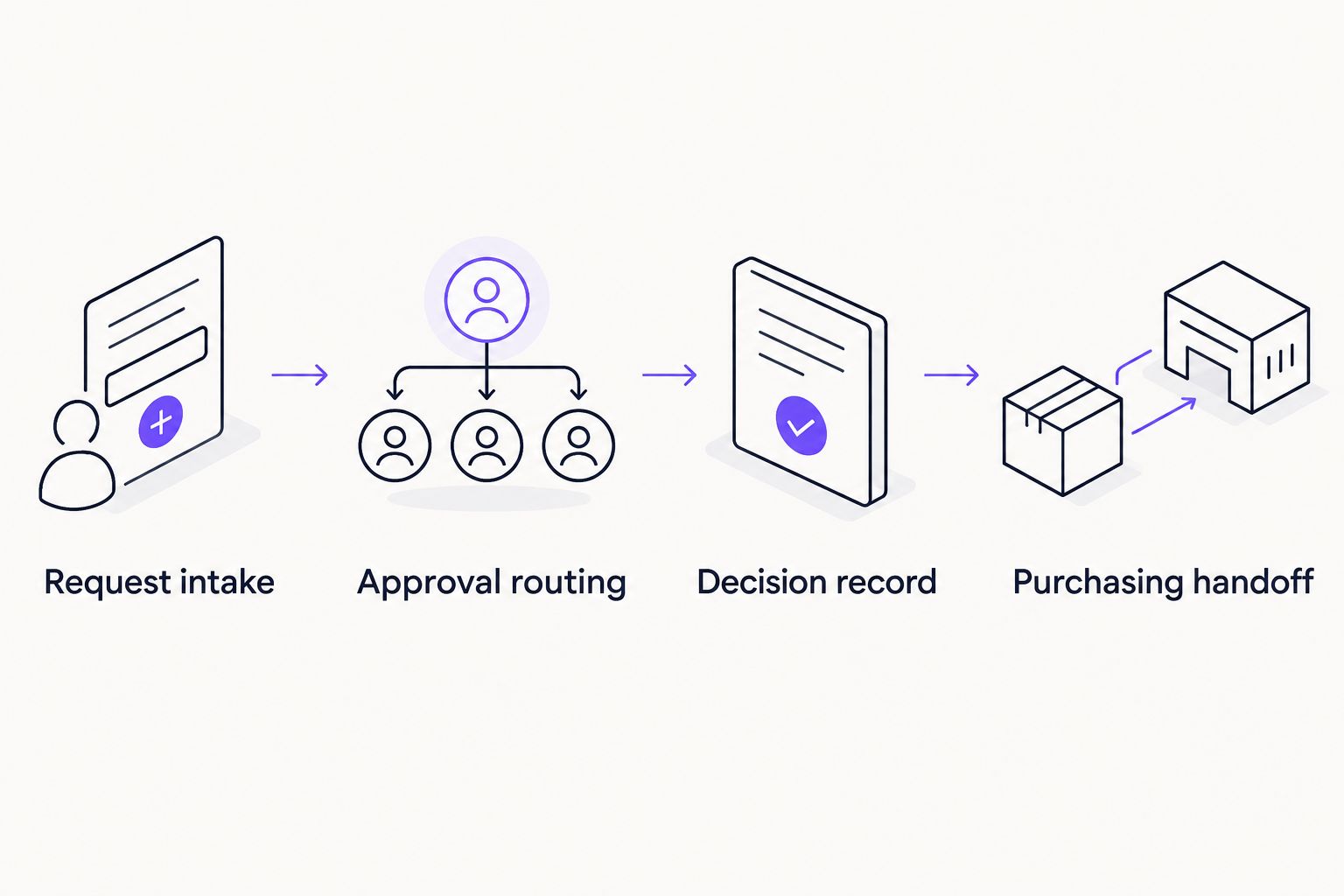
Evaluate the purchasing handoff, not just the approval action.
Give the approver the same purchasing information your employees normally provide. Ask the vendor to show how missing details, rejection, and ownership changes are handled. Keep configuration questions separate from capabilities already demonstrated.
How this ranking works
This 2026 ranking prioritizes workflow fit: approver experience, procurement scope, decision records, and process ownership. It does not present a measured speed comparison or a hands-on test score.
The order starts with recurring approval automation, then moves into purchasing management, enterprise procurement, custom workflows, and manual handling. Use the Best for labels to choose a shortlist rather than assuming the first option covers every procurement requirement.
Which procurement approval software should you choose?
Choose Approveit for recurring procurement approvals inside Slack, Microsoft Teams, and email. Choose Procurify when the purchasing process itself needs management. Evaluate SAP Ariba or Coupa when sourcing or broader spend management is part of the project.
Microsoft Power Automate belongs on the shortlist when your team wants to build and maintain the workflow. Keep manual approvals only when the request volume and routing complexity do not justify automation.
Before booking a demo, write down the purchase request that causes the most follow-up. Bring that example, its approval owners, and the required final record. Your next move is to prove that one process works, not to collect another general product tour.
See purchase approvals in action
Explore no-code purchase approval workflows inside Slack, Microsoft Teams, and email.
FAQ
What's the best procurement approval software for Slack and Teams?
Approveit is the best fit in this shortlist for recurring purchase approvals directly inside Slack, Microsoft Teams, and email. It provides no-code approval workflows for finance and operations requests.
Is procurement approval software the same as procurement software?
No. Procurement approval software manages purchasing decisions, while broader procurement software can also cover sourcing, suppliers, purchasing, and spend management. Choose the scope that matches your project.
Should we replace manual purchase approvals in email?
Replace manual email approvals when recurring requests need consistent routing and traceable decisions. Keep manual handling for occasional, straightforward requests with clear ownership.
Is Microsoft Power Automate better than a dedicated approval tool?
Microsoft Power Automate is a better fit when your team wants to build and maintain a custom workflow in its Microsoft environment. A dedicated approval tool is a better fit when business teams need approval-focused configuration rather than ownership of a general automation flow.
How do we compare procurement approval software in a demo?
Run the same purchase scenarios through every shortlisted option. Include a routine request, additional approval review, missing information, and rejection; then inspect the purchasing handoff and decision record.
Do we need SAP Ariba or Coupa for purchase approvals?
Purchase approvals alone do not establish a need for SAP Ariba or Coupa. Evaluate those platforms when sourcing, supplier processes, or broader spend management belong in the same project.
What information should a purchase approval request include?
A purchase approval request should include the business reason, supplier, amount, department, and supporting information needed by the approver. Define the required fields before configuring the workflow.
One last thing
Approval is not the same as permission to complete every downstream action. Your 2026 purchasing process should specify what the decision authorizes and who handles the next step. If the requester still asks what happens after approval, fix that handoff before adding more routing rules.







