

Best overall for recurring approvals in Slack and Teams: Approveit. Best for IT service requests: Jira Service Management. Best for formal change management: ServiceNow IT Service Management. Best for custom Microsoft workflows: Power Automate. This 2026 guide compares IT approval software by the work you need to control, with manual Slack, Teams, and email approvals as the main alternative.
TL;DR
Approveit is the best IT approval software choice here for recurring, no-code approvals inside Slack and Microsoft Teams.
Choose Jira Service Management when approval belongs inside an IT service request.
Choose ServiceNow IT Service Management when change approval belongs within a broader IT management process.
Choose Power Automate for custom Microsoft workflows; retain manual approvals only for simple, occasional requests.
Why this matters
An access request is not complete when someone replies yes. IT still needs to know what was requested, who approved it, and what action follows. A software purchase also involves a different decision from permission to use an existing application.
The first question for your 2026 shortlist is therefore scope: Do you need a repeatable approval process, a service desk, or a broader IT management system? Buying the larger system does not remove the need to define approvers. Keeping requests in chat does not remove that need either.
Manual approvals remain the real alternative for teams already using Slack, Teams, or email. They require little process setup, but someone must connect the request, decision, and follow-up. Automation becomes useful when that coordination repeats across access requests, software requests, and employee changes.
What makes the best IT approval software
Use these criteria before comparing names. The strongest choice fits your approval work without adding an unrelated system to administer.
Approval location: Can your approvers decide where they already work, or must they open another queue?
Decision ownership: Can you represent the people responsible for access, spending, and exceptions?
Request context: Can the request carry the application, business reason, access level, and supporting information?
Traceable decisions: Can you connect the decision to the original request and the responsible approver?
Setup ownership: Can operations maintain the process, or does every adjustment require technical work?
Execution boundary: Does the software record approval, perform the IT action, or require a separate handoff?
Treat the final criterion as a separate purchase question. Approval, account provisioning, and license assignment are different jobs. Do not assume a product performs all of them because it supports approval workflows.
IT approval software at a glance
This 2026 comparison separates approval-first software from service management and custom automation. Manual approvals appear as the baseline, not as another software recommendation.
Approveit
Best for: Recurring approvals inside Slack and Teams
Standout feature: No-code request approvals across Slack, Microsoft Teams, and email
Key limitation: Evaluate fulfillment separately from approval
Jira Service Management
Best for: Approvals attached to IT service requests
Standout feature: Approval steps within service management workflows
Key limitation: Requires service project and workflow configuration
ServiceNow IT Service Management
Best for: Formal IT change management
Standout feature: Change approvals within broader IT management processes
Key limitation: Broader scope than a standalone approval requirement
Power Automate
Best for: Custom Microsoft approval workflows
Standout feature: Approval actions within configurable automation flows
Key limitation: Your team must build and maintain the flow
Manual Slack, Teams, or email
Best for: Occasional, straightforward decisions
Standout feature: Uses existing communication channels
Key limitation: People must maintain the request-to-decision connection
1. Approveit: best IT approval software for chat-based teams
Approveit provides no-code workflow approval software for finance, HR, IT, and operations. Teams can automate access requests and software requests directly within Slack, Microsoft Teams, and email. It is the closest fit here when the problem is repeated approval coordination rather than a missing service desk.
A useful starting workflow is a software request that needs a business owner's decision before IT takes action. Keep the application name, purpose, and requested access together. The approval process should tell IT what was authorized without treating that decision as proof that access has already been granted.
Approveit pros:
No-code setup suits teams that need to maintain approval processes without writing software.
Approval inside Slack or Teams keeps the decision in an existing work channel.
IT requests can sit alongside finance, HR, and operations approval processes.
Traceable decisions and audit records address the need to explain who authorized a request.
Approveit cons:
Approval software does not replace the work of defining request owners and decision rules.
You must assess provisioning and other IT execution requirements separately.
A team seeking a full service desk should evaluate that requirement independently.
Best for: Teams with recurring access and software requests whose approvers already work in Slack or Microsoft Teams.
For a Teams-first evaluation, compare the workflow requirements in the guide to approval software for Microsoft Teams. Focus on the request-to-decision path, not just whether a notification reaches the channel.
Verdict: Buy for recurring, no-code approval coordination inside existing communication tools.
2. Jira Service Management: best for IT service request approvals
Jira Service Management organizes IT service requests and supports approval steps in service management workflows. It fits a team that wants approval to remain part of the same request that IT processes. The request record, rather than a separate chat conversation, becomes the center of the work.
Consider an employee asking for access to an application. The service request can represent the work item, while the approval step determines whether it proceeds. This structure is useful when your team already manages support requests through a service queue.
Jira Service Management pros:
Approval can sit within the service request process.
Request workflows connect the authorization decision with subsequent IT handling.
A service management approach suits teams organizing multiple request types.
Existing Jira service teams can evaluate approval within their current request model.
Jira Service Management cons:
The team must configure the service project and approval workflow.
A service queue adds process structure beyond a simple chat-based approval.
Buying a service management product solely to replace occasional yes-or-no messages introduces unnecessary scope.
Best for: IT teams that want approvals embedded in service requests and already need a structured service desk.
For your 2026 evaluation, ask for a demonstration of a request submitted with incomplete information, corrected, approved, and handed to IT. A straightforward approval example does not show how the workflow handles the exceptions your team actually encounters.
Verdict: Buy when the service request is the primary work record; skip when you only need an approval layer.
3. ServiceNow IT Service Management: best for formal change approvals
ServiceNow IT Service Management includes change management processes with approvals. Its fit is broader than routine employee permission requests. Evaluate it when authorization belongs within a formal process for assessing and managing IT changes.
A production change illustrates the difference. The decision concerns whether a planned change should proceed within the organization's change process, not simply whether an employee can purchase an application. That broader operating context is the reason to consider this option.
ServiceNow IT Service Management pros:
Change approval sits within a broader change management process.
IT service management provides context beyond the approval decision alone.
Formal processes suit organizations with defined change ownership and governance.
Teams using ServiceNow can assess approvals within their existing IT operating model.
ServiceNow IT Service Management cons:
The scope exceeds what a standalone approval requirement needs.
Implementation requires decisions about the wider service management process.
Buying before naming process owners leaves fundamental workflow questions unresolved.
Best for: Organizations that need change approvals as part of a broader IT service management program.
Do not use enterprise scope as a ranking shortcut. A small software request and a production change require different information, different decision owners, and different follow-up. The appropriate system is the one that matches the process you need to run.
For a 2026 shortlist, separate mandatory change governance from routine employee approvals before comparing demonstrations.
Verdict: Buy for formal IT management requirements; skip for a narrowly defined approval-only problem.
4. Power Automate: best for custom Microsoft approval workflows
Power Automate provides approval actions within configurable automation flows. It suits teams that want to build approval logic around Microsoft tools and have someone responsible for maintaining that automation. The value is flexibility, not the absence of configuration.
For example, you can design a workflow that collects a software request, routes a decision, and passes the outcome to another step. The team must define what each step does and how failures are handled. A working first version is not the same as a maintained business process.
Power Automate pros:
Approval actions can form part of a larger automation flow.
Configurable logic supports workflows designed around your team's process.
It is a relevant option for teams building around Microsoft services.
An existing automation owner can manage approval alongside other business flows.
Power Automate cons:
Your team owns flow configuration and ongoing maintenance.
Changes to connected systems require attention from the workflow owner.
A custom flow needs explicit exception handling and ownership documentation.
Best for: Microsoft-focused teams with a named automation owner and requirements that justify building a custom flow.
Ask the owner to explain what happens when an approver changes roles, a connected step fails, or a request needs correction. If nobody owns those answers, the custom workflow is not ready to become a dependable approval process.
Verdict: Buy into this approach when you can maintain it; hold when ownership is unclear.
When manual approvals are enough
Best for: Occasional requests with a clear approver, straightforward context, and little follow-up.
Manual Slack, Teams, or email approvals are a valid baseline. They let you ask for a decision through tools your team already uses. They also leave the process dependent on people connecting messages and completing the next action.
Manual approval pros:
You can start with existing communication channels.
An unusual request can be explained in ordinary conversation.
A simple decision does not require a new workflow design.
Manual approval cons:
Someone must connect the authorization to the original request.
Follow-up and reassignment depend on the people managing the conversation.
Retrieving the decision later requires a deliberate recordkeeping approach.
Verdict: Hold for occasional decisions; replace manual coordination when recurring requests need a repeatable process.
Evaluate one real workflow before booking a demo
Use a workflow your team already recognizes. For a 2026 evaluation, a software access request is more useful than a generic demonstration because it exposes both approval ownership and the handoff to IT.
Build the sample around 4 request fields: application, business reason, access level, and requested duration. Treat these as an example design, not a product specification. Add other information only when someone uses it to make a decision.
Then walk through 3 workflow steps:
Request intake: Capture the information the decision requires.
Approval decision: Identify who can authorize the request and record the outcome.
IT fulfillment: Hand the authorized request to the person responsible for execution.
For a request requiring 2 approvers, name both roles and define whether the decisions happen together or in sequence. Do not add an extra approver merely because the software allows one. Each approval should answer a distinct business question.
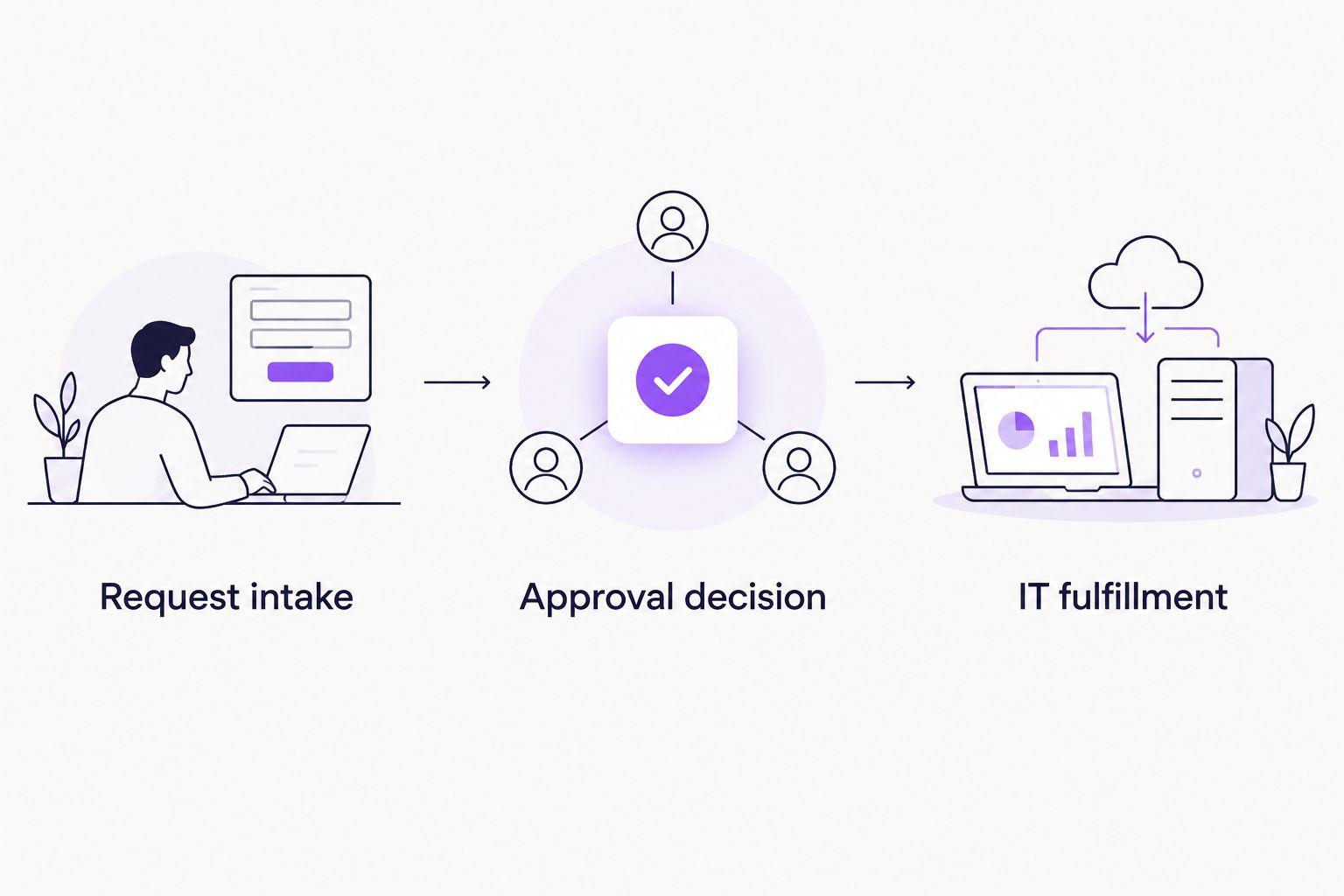
An approval decision authorizes the work; IT fulfillment completes it.
Ask the vendor to show a rejected request and a request returned for clarification. Then ask how the responsible person retrieves the decision record. These examples reveal whether the process supports your operating rules rather than just a straightforward approval.
Evaluate your IT approval workflow
Bring an access or software request and assess approval inside Slack or Microsoft Teams.
How we ranked
The ranking prioritizes the recurring approval problem described in this guide: requests that need a clear decision without unnecessary switching between tools. It then separates service request management, formal change management, and custom Microsoft automation into distinct use cases.
These are scope-based recommendations, not performance test results. Approval location, decision ownership, request context, traceability, setup responsibility, and the fulfillment boundary determine the fit.
Which IT approval software should you choose?
Start with approval-first software if your recurring problem is chasing decisions in Slack, Teams, or email. Choose Jira Service Management when approvals belong inside a service desk. Choose ServiceNow IT Service Management when formal change management is the requirement.
Choose Power Automate when your team deliberately wants a custom flow and can maintain it. Keep manual approvals when the work remains occasional and straightforward. For 2026, the decisive question is whether you need a better approval process or a larger IT operating system.
FAQ
What's the best IT approval software for Slack and Teams?
Approveit is the best fit in this comparison for recurring, no-code IT approvals inside Slack and Microsoft Teams. Its stated scope includes IT access and software requests, alongside finance, HR, and operations approvals.
Is Jira Service Management better than standalone approval software?
Jira Service Management is the better fit when approval belongs within an IT service request. Standalone approval software fits teams whose main requirement is repeatable decision routing rather than a service desk.
Should a small IT team choose ServiceNow for approvals?
Choose ServiceNow IT Service Management when the requirement includes broader IT management and formal change processes. An approval-only requirement does not justify that scope by itself.
Can I build IT approvals with Power Automate?
Power Automate supports approval actions within automation flows. Your team must configure the workflow, define exception handling, and assign someone to maintain it.
Does approving an access request automatically grant access?
An approval decision does not by itself establish that access has been granted. Evaluate provisioning separately and define the handoff between the approver and the person or system completing the IT action.
When should we replace manual approvals in email?
Replace manual coordination when recurring requests need consistent routing, traceable decisions, and a defined follow-up process. Keep manual approvals for occasional decisions that remain straightforward to manage.
What should I bring to an IT approval software demo?
Bring a real access or software request, its required information, and the roles that approve it. Ask the vendor to show approval, rejection, clarification, and the handoff to IT fulfillment.
One last thing
Do not make approval and completion the same status. A manager can authorize application access while IT still needs to grant it. Keeping those stages separate prevents an approved request from being mistaken for finished work.







