

Manufacturing purchase order approval software is a system for routing purchasing decisions to authorized reviewers with the aim of controlling commitments before orders reach suppliers. This 2026 guide covers plant-level responsibilities, urgent maintenance purchases, and approval records without treating approval software as a replacement for production planning or inventory management.
TL;DR
Purchase order approval software for manufacturing should control authorization before supplier commitment, not just collect approvals afterward.
Approveit is best for teams seeking no-code purchase approvals inside Slack, Microsoft Teams, or email.
Define plant ownership, purchasing authority, and emergency exceptions before configuring purchase order workflows.
Test changed orders and rejected requests alongside routine approvals before expanding the workflow.
Why purchase order approval software matters for manufacturing
A manufacturing purchase request needs more context than a supplier name and an amount. A replacement component, a recurring materials order, and a tooling purchase ask different questions: Is the specification correct? Who owns the budget? Does an existing agreement cover the purchase?
Approve the business decision before authorizing the supplier commitment. An approval recorded after an order is placed documents an event; it does not control that commitment.
For your 2026 shortlist, use the purchase order approval software guide alongside the manufacturing-specific acceptance criteria below. Start with the request types your team actually handles, not a vendor feature checklist.
Manual approvals in Slack, Microsoft Teams, or email remain a valid option when ownership is clear and requests are straightforward. The limitation is operational: someone must connect the request, supporting documents, decision, and final order. Software should reduce that coordination work without removing accountability.
How to build a manufacturing purchase approval workflow
Define what requires approval
Write down the event that starts the approval process. For a purchase request, that event normally precedes issuing the purchase order. For an amended order, it is the proposed change—not the original authorization.
Separate permission to purchase from supplier selection, goods receipt, and invoice approval. These decisions inform one another, but they answer different questions. A manager approving a component purchase has not confirmed that the component arrived or that an invoice matches the order.
Build your 2026 scope around named purchasing scenarios. Describe the information and authority each scenario requires before discussing automation.
Production materials: identify the item specification, quantity, supplier, and required delivery date.
Maintenance purchases: record the affected equipment and operational reason for the request.
Tooling purchases: identify the intended use and responsible budget owner.
Services: specify the work, business owner, and acceptance criteria.
Order changes: state what changed and whether renewed authorization is required.
Map authority by plant and purchase type
Create a written approval matrix before building a workflow. Name who confirms the technical need, who authorizes the commitment, and who releases the order. One person can hold more than one responsibility where your policy permits it; the responsibilities should still be explicit.
For a maintenance component, the equipment owner can confirm the specification while the budget owner authorizes the purchase. Procurement can then handle supplier communication. This is a workflow design example, not a requirement to add every role to every request.
Add a reviewer only when that reviewer owns a distinct decision. Extra approval stages are not a substitute for clear authority. Your manual version can be a controlled document that requesters and reviewers consult before sending requests.
Name the budget owner for each plant or cost center.
Assign technical review only where specification approval is needed.
Define who can approve requests submitted by managers.
Record authorized cover for absent approvers.
Specify which changes restart approval.
Separate approval authority from permission to issue an order.
Configure the workflow where reviewers work
Start manually with a standard request template, a named reviewer, and an explicit decision recorded in the same thread. This establishes the process before you automate it. Avoid treating a reaction icon or an informal acknowledgment as authorization unless your written policy defines it that way.
Approveit provides no-code purchase approval workflows within Slack, Microsoft Teams, and email. The fit is teams with recurring requests that want reviewers to approve within those tools rather than move the decision into another interface. The limitation is scope: purchase approval software does not replace your purchasing policy, inventory records, or production planning.
For a demonstration, bring a real request pattern: a maintenance purchase requiring technical review and budget authorization, followed by an order issued by procurement. Ask the vendor to show the complete path and the resulting decision record; do not infer support from a feature label.
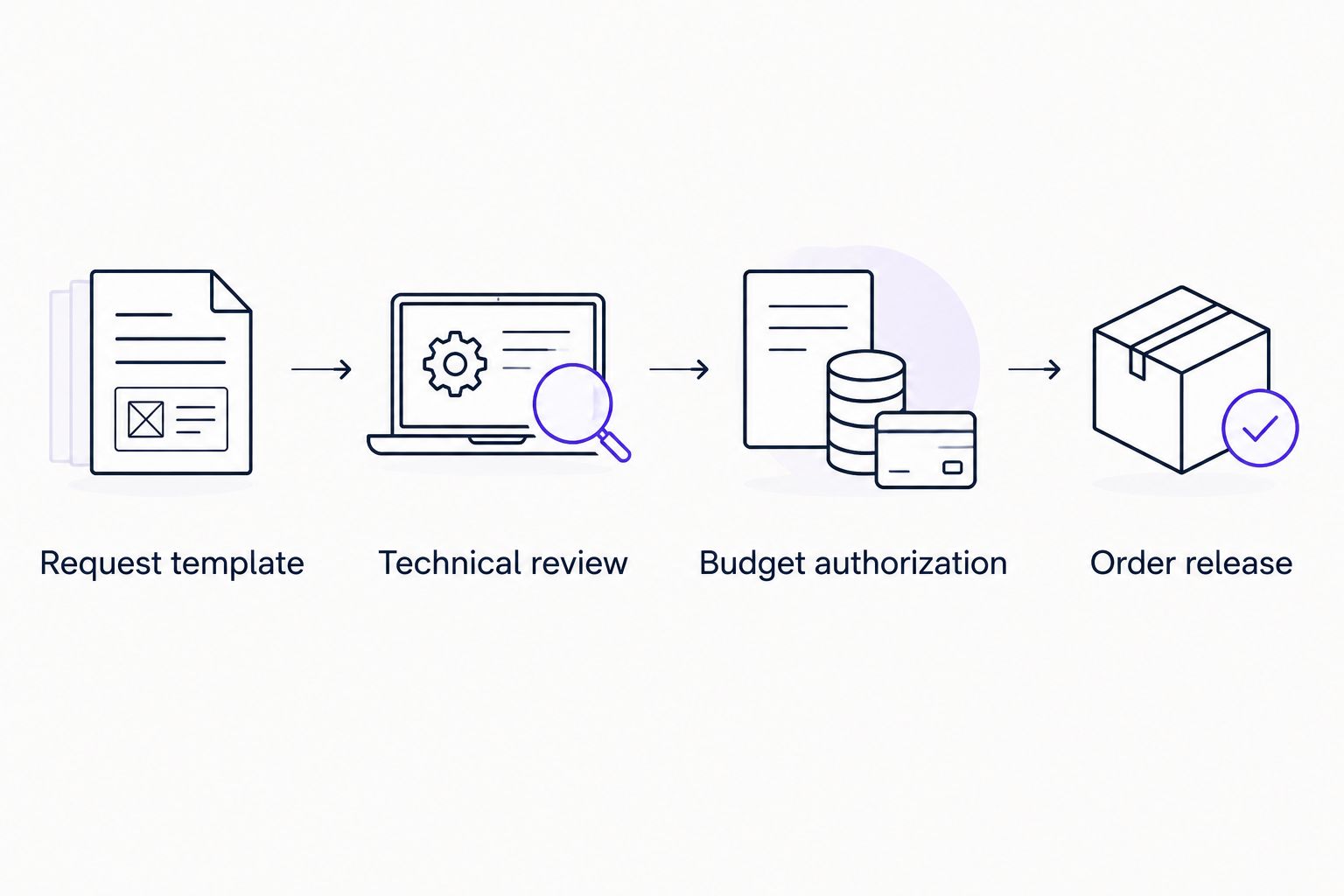
Keep technical review, budget authorization, and order release as distinct responsibilities.
Request template: capture the information reviewers need before submission.
Technical review: confirm specifications when the purchase requires specialist judgment.
Budget authorization: record the decision by the authorized budget owner.
Order release: identify who can send the approved order to the supplier.
Decision record: check how the request, reviewer, outcome, and supporting context remain connected.
Define emergency and change controls
Write an emergency purchasing procedure before an equipment failure forces the issue. State who can authorize urgent action, what evidence is required, and how the decision enters the purchasing record. Urgency should change the approved route, not erase ownership.
Treat amendments as their own control problem. An approved order for one specification does not automatically authorize a different specification. Your policy should define which changes require another decision and which administrative corrections do not.
A manual process can use an emergency request template and a named escalation contact. When evaluating software, demonstrate the same exception cases and inspect the resulting records. Confirm how unavailable reviewers and revised requests are handled rather than assuming those behaviors.
Define what qualifies as an emergency purchase.
Name the person authorized to approve the exception.
Record the reason the standard route cannot be followed.
Identify changes that require renewed approval.
Preserve the original request and the reason for the amendment.
Set an internal deadline for completing any required follow-up review.
Test real requests before expanding
Run a bounded 2026 pilot before adding more plants or departments. Start with 10 representative requests over 2 weeks as a practical test plan, not a performance benchmark. Include routine materials, a maintenance purchase, and an amended order so the test covers different decisions.
Use completed historical requests where available, removing sensitive information when needed. Ask participants to follow the proposed process rather than explain what they would do. A demonstration that requires repeated verbal instructions exposes a design problem you can fix before launch.
Measure the process you control. Record submission time, decision time, missing information, reassignment, and manual follow-up. These observations show where requests stop; they do not establish savings until you compare equivalent work.
Test an ordinary request with complete supporting information.
Submit a request with a missing specification or supplier detail.
Check what happens when the designated reviewer is unavailable.
Reject a request and inspect the explanation available to the requester.
Change an approved request and verify the required next decision.
Review whether the final record explains who authorized the purchase.
Assign ownership and review the results
Name a process owner who maintains approval rules as responsibilities change. Procurement can own the purchasing process while finance owns spending authority and plant leaders own technical review. Document the division rather than leaving it to individual interpretation.
Keep a simple review log before building a reporting program. A spreadsheet can record request type, submission time, decision time, and the reason for a return or escalation. During software evaluation, ask which of these fields and records you can inspect or retrieve.
For the remainder of 2026, review recurring exceptions before adding approval stages. If requests repeatedly return for missing specifications, improve the form. If decisions wait on the wrong reviewer, correct the authority map.
Assign an owner for workflow changes.
Review approval authority when roles change.
Separate missing-information delays from decision delays.
Track emergency requests as a distinct category.
Check that approved requests connect to the orders actually issued.
Remove approval stages that do not represent a separate decision.
Compare your manufacturing approval options
Choose the least complicated option that preserves your required controls. Manual approvals are the baseline—not an automatic failure. Structured software becomes relevant when recurring requests create coordination work that your team no longer wants to manage by hand.
This comparison concerns purchase authorization. Inventory management, supplier management, purchasing, and accounts payable involve additional requirements that need their own evaluation.
Manual Slack, Teams, or email approvals
Best for: Straightforward requests with clear ownership
Main advantage: Reviewers use familiar communication channels
Key limitation: People must connect requests, documents, decisions, and follow-up
Shared request tracker
Best for: Teams needing a central request register
Main advantage: Makes ownership and status explicit when maintained
Key limitation: Updating the tracker and enforcing the process remain manual responsibilities
Approveit purchase approval software
Best for: Recurring approvals handled inside Slack, Microsoft Teams, or email
Main advantage: Provides no-code approval workflows within those channels
Key limitation: Does not replace purchasing policy, inventory management, or production planning
Approval functionality in an existing purchasing system
Best for: Teams evaluating whether their current system covers authorization
Main advantage: Keeps the evaluation tied to the purchasing system already in use
Key limitation: Suitability depends on the actual approval controls and reviewer experience available
For an existing purchasing system, demonstrate the workflow before adding another application. For a separate approval tool, demonstrate how an authorized request reaches the person issuing the order. Do not assume a purchase-system integration, automatic order creation, or inventory update without verifying it.
Evaluate your purchase approval workflow
Review no-code purchase approvals inside Slack, Microsoft Teams, and email.
Common mistakes manufacturing teams make
Treating every plant as the same approval group
A shared company policy does not identify the correct reviewer for every site. Map plant ownership and purchasing responsibility explicitly, then check requests that involve shared budgets or equipment used across locations.
Approving incomplete technical specifications
A budget decision cannot resolve an unclear component specification. Require the information needed for technical review before asking someone to authorize the commitment. Otherwise, the recorded approval leaves the underlying purchasing question unanswered.
Using the emergency route for routine work
An exception process needs an owner and a recorded reason. Review repeated emergency requests to determine whether the standard workflow needs correction or whether requesters are bypassing it.
Confusing purchase approval with invoice approval
Purchase approval authorizes a proposed commitment. Invoice approval assesses a bill against the relevant records and your payment controls. Keep both decisions traceable without treating one as proof that the other occurred.
Buying software before defining order release
A completed approval does not explain who sends the order to the supplier. Define that handoff during evaluation, including what happens when the final order differs from the approved request.
FAQ
What's the best purchase order approval software for manufacturing teams using Slack?
Approveit is best for teams seeking no-code purchase approvals inside Slack, Microsoft Teams, or email. Evaluate it against your plant approval matrix and demonstrate technical review, budget authorization, and order release before choosing.
Can we keep approving purchase orders through email?
Yes, email can support a manual purchase approval process when authority and required records are explicit. Keep the request, supporting documents, decision, and final order connected, and define how amendments receive renewed approval.
Does purchase order approval software replace our inventory system?
No, purchase order approval software controls authorization rather than replacing inventory management. Confirm separately how your team records stock, receives goods, issues orders, and processes invoices.
How should a manufacturing company handle emergency purchase approvals?
Use a documented emergency route with a named authorized approver and a recorded reason. Define the follow-up review and supporting evidence before an urgent maintenance request arrives.
Should finance approve every manufacturing purchase request?
Finance should approve the requests assigned to it by your authority policy, not automatically every request. Separate technical review, budget authorization, and order release so each reviewer owns a distinct decision.
How do we test purchase order approval software in 2026?
Use a bounded pilot with representative routine, rejected, urgent, and amended requests. Record missing information, decision delays, manual follow-up, and whether the final record explains who authorized the purchase.
Can approval software automatically update our purchasing system?
Automatic updates depend on the specific connection and supported actions, so verify them during evaluation. Ask for a demonstration using your intended request-to-order handoff rather than assuming that an approval also creates or changes an order.
One last thing
Test what happens after someone approves. Take an authorized request and ask the buyer to issue the order using only the recorded information. If the buyer still needs to ask which specification, supplier, or quantity was approved, the workflow has not finished its job.
Before expanding your 2026 rollout, fix that handoff. A clear approval record should explain the authorized purchase—not merely show that someone selected approve.







