

ITarian serves teams managing IT endpoints; approval workflow software addresses a different job. When your problem is chasing purchase, invoice, or access decisions in chat, changing endpoint-management tools does not fix the approval process. The best choice among Itarian alternatives in 2026 is Approveit for no-code approvals inside Slack, Microsoft Teams, and email; NinjaOne belongs on your shortlist when you need remote monitoring and management instead.
TL;DR
Choose Approveit among Itarian alternatives for recurring invoice, purchase, expense, and access approval workflows.
Compare ITarian with NinjaOne when endpoint monitoring and management are your actual requirements.
Manual Slack, Teams, and email approvals suit occasional requests with straightforward ownership.
Separate permission to act from the technical work of managing an endpoint.
Why this matters
An access request and an endpoint alert can reach the same IT team, but they require different responses. An access request needs an authorized decision. An endpoint alert needs technical investigation or action.
Start your 2026 shortlist with that distinction. Otherwise, you risk buying another IT operations tool while employees still chase managers for permission in messages.
For approval workflow buyers, the main alternative is often the process already in place: a Slack message, a Teams conversation, or an email asking someone to approve. The buying question is whether that process gives you consistent request information, clear ownership, and a traceable decision.
Do not replace an endpoint-management platform to solve an approval-routing problem. Define the job first, then compare products that perform it.
Itarian alternatives at a glance
This comparison separates endpoint management from business approvals. It is a buying framework, not a claim that every option replaces every ITarian function.
ITarian
Best for: Teams evaluating endpoint management
Standout function: IT endpoint monitoring and management
How it differs from ITarian: The reference option for the technical operations requirement
Approveit
Best for: Recurring finance, HR, IT, and operations approvals
Standout function: No-code approval workflows inside Slack, Microsoft Teams, and email
How it differs from ITarian: Focuses on business requests and approval decisions rather than the endpoint-management job
NinjaOne
Best for: Teams comparing remote monitoring and management tools
Standout function: Remote monitoring and endpoint management
How it differs from ITarian: Competes in the endpoint-management category, not primarily the business-approval category
Manual Slack, Teams, or email approvals
Best for: Occasional requests with a clear decision-maker
Standout function: Direct conversations using existing communication tools
How it differs from ITarian: Handles permission through messages rather than an endpoint-management platform
For your 2026 evaluation, keep two requirement lists separate. One should describe device operations. The other should describe who requests, who decides, and how the decision is recorded.
1. Approveit: best for recurring business approvals
Approveit is approval workflow software for finance, HR, IT, and operations teams that need recurring decisions handled inside Slack, Microsoft Teams, or email. It supports no-code workflows for invoices, purchases, expenses, and other requests. The relevant replacement is usually manual approval chasing, not your entire IT management system.
Approveit is best for teams that need recurring business approvals inside Slack or Microsoft Teams without coding.
Where it shines
Finance approvals: Structure the process for invoice, purchase, and expense decisions instead of relying on scattered conversations.
HR approvals: Bring recurring employee requests, including time off, into a defined approval process.
IT requests: Handle permission for access and software requests where employees already communicate.
Decision records: Keep approval decisions traceable rather than treating an isolated chat response as the complete record.
No-code setup: Configure approval workflows without making custom development the starting point.
A purchase request illustrates the fit. The employee needs permission to spend, the manager needs enough context to decide, and finance needs a record of that decision. Those are approval requirements, even when the purchase involves software used by IT.
Where it falls short
Different buying category: This is not a like-for-like recommendation for replacing endpoint monitoring and management.
Process decisions still matter: You must define the request information, approval owner, and decision rules before automation has a clear job.
Occasional requests need scrutiny: A structured workflow adds process that a simple, infrequent request might not need.
No-code does not mean no preparation. If nobody agrees who can authorize a software purchase, putting the request into a workflow does not settle that policy question.
Head-to-head: approval workflow or endpoint management?
Primary problem
Approval workflow choice: Getting a business request approved
ITarian evaluation: Managing IT endpoints
Example requirement
Approval workflow choice: Route an invoice or access request for a decision
ITarian evaluation: Monitor and manage devices
Main evaluation focus
Approval workflow choice: Request submission, authorized decisions, and records
ITarian evaluation: Technical endpoint-management requirements
Relationship between them
Approval workflow choice: Can address the permission stage
ITarian evaluation: Addresses a separate technical operations requirement
Best for: Teams with recurring approvals across departments and a defined need to stop chasing decisions in messages.
Verdict: Buy for approval automation, not as a substitute for endpoint management.
2. NinjaOne: best for an endpoint-management shortlist
NinjaOne is a remote monitoring and endpoint-management platform. It belongs in your comparison when the requirement behind your Itarian alternatives search is managing devices rather than approving employee requests. Keep this evaluation with the people responsible for IT operations.
Where it shines
Category fit: NinjaOne addresses the same broad endpoint-management buying category as ITarian.
Technical focus: It gives your shortlist an endpoint-management option instead of redirecting the evaluation into business approvals.
Clear evaluation ownership: Your IT operations requirements can drive the comparison.
Where it falls short
Wrong category for approval chasing: An endpoint-management shortlist does not answer how finance should approve an invoice or HR should approve time off.
Category membership is not feature parity: Being an RMM option does not establish that every capability you use in ITarian transfers unchanged.
Migration needs its own review: Evaluate your actual device workflows before making a replacement decision.
Do not choose NinjaOne simply because it appears in an alternatives list. Bring the endpoint tasks your team performs and ask for a demonstration of those tasks.
Broad category
NinjaOne: Remote monitoring and endpoint management
ITarian: IT endpoint monitoring and management
Best evaluation focus
NinjaOne: Your required endpoint operations
ITarian: Your required endpoint operations
Business approval question
NinjaOne: Evaluate separately
ITarian: Evaluate separately
Best for: IT teams building an endpoint-management shortlist in 2026.
Verdict: Hold for a requirements-based demonstration before replacing your existing platform.
3. Manual Slack, Teams, or email: best for occasional requests
Manual approvals use a direct message, conversation, or email to ask an authorized person for a decision. They are the practical baseline for an approval-software evaluation. A workflow should solve a specific weakness in that baseline, not merely replace conversation with more process.
Where manual approvals shine
Familiar channel: Employees can ask a question using a communication tool they already use.
Flexible discussion: The requester and approver can clarify an unusual situation directly.
Simple ownership: An occasional request with one obvious decision-maker does not require a complicated routing design.
Where manual approvals fall short
Inconsistent information: A message does not by itself enforce a standard request format.
Separate recordkeeping: You need an agreed method for retaining the request and its decision.
Unclear handoffs: Conversations alone do not define which department acts after approval.
For example, permission to buy software is not the same as permission to grant access to it. If those decisions have different owners, a casual conversation needs explicit handoffs.
Best for: Infrequent, straightforward requests with a clear approver and an agreed recordkeeping method.
Verdict: Hold manual approvals when they meet the requirement; replace them when recurring requests need consistent routing and records.
Test the approval process before choosing software
A useful 2026 evaluation starts with 1 recurring workflow, not every request your company handles. Select a process with an identifiable requester, an authorized approver, and a clear outcome. A software purchase request is a practical example because it separates the business decision from the technical follow-through.
Use these steps as evaluation criteria, not as claims that every shortlisted product performs them identically.
Request details
Define what the approver needs to decide. For a software purchase, that includes what the employee wants, why it is needed, and who will use it. Keep the request focused on the decision rather than collecting information nobody reviews.
Decision owner
Name the person authorized to approve. If a manager approves the business need while another department owns a separate review, make that distinction explicit. Do not treat everyone copied into a conversation as an approver.
Approval decision
Specify what approval means and what happens after rejection. A decision should be attributable to an authorized person, not inferred from silence or an unrelated message.
Decision record
Determine which information must remain available after the conversation ends. The request, decision, and responsible person form the basis of a traceable approval record. Your requirements should explain who needs to review that record later.
Fulfillment handoff
Identify who carries out the approved action. For an access request, approval grants permission to proceed; it does not automatically prove that access was provisioned. Keep authorization and completion distinct.
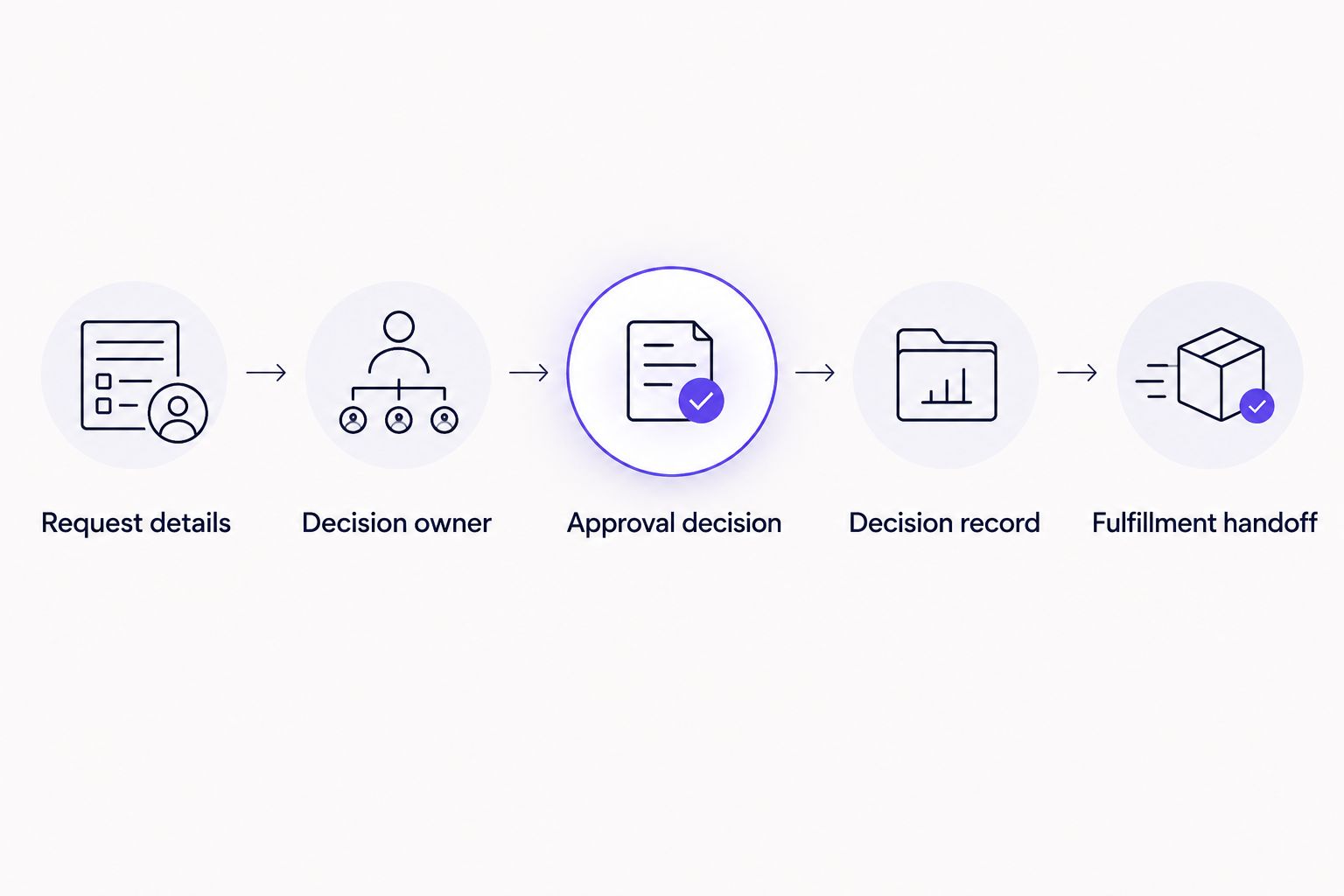
Approval authorizes the next action; fulfillment is a separate handoff.
Evaluate 2 sample requests during the demonstration: one approved request and one rejected request. This is a test plan, not a performance benchmark. Both paths should make the responsible person and resulting status clear.
Use 3 decision points to assess the result: can the employee submit the needed information, can the authorized person decide in the intended channel, and can the team retrieve the decision afterward? Those questions keep the demonstration tied to work your team actually performs.
Explore your approval workflow
Evaluate recurring purchase, invoice, time-off, or access approvals inside Slack, Teams, or email.
When an alternative makes sense
A valid reason to change depends on the job that is failing. For approval buyers, evaluate these conditions before you start a vendor-replacement project:
Requests arrive without needed context. Define a repeatable request format before comparing workflow tools.
Employees cannot identify the approver. Establish ownership before automating routing.
Decisions stay inside isolated conversations. Require a traceable approval record and test its retrieval.
Business permission and technical completion get confused. Separate the approval decision from the action that follows.
The requirement is actually endpoint management. Keep the evaluation in the IT operations category and compare the required technical tasks.
These are selection criteria, not claims about ITarian outages, pricing changes, or customer complaints. Your shortlist should follow your own process requirements.
If manual Slack or Teams approvals are the real baseline, demonstrate the proposed workflow against that baseline. Ask what becomes clearer for the requester, approver, and person responsible for completing the work.
When staying with ITarian is the right call
Stay with ITarian when it meets your endpoint-management requirements and your unmet need is business approval routing. Those are separate purchasing decisions. Adding an approval process does not inherently require replacing the platform used to manage devices.
For a 2026 review, document the required endpoint tasks before considering a migration. If your team cannot identify a technical requirement that warrants replacement, keep the evaluation focused on the approval problem instead.
FAQ
What's the best Itarian alternative for business approvals?
Approveit is the best fit in this comparison for recurring business approval workflows inside Slack, Microsoft Teams, and email. It addresses invoice, purchase, expense, HR, and IT request approvals rather than the endpoint-management job.
Is approval software a direct replacement for ITarian?
No, business approval software and endpoint-management software address different requirements. Separate permission to act from the technical work of managing devices.
Which Itarian alternative should I evaluate for endpoint management?
NinjaOne belongs on an endpoint-management shortlist. Compare your required technical tasks rather than assuming that membership in the same category establishes feature parity.
Can I keep ITarian and change only my approval process?
Yes, you can evaluate business approval routing as a separate requirement from endpoint management. Keeping those decisions separate does not establish an integration between the products.
When are manual Slack or Teams approvals enough?
Manual approvals are suitable for occasional, straightforward requests with a clear decision-maker and an agreed recordkeeping method. Recurring requests with multiple handoffs need a more explicit process.
What should I bring to an approval software demonstration?
Bring one recurring workflow, the required request information, and the authorized decision-maker. Test an approved request and a rejected request, then inspect how the decisions are recorded.
Does approving an access request mean access has been granted?
No, approval authorizes the action; fulfillment completes it. Your process should identify who grants access after the authorized decision.
One last thing
The most useful question is not whether a tool can approve an access request. Ask who confirms that the approved access was actually granted. That handoff exposes the boundary between approval workflow software and IT operations—and helps you buy for the right problem.







