

Cflow offers no-code workflow automation for teams that want to formalize business processes. The limit to examine is whether your approval process needs a broader workflow platform or a focused way to collect decisions inside existing communication tools. The best Cflow alternative in 2026 is Approveit for recurring approvals inside Slack, Microsoft Teams, and email; manual Microsoft Teams approvals are the better fit for occasional, straightforward decisions.
TL;DR
For Cflow alternatives in 2026, choose Approveit approval workflow software for recurring invoice, purchase, expense, and employee requests.
Keep Cflow when its workflow approach already fits your process and approvers use it consistently.
Manual Slack, Microsoft Teams, and email approvals suit occasional requests with clear ownership.
Evaluate approval routing, decision records, and the approver experience before selecting a replacement.
Why this matters
An approval request is not just a message. It needs enough information for someone to decide, a named owner, and a clear outcome that the requester can act on. A purchase request also needs to remain distinguishable from the later invoice approval; agreeing to buy something does not establish that its invoice is correct.
Your 2026 shortlist should start with the work, not the software category. Finance needs invoice, purchase, and expense decisions. HR needs time-off and employee approvals. IT needs access and software requests.
The central choice is whether to formalize those recurring decisions or keep managing them manually. Replacing a vendor is secondary. If requests currently arrive through chat and email, compare that actual process with the proposed workflow before deciding that another platform is necessary.
Cflow alternatives at a glance
This comparison separates software-led workflows from manual approval methods. Manual options are included because they are the real alternative when your team already makes decisions in chat or email.
Cflow
Best for: Teams seeking no-code business workflow automation
Standout feature or approach: No-code workflow automation
How it differs from Cflow: Baseline for the comparison
Main trade-off: A broader workflow approach needs to match the actual approval requirement
Approveit
Best for: Recurring finance, HR, IT, and operations approvals
Standout feature or approach: No-code approvals directly in Slack, Microsoft Teams, and email
How it differs from Cflow: Focuses this comparison on approvals inside existing communication tools
Main trade-off: Your team still needs to define ownership and approval policy
Manual Slack approvals
Best for: Occasional decisions in a Slack-based team
Standout feature or approach: Direct discussion in channels or messages
How it differs from Cflow: People manage the approval process themselves
Main trade-off: Request status and decision records require consistent handling
Manual Microsoft Teams approvals
Best for: Occasional decisions in a Teams-based team
Standout feature or approach: Direct discussion in chats or channels
How it differs from Cflow: People coordinate decisions without adopting another workflow platform
Main trade-off: Ownership and follow-up remain manual
Email approvals
Best for: Occasional requests where email is the shared channel
Standout feature or approach: Reply-based decisions with written context
How it differs from Cflow: The message thread carries the process
Main trade-off: Forwarding and separate replies complicate the record
Do not confuse a convenient notification with a usable approval experience. During evaluation, ask the approver to complete the decision where they normally work, then ask the requester to explain what happens next. That demonstration exposes gaps a feature list does not resolve.
1. Approveit: best for recurring approvals inside chat and email
Approveit approval workflow software lets finance, HR, IT, and operations teams automate invoice, purchase, expense, and request approvals directly within Slack, Microsoft Teams, and email. Its no-code approach fits teams that want structured approvals without writing code. The practical reason to shortlist it is straightforward: approvers can make decisions in tools they already use.
Start with a specific request rather than a general automation brief. For example, a purchase request needs a business reason and a responsible approver; an access request needs the requested access and the person authorized to decide. Those requirements belong in your process before you configure the workflow.
Where it shines
Supports the approval categories in this comparison: invoices, purchases, expenses, employee requests, and IT requests.
Brings approval actions into Slack, Microsoft Teams, and email.
Provides a no-code route to automating recurring approval work.
Fits an evaluation centered on traceable decisions and audit records.
Where it falls short
No-code setup does not resolve unclear approval ownership. Your team must decide who has authority before automating the request.
A focused approvals evaluation does not establish suitability for every unrelated business process. Test your actual requirements rather than assuming a category match covers them.
Switching software does not fix incomplete request information. The requester still needs to provide the details required for a decision.
Head-to-head: focused approvals versus broader workflows
Core evaluation
This alternative: Recurring business approvals
Cflow: No-code business workflow automation
Working channels
This alternative: Slack, Microsoft Teams, and email are explicitly supported
Cflow: Demonstrate the channels required by your team
Initial test
This alternative: Complete an invoice, purchase, or employee approval
Cflow: Complete the same request in the proposed workflow
Selection criterion
This alternative: Fit for approval work in existing tools
Cflow: Fit for the full process you need to formalize
Best for: Teams with recurring approval requests and a clear need to automate them inside existing communication tools.
Verdict: Buy for the stated approval use case after a workflow demonstration confirms your requirements.
2. Manual Slack approvals: best for occasional chat-based decisions
Manual Slack approvals mean asking for a decision in a channel or direct message and recording the response yourself. They are an approval method, not a dedicated replacement platform. Use this approach when requests are occasional and everyone involved understands who decides.
The strongest use case is a simple, self-contained decision. A requester explains what they need, names the approver, and receives an explicit response. Once the process depends on handoffs or repeated follow-up, assess whether keeping everything manual still serves the team.
Where Slack shines
Keeps discussion in the team's existing Slack conversations.
Lets the requester and approver clarify details in the same discussion.
Avoids introducing another workflow tool for an isolated request.
Where Slack falls short
Someone must manage request ownership and follow-up.
A conversational response needs to state clearly whether it approves the request or merely acknowledges it.
Decision records depend on how consistently your team preserves the request and its outcome.
Process structure
Manual Slack approvals: Agreed message format and human follow-up
Cflow: No-code workflow automation
Decision handling
Manual Slack approvals: People interpret and record the response
Cflow: Evaluate the configured approval process
Appropriate scope
Manual Slack approvals: Occasional, straightforward requests
Cflow: Business processes requiring formal workflow structure
Best for: Slack-based teams handling occasional decisions with clear ownership.
Verdict: Hold while the process remains simple; replace manual handling when recurring requests need formal coordination.
3. Manual Microsoft Teams approvals: best for occasional internal requests
Manual Microsoft Teams approvals use chats or channels to collect decisions. This option suits a team that already conducts its internal discussions in Teams and does not need a dedicated workflow for every request. Keeping a simple decision close to the conversation is its main advantage.
Separate the decision from the discussion around it. A manager asking for more information has not approved a time-off request; a colleague acknowledging a software request has not authorized it. Your process needs an explicit outcome and a named decision-maker.
Where Microsoft Teams shines
Keeps the request in the team's existing communication environment.
Supports direct clarification before the approver decides.
Fits occasional internal requests that do not require a separate workflow platform.
Where Microsoft Teams falls short
A chat does not define your approval policy.
Requesters and managers must coordinate follow-up themselves.
Your team needs a consistent method for connecting the decision to the original request.
Process structure
Manual Microsoft Teams approvals: Team conventions and manual coordination
Cflow: No-code workflow automation
Approval ownership
Manual Microsoft Teams approvals: Named by the requester or team policy
Cflow: Evaluate ownership in the configured workflow
Appropriate scope
Manual Microsoft Teams approvals: Occasional internal decisions
Cflow: Processes requiring formal workflow structure
Best for: Teams-based organizations with occasional requests and clearly assigned decision authority.
Verdict: Hold for straightforward requests; evaluate automation when ownership and follow-up become recurring work.
4. Email approvals: best for occasional requests with written context
Email approvals use a message and reply to document a decision. They fit requests where email is already the shared communication channel and the process has a clear owner. Keep the request, supporting information, and final decision together wherever your policy permits.
Where email shines
Gives the requester room to explain the decision and include supporting context.
Fits occasional requests without introducing a dedicated workflow platform.
Provides a written conversation that participants can review.
Where email falls short
Forwarding and separate replies split the conversation.
Someone must identify the authoritative decision and maintain request status.
An acknowledgment is not an approval unless it explicitly authorizes the request.
Process structure
Manual email approvals: Message conventions and human follow-up
Cflow: No-code workflow automation
Request status
Manual email approvals: Maintained by the responsible person
Cflow: Evaluate status handling in the workflow
Appropriate scope
Manual email approvals: Occasional requests with clear ownership
Cflow: Processes needing formal coordination
Best for: Occasional approvals where email is the shared channel and one person owns the record.
Verdict: Hold for simple requests; skip email-only handling when the process requires structured routing and traceable status.
Why people switch from Cflow
A sound reason to switch is a demonstrated mismatch between the process you need and the workflow you have. This is not a claim that Cflow lacks a particular feature. Your evaluation must establish the mismatch using the same request in both systems.
For a 2026 buying decision, use these switch criteria:
Working-channel fit: Your approvers need to complete decisions in Slack, Teams, or email, and the proposed replacement demonstrates that experience.
Process fit: Your main requirement is recurring approvals rather than a wider business-process redesign.
Administrative fit: The people responsible for approvals can understand and maintain the proposed configuration.
Record fit: Your team can connect the final decision to the request and retrieve the information it needs.
Do not switch because a comparison page lists more features. Switch when the replacement handles a real requirement better in your demonstration. If the current system already meets those requirements, changing vendors adds work without establishing a benefit.
Test an actual workflow before booking the next conversation
Use the same request to evaluate every shortlisted option in 2026. Choose a recurring approval that already has a known owner and clear decision criteria. An invoice, purchase request, time-off request, or access request gives the demonstration a concrete purpose.
Request details
Write down the information the approver needs. For an invoice, identify the invoice and the business context. For an access request, identify the requested access and why it is needed. Do not ask a workflow to compensate for missing information.
Approval owner
Name the person authorized to decide. Distinguish someone who supplies information from someone who approves the request. A workflow that sends a message to the wrong person has not solved the approval problem.
Decision record
Ask the demonstrator to show the outcome linked to the request. Confirm that your team can understand who decided and what the decision covered. Use your own record requirements rather than accepting a generic audit claim.
Next action
Explain what an approved, rejected, or returned request means operationally. Purchase authorization, invoice payment, and access provision are different actions. The approval should make the next responsible person's job clear.
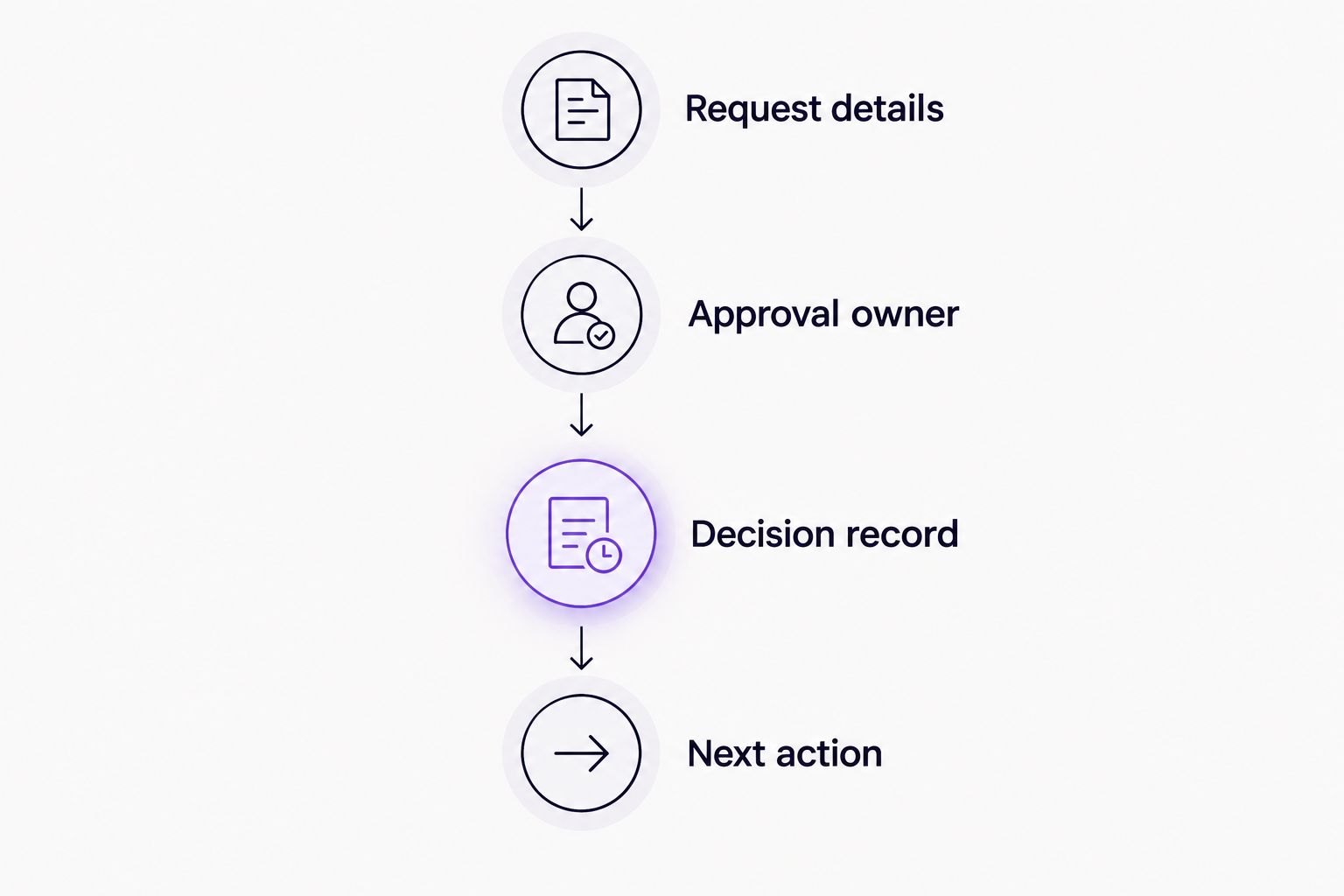
Evaluate the complete decision path, not just the approval notification.
Bring this example to an Approveit demonstration and ask to complete it in the communication channel your approvers actually use. Then review the resulting record with the person responsible for the process. That keeps the conversation tied to your operating requirements rather than a generic product tour.
Evaluate your approval workflow
Bring an invoice, purchase, employee, or access request to your next approval software evaluation.
When staying with Cflow is the right call
Keep Cflow if it already supports your required process, your approvers use it consistently, and your team can maintain the workflow. A different interface is not enough reason to replace a working system. Compare the complete request-to-decision path before treating a narrower approval tool as an upgrade.
Keeping the current platform is also the right outcome when your requirement extends beyond the approval step and the existing workflow handles that wider process. Your 2026 evaluation should establish whether the problem is configuration, unclear policy, or genuine product fit. Only the last of those necessarily calls for a replacement.
FAQ
What's the best Cflow alternative for approvals in Slack or Teams?
Approveit is the best fit in this comparison for recurring approvals directly within Slack, Microsoft Teams, and email. Evaluate it with an actual invoice, purchase, expense, or employee request before selecting it.
Should I replace Cflow if my current workflow works?
No. Keep Cflow when it meets your process requirements, approvers use it consistently, and your team can maintain it. A replacement should demonstrate a concrete improvement in your actual workflow.
Can I manage approvals manually in Slack?
Yes, manual Slack approvals suit occasional requests with clear ownership. Your team must explicitly record the decision, maintain status, and handle follow-up.
Are manual Microsoft Teams approvals enough for employee requests?
Manual Microsoft Teams approvals fit occasional employee requests with a clearly authorized decision-maker. Recurring requests that require structured coordination are a reason to evaluate approval workflow software.
Is an email reply enough to approve an invoice?
An email reply documents approval only when it explicitly authorizes the identified invoice under your organization's policy. Acknowledging receipt or requesting more information does not establish approval.
What should I check in a Cflow alternatives demo?
Check request details, approval ownership, the decision record, and the next operational action. Complete the same request in each shortlisted option so the comparison reflects your real process.
Does no-code approval software remove the need for an approval policy?
No. No-code software changes how you configure the workflow, not who has authority to decide. Define the request information, authorized approver, and required outcome before automating the process.
One last thing
Ask the approver to explain exactly what their approval authorizes. An approved purchase request is not automatically an approved invoice, and an approved software request is not automatically authorization for every access permission. This distinction makes your 2026 shortlist more useful: choose the method that keeps the decision attached to the right request and the right next action.







