

Best overall for recurring approvals in Slack, Microsoft Teams, or email: Approveit. Best for receipt-led reimbursements: Expensify; best for card-led spending controls: Ramp; best for travel expense reporting: Zoho Expense. This 2026 guide compares the best expense approval software for startups by workflow fit, not by the size of the feature list.
TL;DR
Approveit is the best expense approval software for startups that need recurring approvals inside Slack, Microsoft Teams, or email.
Choose Expensify when receipt collection and employee reimbursement are the main problem.
Choose Ramp when company-card spending controls drive the buying decision.
Choose Zoho Expense when travel claims and expense reports drive the buying decision.
Replace manual approvals when ownership, request details, and decision records become difficult to track.
Why this matters
An expense approval problem is not always an expense reporting problem. Your employees might submit complete receipts while managers still approve requests through scattered messages. Adding another reporting interface does not fix unclear ownership.
For a startup buying in 2026, the first decision is where the bottleneck sits: before spending, during expense submission, or after approval. Buy approval workflow software when routing and decisions are the problem; buy expense management software when receipts, reports, and reimbursement are the problem.
Manual Slack, Teams, and email approvals remain the main alternative. They are simple to start, but your team must keep request details, decisions, and follow-up connected without a defined workflow. That becomes the buying trigger when approvals recur across employees and departments.
What makes the best expense approval software for startups
Use these criteria before reviewing the shortlist:
Approval location: Managers should be able to decide where they already work. Check the actual approval experience, not just whether a tool sends notifications.
Request completeness: The workflow should collect the business purpose and supporting information before asking someone to approve.
Clear ownership: Every request needs an accountable approver. A group message is not an approval policy.
Decision records: Finance needs to distinguish a submitted request from an approved expense and recover the decision later.
Expense lifecycle fit: Separate permission to spend, expense reporting, and reimbursement. Decide which stages the software must cover.
Setup burden: A startup should be able to maintain its process without turning each policy change into a development task.
For your 2026 shortlist, treat these as requirements to demonstrate rather than boxes to accept on a sales slide. Ask each vendor to show your own expense example from submission through the final decision.
Expense approval software at a glance
The options below serve different buying needs. The order matches the detailed recommendations, but the first choice is not the right choice for every expense process.
Approveit
Best for: Recurring expense approvals in existing communication tools
Standout feature: No-code approval workflows inside Slack, Microsoft Teams, and email
Key limitation to consider: Approval automation alone does not define your expense policy or reimbursement process
Expensify
Best for: Receipt-led employee reimbursements
Standout feature: Receipt capture and expense reporting
Key limitation to consider: An expense report is not the same as permission to spend before a purchase
Ramp
Best for: Company-card-led spending controls
Standout feature: Corporate cards and expense management
Key limitation to consider: Card controls do not replace approval rules for every non-card request
Zoho Expense
Best for: Travel claims and structured expense reports
Standout feature: Travel and expense management
Key limitation to consider: Report-oriented workflows require a clear distinction between preapproval and claims
1. Approveit: best for recurring expense approvals in chat
Approveit provides no-code approval workflow software for finance, HR, IT, and operations. Employees and approvers can handle expense, purchase, invoice, and other requests directly within Slack, Microsoft Teams, and email.
Approveit is the best expense approval software for startups whose main problem is recurring approval work inside Slack or Microsoft Teams. It fits the team that already has a place to communicate but needs a defined process for requesting, deciding, and recording permission.
Consider a startup where an employee asks permission to attend a customer event. The approval needs a business purpose, an accountable manager, and a traceable decision. The software purchase should solve that handoff rather than force the team to rethink every finance process at once.
Approveit pros:
Keeps approval work inside Slack, Microsoft Teams, or email.
Supports no-code setup for recurring approval workflows.
Covers expense requests alongside purchase, invoice, HR, and IT approvals.
Emphasizes traceable decisions and audit records.
Approveit cons:
Requires you to define approvers and decision rules before automation has value.
Does not remove the need to plan receipt handling, accounting handoff, and reimbursement separately.
Adds process overhead when an occasional request needs no repeatable workflow.
Best for: Startups with repeated approvals across employees or departments and managers who work in Slack or Teams.
Verdict: Buy for recurring approval coordination; skip a workflow rollout if your actual bottleneck is receipt capture alone.
2. Expensify: best for receipt-led employee reimbursements
Expensify is expense management software built around capturing receipts, creating expense reports, and handling reimbursements. Its core fit is the employee who has incurred a business expense and needs to submit it for review.
Choose this category when finance spends its time collecting receipts and organizing claims. A structured expense report gives the reviewer a different starting point from an open-ended message asking whether a purchase is acceptable.
The distinction matters for a startup. An approved reimbursement claim answers whether the company will reimburse an expense; preapproval answers whether the employee should incur it in the first place. Decide whether you need one process or both.
Expensify pros:
Centers the workflow on receipts and expense reports.
Connects employee expense submission with reimbursement work.
Provides a focused option when expense administration is the buying priority.
Expensify cons:
Requires employees to follow an expense submission process rather than rely on informal messages.
Receipt-led workflows do not eliminate the need for permission before sensitive purchases.
Expense reporting alone does not establish approval ownership for unrelated HR or IT requests.
Best for: Startups where employee-paid expenses and reimbursement administration create the main workload.
Ask the vendor to demonstrate a rejected claim and a corrected resubmission, not just a clean report. Those steps reveal whether employees and reviewers understand what happens when an expense needs clarification.
Verdict: Buy for receipt-led reimbursements; hold if pre-spend approval routing is the real problem.
3. Ramp: best for company-card-led spending controls
Ramp combines corporate cards with expense management and spending controls. It belongs on the shortlist when your expense process begins with company-card purchases rather than employees paying personally and seeking reimbursement afterward.
A card-led approach moves part of the decision upstream. Instead of reviewing only what an employee has already spent, your finance team also defines how company-card spending should be controlled.
That is a distinct buying decision. A startup evaluating Ramp should map card spending separately from invoice approvals, vendor requests, and other expenses that follow a different path.
Ramp pros:
Combines corporate cards and expense management.
Makes card spending controls part of the finance operating model.
Fits teams that want to review spending around company-card activity.
Ramp cons:
Requires a decision about the company's card program, not just its approval workflow.
Card controls do not define how every non-card purchase should be approved.
Changing the spending model adds decisions about card ownership and policy administration.
Best for: Startups whose priority is managing company-card spending and related expense administration.
Use a card purchase and a non-card request in the evaluation. The point is to see where each process starts and ends, not to assume that controlling a card transaction resolves every purchasing decision.
Verdict: Buy for a card-led spending model; hold if you only need to organize approvals in existing communication tools.
4. Zoho Expense: best for travel claims and expense reports
Zoho Expense is travel and expense management software. It fits startups that need employees to organize business travel expenses and submit structured reports for review.
This is a report-oriented choice. Your evaluation should begin with a trip or employee claim, then follow the information through submission and approval. Keep the permission to travel separate from the later decision about which expenses to reimburse.
Zoho Expense pros:
Focuses on travel and expense management.
Gives expense reports a defined place in the employee submission process.
Fits buying discussions centered on claims rather than general operational requests.
Zoho Expense cons:
Requires employees and reviewers to adopt a structured reporting process.
Travel permission and reimbursement review still need distinct policy rules.
A report-oriented buying decision does not resolve ownership for every operational approval.
Best for: Startups where business travel and employee expense reports are the central finance workflow.
Verdict: Buy for structured travel claims; hold if the main requirement is approving varied requests in chat.
How the ranking works
This 2026 ranking separates approval coordination, receipt-led reimbursements, card-led controls, and travel reporting. Each recommendation owns a different use case because these products do not solve the same starting problem.
The criteria prioritize approval location, complete requests, ownership, decision records, lifecycle coverage, and setup burden. The default recommendation favors a defined approval workflow when the startup already manages requests through Slack, Teams, or email. The other choices fit a more specific finance operating model.
How to evaluate your shortlist with a real expense
Use 1 expense request from your actual operating process, 2 approval roles from your own policy, and 3 test cases: approve, reject, and return for clarification. These are evaluation steps, not performance benchmarks.
Avoid choosing the cleanest example. A request with an unclear business purpose or missing supporting information shows how the workflow handles the work that usually creates follow-up.
Request details
Write down what the requester must provide. Include the business purpose, relevant expense information, and supporting documents required by your policy. Decide which missing details should stop a request from reaching an approver.
Approval ownership
Name the decision-makers and explain their responsibilities. If your process needs a manager and finance reviewer, make the distinction explicit. A notification sent to both people does not tell either person who must act first.
Decision record
Show where the approval, rejection, or clarification request will be recorded. Your finance team should be able to connect the decision to the original request rather than reconstruct it from messages.
Finance handoff
Define what follows approval. Permission to spend, reimbursement, and accounting entry are separate events; your evaluation should show which system and person own each one.
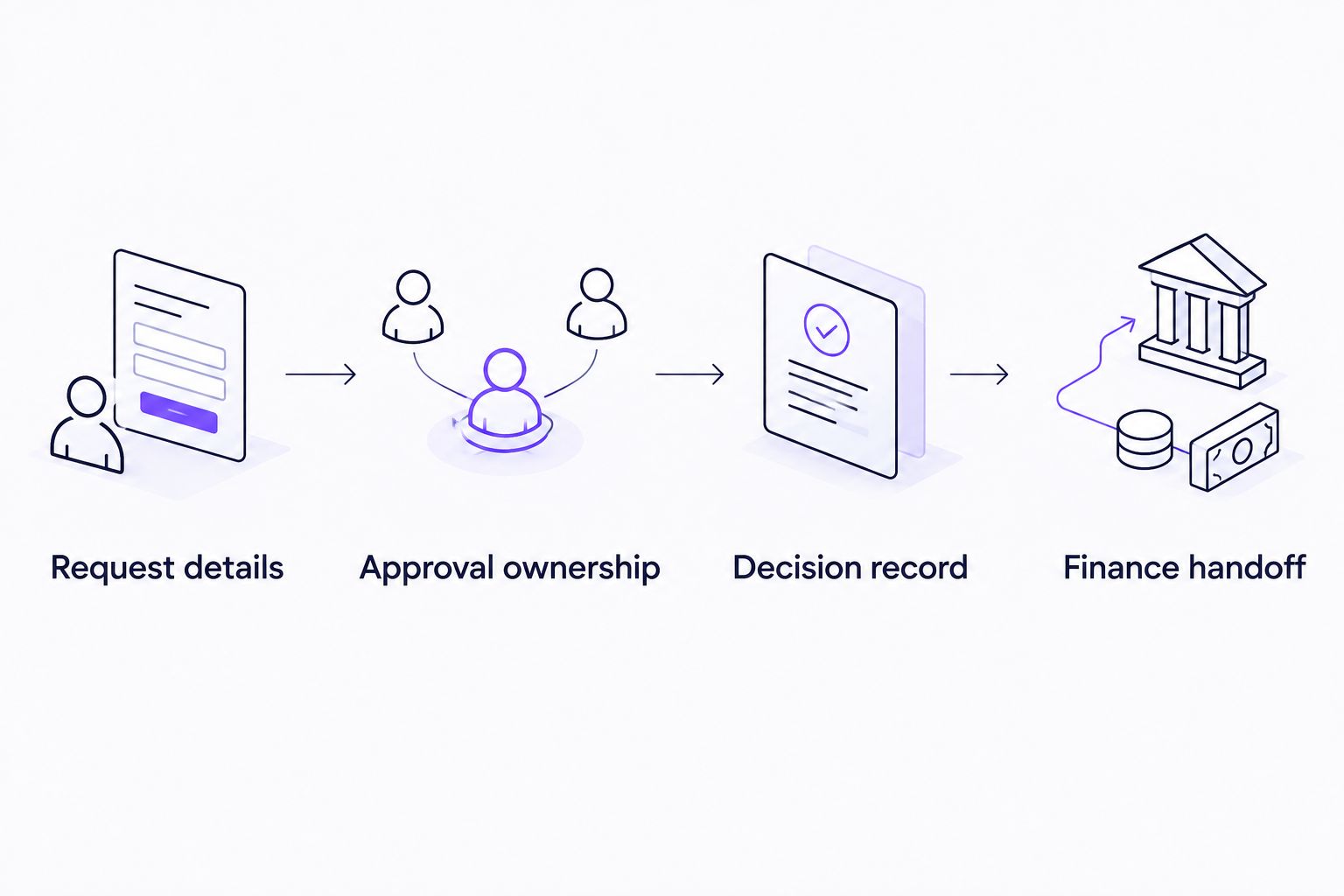
Define the finance handoff before treating an approved request as a completed expense process.
For a 2026 demo, bring those test cases and ask the vendor to walk through them. Watch where the requester works, where the approver decides, and what finance receives afterward. A finished demonstration should make responsibility clear at every handoff.
Evaluate your expense approval workflow
Start with your recurring requests, current approvers, and the tools your team already uses.
Which expense approval software should you choose?
Choose workflow automation first when your startup already submits requests through Slack, Teams, or email and repeatedly loses track of decisions. That is the default recommendation for approval coordination, not a recommendation to replace every finance tool.
Choose Expensify when collecting receipts and reimbursing employees dominate the work. Choose Ramp when company-card controls drive the operating model. Choose Zoho Expense when travel claims and structured expense reports define the requirement.
For your 2026 purchase, write the decision in plain terms: what employees submit, who approves, where the decision happens, and what finance does next. If the shortlisted product cannot demonstrate that exact process, a longer feature list does not make it the right fit.
FAQ
What's the best expense approval software for startups in 2026?
Approveit is the best fit for startups that need recurring expense approvals directly within Slack, Microsoft Teams, or email. Choose a receipt-, card-, or travel-focused expense management product when that part of the expense lifecycle is your main problem.
Is expense approval software the same as expense management software?
No. Expense approval software organizes requests and decisions, while expense management software commonly covers receipts, expense reports, and reimbursement work. Define the stages you need before comparing products.
Can we keep approving expenses manually in Slack or email?
Yes, if your team can reliably maintain request details, approval ownership, and decision records. A recurring process becomes a better candidate for automation when those responsibilities are difficult to track.
Should a startup choose Expensify or an approval workflow tool?
Choose Expensify when receipt collection, expense reporting, and reimbursement are the main requirements. Choose an approval workflow tool when employees need a repeatable way to request permission and managers need a clear decision process.
When is Ramp the better choice?
Ramp fits a startup whose buying priority is company-card spending controls and related expense management. Evaluate non-card requests separately rather than assuming card controls cover every approval.
Is approving an expense the same as reimbursing it?
No. Approval records a decision, while reimbursement transfers money to the employee. Your process must identify who owns the handoff between those events.
What should we bring to an expense software demo?
Bring a real expense request, your approval roles, and examples of approval, rejection, and clarification. Ask the vendor to show the requester experience, the approver's decision, and the finance handoff.
One last thing
A receipt proves that spending happened; it does not prove that spending was authorized. Keep permission to spend separate from reimbursement approval, even if the same manager handles both. That distinction gives your startup a clearer policy and a more useful software evaluation.







