

Best overall for nonprofit accounting: Blackbaud Financial Edge NXT. Best for invoice approvals inside Slack or Microsoft Teams: Approveit. Best for a dedicated bill-payment workflow: BILL. This 2026 guide separates approval software from payment platforms and fund accounting systems so you can choose the right tool for your nonprofit.
TL;DR
The best accounts payable software for nonprofits depends on whether you need invoice approvals, payments, or fund accounting.
Approveit is best for nonprofits automating recurring invoice and purchase approvals inside Slack, Microsoft Teams, or email.
Blackbaud Financial Edge NXT fits nonprofit accounting needs; BILL fits bill management; Tipalti fits international supplier payments.
Keep manual approvals for occasional requests, not recurring workflows that require traceable decisions.
Why this matters
A nonprofit invoice has more than a supplier and an amount. Your finance team also needs to establish who authorized the purchase, which program incurred the expense, and whether the proposed funding source permits it.
Those are different jobs. Approval software routes a decision. An accounts payable platform manages bills and payments. Fund accounting software records transactions against the accounting structure your organization uses.
Choose the missing capability, not the longest feature list. If your accounting system already works, replacing it to fix slow approvals creates a larger project than the problem requires. If fund reporting is the problem, a faster approval notification does not solve it.
For your 2026 shortlist, write down where work stops: collecting invoice information, obtaining authorization, issuing payment, or posting the transaction. That answer determines which category belongs in your demo calendar.
What makes the best accounts payable software for nonprofits?
Use these criteria before comparing products. They separate useful workflow improvements from features that do not address your bottleneck.
Approval routing: Requests should reach the right budget owner, with clear responsibility for the next decision.
Accounting fit: Check how bills, allocations, and supporting information reach your existing ledger. Distinguish fund accounting from approval routing.
Decision records: You need to recover the request, supporting documents, approver, and outcome without reconstructing a conversation.
Approver experience: Finance staff and occasional program approvers have different needs. Test the experience each person actually uses.
Payment scope: Decide whether you need authorization only, domestic bill payments, or international supplier payments.
Administrative ownership: Name the person who maintains workflows, approver changes, accounting mappings, and exceptions after launch.
Do not treat a nonprofit label as proof of fit. Ask each vendor to demonstrate your invoice, your approval chain, and your accounting handoff. A generic product tour cannot establish how a restricted program expense moves through your process.
Accounts payable options at a glance
The order below starts with the approval layer, then covers broader accounting and payment needs. Each recommendation owns a different use case; this is not a claim that every nonprofit needs the same platform.
Approveit
Best for: Recurring invoice and purchase approvals in existing communication tools
Standout capability: No-code approvals in Slack, Microsoft Teams, and email
Key limitation or evaluation boundary: Evaluate separately from payment execution and fund accounting
Blackbaud Financial Edge NXT
Best for: Nonprofits choosing a fund accounting system
Standout capability: Nonprofit-focused accounting with accounts payable
Key limitation or evaluation boundary: Broader scope than fixing approval delays alone
BILL
Best for: Teams seeking bill management and payment workflows
Standout capability: A dedicated accounts payable workflow
Key limitation or evaluation boundary: Validate nonprofit allocations and accounting handoff
Tipalti
Best for: Organizations paying international suppliers
Standout capability: Supplier onboarding and global payment workflows
Key limitation or evaluation boundary: International payment scope adds evaluation requirements
Manual Slack, Teams, or email approvals
Best for: Occasional, straightforward requests
Standout capability: Uses tools your team already knows
Key limitation or evaluation boundary: Decisions and supporting records need manual organization
1. Approveit: best for nonprofit invoice approvals in Slack or Teams
Approveit provides no-code workflows for invoice, purchase, expense, and other request approvals directly inside Slack, Microsoft Teams, and email. It fits a nonprofit whose finance team already has an accounting system but spends time chasing authorization from program managers.
Consider an invoice for a program event. Finance needs the program owner to confirm the expense before the invoice proceeds. The useful change is a defined approval request with a traceable decision, rather than another message asking whether someone saw the attachment.
Approveit pros:
Supports invoice, purchase, and expense approval workflows.
Lets approvers act inside Slack, Microsoft Teams, or email.
Provides no-code setup for teams without a development project.
Emphasizes traceable decisions and audit records.
Approveit cons:
An approval workflow is not the same job as fund accounting.
Payment execution should be evaluated separately from authorization.
Finance still needs to define approvers, required information, and exceptions.
Best for: Nonprofits with recurring approvals, established accounting processes, and staff who already work in Slack or Teams.
During a demo, show a real approval chain and ask to see the resulting decision record. Confirm the handoff to your accounting process rather than assuming a particular integration or payment capability.
Verdict: Buy for the approval bottleneck; skip as a substitute for a fund accounting evaluation.
2. Blackbaud Financial Edge NXT: best for nonprofit fund accounting
Blackbaud Financial Edge NXT is a nonprofit accounting system with accounts payable functionality. Its strongest place on this list is an organization evaluating the accounting foundation itself, rather than only replacing approval messages.
If your finance team needs accounting organized around nonprofit funds and reporting requirements, start here. Then inspect how invoice entry, approval, posting, and reporting work together in the configuration you are considering.
Blackbaud Financial Edge NXT pros:
Centers the evaluation on nonprofit accounting requirements.
Includes accounts payable within a broader accounting system.
Brings fund accounting into the same software decision as payables.
Blackbaud Financial Edge NXT cons:
A broader accounting decision requires more evaluation than an approval-only tool.
Replacing an established ledger affects processes beyond invoice authorization.
Program approvers still need an experience they can use consistently.
Best for: Nonprofits selecting or replacing a fund accounting system and evaluating accounts payable as part of that project.
Bring an invoice that spans programs or funding sources. Ask the vendor to show the allocation, approval, posting, and resulting report. Do not accept a standard invoice demonstration as evidence that your accounting structure is covered.
Verdict: Buy when fund accounting is the central requirement; hold when your ledger works and approvals are the only problem.
3. BILL: best for dedicated bill management and payments
BILL provides software for managing bills and business payments. It belongs on your shortlist when the finance team wants to evaluate the accounts payable process beyond getting someone to authorize an invoice.
The distinction matters. A nonprofit that struggles to organize bills and execute payments needs a different demonstration from one that only needs a program director to respond to approval requests.
BILL pros:
Focuses the evaluation on bill management and payments.
Offers a dedicated accounts payable workflow rather than a general conversation channel.
Keeps payment operations central to the buying decision.
BILL cons:
Nonprofit fund and program requirements need a separate fit check.
Accounting handoffs must match your ledger and posting rules.
Adding a payment platform does not replace your spending policy.
Best for: Nonprofits seeking a dedicated bill workflow alongside their accounting system.
For a 2026 evaluation, follow an invoice from receipt through authorization and payment. Then inspect the accounting handoff, including how your team handles corrections. A successful payment demonstration is not enough if finance must re-enter or reorganize the information afterward.
Verdict: Buy for a bill-management and payment requirement; hold until accounting fit is demonstrated.
4. Tipalti: best for international supplier payment workflows
Tipalti provides accounts payable automation, supplier onboarding, and global payment workflows. It is a relevant option when international suppliers make payment administration a substantial part of your nonprofit's finance workload.
Start with the supplier locations and payment requirements you actually have. International scope is useful when it solves a real operating need, not when it merely makes the comparison table longer.
Tipalti pros:
Combines supplier onboarding with accounts payable workflows.
Addresses international supplier payment needs.
Provides a payment-focused alternative to an approval-only layer.
Tipalti cons:
International payment requirements expand the evaluation beyond simple invoice routing.
Nonprofit accounting and allocation needs still require validation.
A broad payment platform is a larger decision than fixing manual approvals.
Best for: Nonprofits with international supplier relationships and a clear need to organize onboarding and payment operations.
Ask for a demonstration using your supplier countries, required documentation, payment methods, and accounting process. Verify the specific coverage you need. Do not treat a general global-payments description as confirmation that every supplier scenario is supported.
Verdict: Buy for a demonstrated international payment need; skip when approval routing is the only bottleneck.
5. Manual approvals: best for occasional, simple requests
Manual approvals in Slack, Microsoft Teams, or email are the baseline alternative, not another software vendor. They let an employee send a request and receive a decision using familiar tools.
This approach fits occasional requests with a clear owner. It becomes harder to manage when finance must repeatedly chase responses, distinguish approval from discussion, or reconstruct the record before payment.
Manual approval pros:
Uses communication tools your staff already understands.
Allows discussion alongside the request.
Avoids introducing a separate workflow configuration for an isolated request.
Manual approval cons:
Finance must organize requests, attachments, and decisions manually.
A conversational reply does not necessarily establish clear authorization.
Handoffs depend on people remembering the next step.
Best for: Occasional requests that finance can organize and recover without repeated follow-up.
Write a standard request format even if you stay manual. Include the supplier, business purpose, supporting document, proposed coding, and named approver. Define which response constitutes approval before the conversation starts.
Verdict: Hold for occasional requests; skip for recurring approvals that require consistent routing and decision records.
Test the approval-to-accounting handoff
Use a 30-minute demo agenda with 3 sample invoices and 2 approver roles. These are suggested test inputs, not product limits or implementation promises. Choose a routine bill, a program-specific expense, and an invoice that needs correction.
Ask each vendor to follow the same sequence:
Request details: Show what finance or the requester submits, including the supporting document and business purpose.
Approval routing: Show who receives the request and what happens when another decision is required.
Decision record: Recover the approver's decision without relying on a remembered conversation.
Accounting handoff: Show how the approved information reaches the accounting process and who owns the next action.
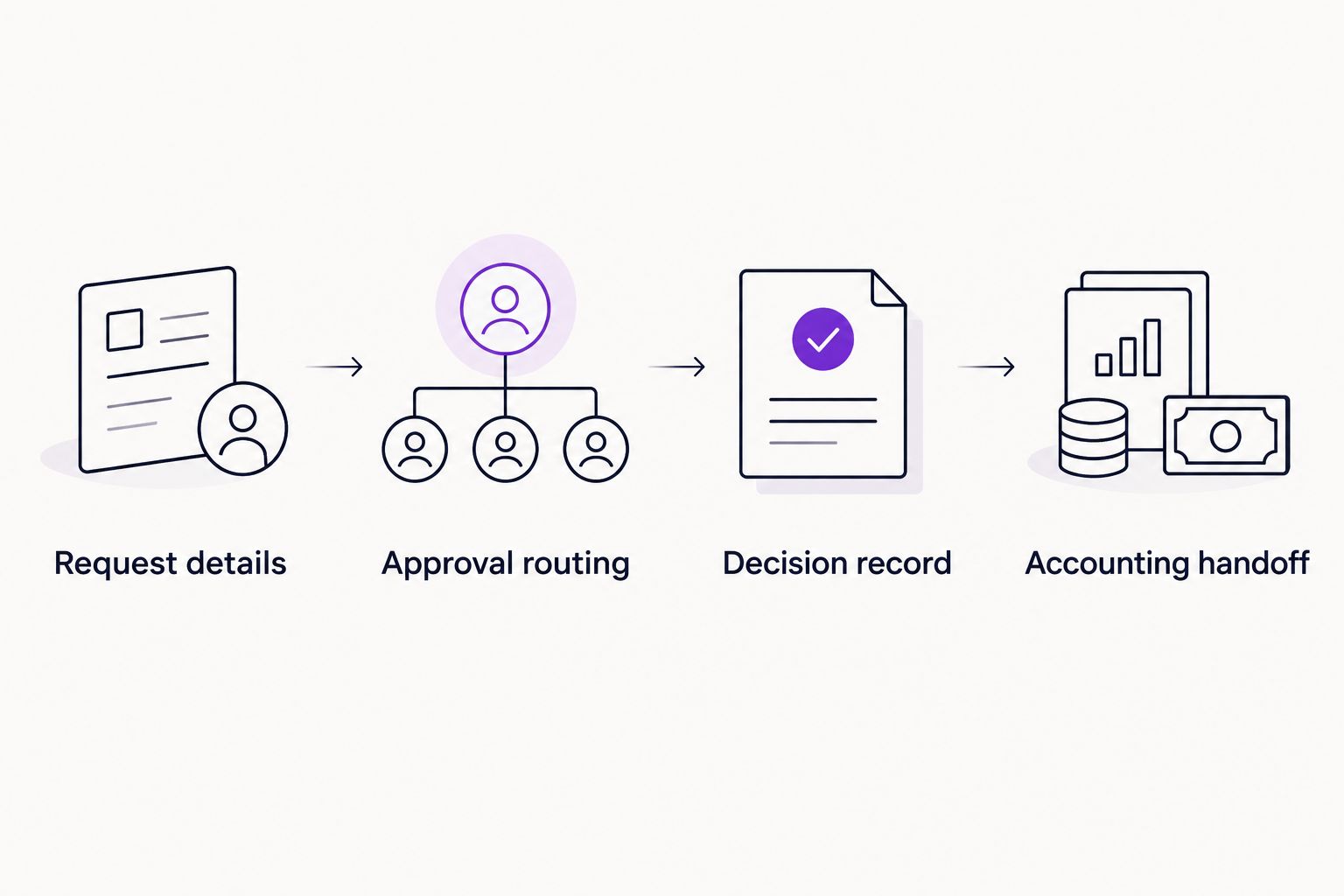
Approval is one stage of accounts payable, not the entire process.
For your 2026 decision, include an exception rather than only the happy path. Change the proposed coding, reject an invoice, or replace the responsible approver. Ask where finance sees the outcome and how the request returns to the right person.
Also test the program manager's experience. Finance can understand a detailed accounting interface while an occasional approver needs only the invoice, the reason for the expense, and a clear decision action. Both experiences matter.
How these options are ranked
These recommendations use the criteria above: approval routing, accounting fit, decision records, approver experience, payment scope, and administrative ownership. The ranking separates use cases rather than claiming a universal performance winner.
This is a selection guide, not a hands-on benchmark. No measured setup times, customer scores, or payment-performance claims determine the order. Your own workflow demonstration should determine the final purchase.
Which accounts payable software should you choose?
Approveit is best for nonprofits that need recurring invoice approvals inside Slack or Microsoft Teams. Choose that approval layer when the ledger works and authorization is the missing step.
Choose Blackbaud Financial Edge NXT when you are selecting nonprofit accounting software. Shortlist BILL for dedicated bill management and payments. Shortlist Tipalti when international supplier operations drive the requirement.
For an undecided buyer in 2026, the next move is simple: identify the stalled stage, bring a real invoice to the demo, and require the vendor to show the complete handoff. Do not replace an accounting system merely because approval messages are difficult to track.
See your invoice approval workflow
Bring an invoice and your approval chain. Evaluate the request, decision record, and accounting handoff.
FAQ
What's the best accounts payable software for nonprofits?
The best choice depends on the missing capability: approval routing, bill payments, or nonprofit accounting. Approveit fits recurring approvals in Slack or Teams; Blackbaud Financial Edge NXT fits a nonprofit accounting evaluation; BILL and Tipalti address payment-focused needs.
Do nonprofits need fund accounting or approval software?
Fund accounting and approval software perform different jobs. Fund accounting records financial activity within the nonprofit's accounting structure; approval software routes and records authorization decisions.
Can nonprofit staff approve invoices inside Slack or Microsoft Teams?
Yes. Approveit supports no-code invoice and purchase approval workflows directly inside Slack, Microsoft Teams, and email. Evaluate the request information and decision record using your own approval chain.
Is approval software the same as accounts payable automation?
No. Approval software handles authorization, while accounts payable automation can cover additional stages such as bill processing and payments. Check the exact scope rather than assuming one tool performs every stage.
Is BILL better than Blackbaud Financial Edge NXT for a nonprofit?
BILL is the more relevant shortlist option for a dedicated bill-management and payment requirement; Blackbaud Financial Edge NXT is more relevant when nonprofit accounting is the central requirement. Validate the accounting handoff and program allocations before choosing.
When should a nonprofit consider Tipalti?
Consider Tipalti when international supplier onboarding and payment operations are a clear requirement. Verify coverage for your actual supplier locations and payment needs during the evaluation.
Can a small nonprofit keep using email approvals?
Yes, for occasional requests with clear ownership and organized records. Move to a defined workflow when recurring requests require repeated follow-up or finance cannot reliably recover the authorization.
What should a nonprofit bring to an accounts payable software demo?
Bring real invoice examples, your approval chain, accounting requirements, and an exception scenario. Require the vendor to demonstrate the decision record and the handoff, not just invoice submission.
One last thing
An approved invoice is not automatically eligible for a particular funding source. Record who checks the funding rules separately from who authorizes the purchase, even when the same person performs both tasks.
That distinction gives your software evaluation a useful final question: can finance see both the spending decision and the information needed to justify the accounting treatment? Keep both visible before payment proceeds.







