

Best for recurring approvals: Approveit. Best for occasional channel decisions: manual Slack or Microsoft Teams approvals. Best for occasional inbox decisions: manual email. For approval workflow software ranked by price in 2026, compare equivalent quotes and the work each option leaves your team doing—not subscription labels alone.
TL;DR
Approveit approval workflow software fits teams with recurring invoice, purchase, expense, and request approvals.
Evaluate approval workflow software ranked by price using equivalent quotes and the same workflow requirements.
Manual Slack, Microsoft Teams, and email approvals suit occasional decisions, but leave routing and recordkeeping to your team.
Require a live workflow demonstration before choosing software for invoice approvals or purchase-order approvals.
Why this matters
An approval is not just a message saying yes. Your team needs to know what was requested, who had authority to decide, what changed, and whether the next person can act.
Manual approvals leave those responsibilities with people. Someone posts the request, follows up, checks the response, and records the outcome. That approach fits an occasional decision; recurring invoice, purchase, expense, and employee requests need a repeatable process.
Approveit approval workflow software is best for teams that need recurring decisions inside Slack, Microsoft Teams, or email. Its stated purpose is no-code approval automation across finance, HR, IT, and operations. Your buying decision should start with those workflows, then compare commercial terms for the same scope.
What makes the best approval workflow software?
Use these criteria before comparing proposals. A lower quoted amount is not a useful advantage if the proposal excludes the people or workflows you need.
Workflow fit: The tool must handle your actual request, required information, and approval responsibilities—not just a generic demonstration.
Approver experience: Check where people receive requests and record decisions. Confirm the workflow works in the communication channel your team uses.
Decision traceability: Ask to see the request, decision, responsible person, and activity record together.
No-code administration: Have the person who will own the workflow demonstrate how they would create and change it.
Equivalent commercial scope: Compare the same requester population, approver population, workflow requirements, and contract period.
Manual work remaining: List every task that stays outside the workflow, including follow-up, copying decisions, and handing work to another team.
Approval options at a glance
The order below prioritizes recurring approval needs, then separates manual alternatives by where the decision happens. It is a workflow-fit ranking, not a cheapest-to-most-expensive vendor ranking. Establish the monetary order from current, equivalent proposals in 2026.
Approveit
Best for: Recurring cross-functional approvals
Standout feature or approach: No-code approvals in Slack, Microsoft Teams, and email
Main cost question: What does the proposal cover for your users and workflows?
Key limitation: Workflow ownership and approval rules still need definition
Manual Slack approvals
Best for: Occasional channel-based decisions
Standout feature or approach: Request and response remain in a Slack conversation
Main cost question: How much coordination remains with employees?
Key limitation: People must manage routing, follow-up, and the final record
Manual Microsoft Teams approvals
Best for: Occasional decisions in Teams conversations
Standout feature or approach: Request and response remain in a Teams conversation
Main cost question: What work remains outside the conversation?
Key limitation: A message exchange does not define an approval process
Manual email approvals
Best for: Occasional inbox-based decisions
Standout feature or approach: A request and reply form the decision exchange
Main cost question: Who maintains the authoritative decision record?
Key limitation: People must reconcile replies and revised requests
1. Approveit: best approval workflow software for recurring requests
Approveit provides no-code approval workflow automation for finance, HR, IT, and operations. Teams can automate invoice, purchase, expense, and request approvals directly within Slack, Microsoft Teams, and email.
That makes it the first option to evaluate when the same request types recur and employees need a defined approval path. The buyer is not necessarily replacing another software vendor. The starting point is often a manual conversation that needs structure and traceable decisions.
Approveit pros:
Supports approval work across finance, HR, IT, and operations.
Places approvals inside Slack, Microsoft Teams, and email.
Uses no-code workflow setup rather than requiring custom development.
Fits a buying brief centered on traceable decisions and audit records.
Approveit cons:
Your team still needs to define who can approve each request and who owns the process.
A recurring approval platform adds administration that an isolated decision does not need.
Your exact workflow and commercial scope need validation before commitment.
Commercial check: Request a proposal for your actual participants, request types, and approval rules. Do not assume that a general product description establishes every capability required by your process.
Best for: Teams with recurring invoice, purchase, expense, HR, or IT approvals that want decisions inside existing communication tools.
Verdict: Buy only after a live demonstration confirms your workflow and the proposal matches its scope.
2. Manual Slack approvals: best for occasional channel decisions
A manual Slack approval uses a message to describe a request and a reply to record the decision. The requester or process owner manages the next step.
This approach fits an occasional decision that does not require a maintained approval workflow. Keep the distinction clear: a conversation can contain a decision without automatically managing the business process around it.
Manual Slack approvals pros:
Keep the discussion in the channel where participants communicate.
Allow participants to ask questions alongside the request.
Let a team agree on a simple request format without building a workflow.
Manual Slack approvals cons:
Someone must identify the approver and follow up manually.
Someone must connect the final response to the correct request version.
A channel conversation alone does not enforce your approval responsibilities.
Commercial check: Include the work spent posting, chasing, and recording requests when evaluating this alternative. Treat existing communication arrangements separately from approval-process requirements.
Best for: Occasional, straightforward decisions whose owner can maintain the record manually.
Verdict: Hold for isolated requests; skip as the default for recurring approvals that need controlled routing.
3. Manual Microsoft Teams approvals: best for occasional Teams decisions
A manual Microsoft Teams approval follows the same basic pattern: send the request, discuss it, and record a response in the conversation. This entry concerns manual messages, not a separate configured approval application.
Choose this approach when the participants already communicate in Teams and the request is occasional. A recurring process still needs explicit ownership, a consistent request format, and a maintained decision record.
Manual Microsoft Teams approvals pros:
Keep request discussions in the team's existing conversation space.
Let participants clarify the request before deciding.
Support a simple, manually maintained decision exchange.
Manual Microsoft Teams approvals cons:
People remain responsible for routing and follow-up.
Revised requests need a clear link to the eventual decision.
A conversation does not, by itself, establish who has approval authority.
Commercial check: Separate any existing Teams arrangement from the scope of a proposed approval solution. Compare the tasks each approach actually covers rather than treating the communication tool as the complete process.
Best for: Occasional approvals among participants who work in Microsoft Teams.
Verdict: Hold for simple conversation-led decisions; skip when recurring requests need a maintained workflow.
4. Manual email approvals: best for occasional inbox decisions
A manual email approval sends a request to a decision-maker and uses the reply as the response. The process owner keeps the relevant messages and connects the decision to the work that follows.
Email fits an occasional request where participants prefer inbox communication. Define what counts as approval before sending it: an explicit decision is easier to interpret than a reply that only acknowledges receipt.
Manual email approvals pros:
Put the request and response in an email exchange.
Allow the requester to include context and supporting documents.
Let an owner maintain a simple process without configuring a workflow.
Manual email approvals cons:
Someone must reconcile separate replies and revised attachments.
Forwarded messages can leave the process owner maintaining multiple conversation branches.
Follow-up and handoff remain manual responsibilities.
Commercial check: Include inbox coordination and decision recordkeeping in the comparison. Assess the actual process rather than assuming that sending an email completes the approval work.
Best for: Occasional decisions with a clear owner and a manually maintained record.
Verdict: Hold for isolated inbox requests; skip for recurring approvals that require consistent routing and traceability.
How to build a defensible price ranking
For a 2026 shortlist, send every supplier the same buying brief. Otherwise, proposals can describe different populations, workflow coverage, or contractual commitments, making their order misleading.
Use this sequence to turn proposals into a decision:
Define scope: Name the request types, participants, communication channels, and approval rules.
Confirm coverage: Ask each supplier to demonstrate those requirements rather than substituting a standard sales example.
Compare terms: Align the contract period and document what each proposal includes and excludes.
Count handoffs: Identify the manual tasks that remain after a request enters the proposed workflow.
Choose fit: Rank equivalent proposals, then reject options that fail an essential requirement.
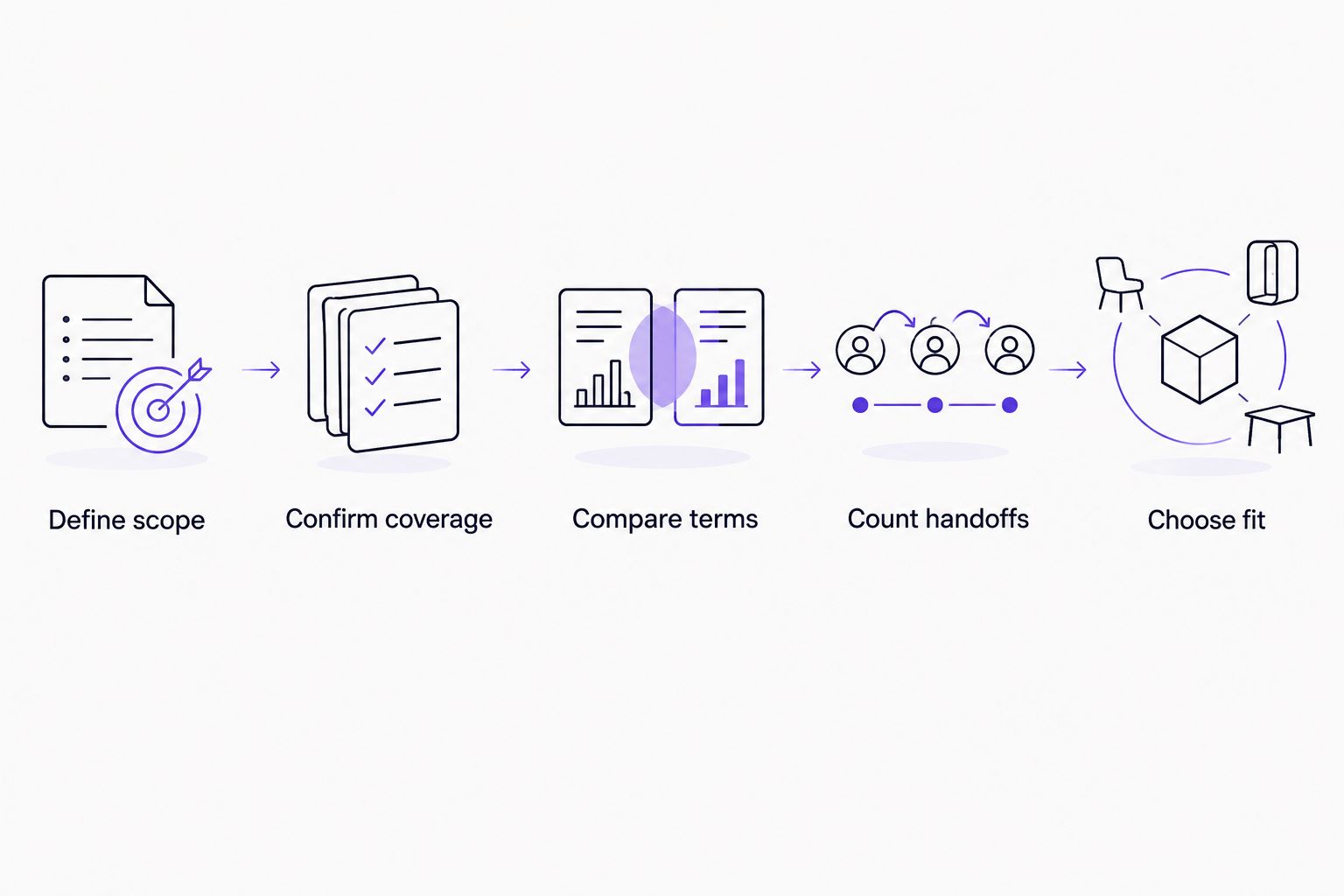
Compare equivalent scope before deciding which proposal fits your approval process.
Keep commercial terms and workflow quality as separate columns in your decision sheet. Do not turn an unverified capability into a scoring advantage. Record whether each requirement was demonstrated, confirmed in writing, or left unresolved.
The main comparison is automation versus manual coordination. A useful proposal tells you which parts of the process the software handles and which responsibilities remain with your team.
Test the workflow before signing
For a 2026 evaluation, bring 3 sample requests, 2 approvers, and 1 workflow owner to the demonstration. These are recommended test inputs, not a product limit or implementation requirement.
Choose examples from your own work: a complete request, a request missing necessary information, and a revised request. Ask the demonstrator to follow each request through the decision and show what the process owner can inspect afterward.
Check these points:
Can the requester provide the information the approver actually needs?
Is the responsible approver clear?
Can the approver act in the required communication channel?
Does the decision remain connected to the correct request?
Can the workflow owner explain and maintain the setup?
Which follow-up tasks still require manual work?
For purchasing teams, the purchase-order approval software guide provides a more focused starting point. Keep the demonstration centered on the purchasing decision, not unrelated features.
Bring a real request, not just a feature checklist. A demonstration should answer whether your team can run the process—not merely whether the interface looks straightforward.
Evaluate your recurring approval workflow
Bring an invoice, purchase, expense, or employee request to your software evaluation.
How we ranked these options
This guide orders the options by fit for recurring approval work, using workflow coverage, approver experience, traceability, administration, and remaining manual tasks. It does not assign an unsupported monetary order.
Manual Slack, Microsoft Teams, and email are separate entries because the decision location changes the working process. None earns an automatic budget win. Your 2026 comparison needs equivalent commercial terms and a clear account of the responsibilities left with employees.
Which approval approach should you choose?
Choose Approveit for recurring approvals that need no-code workflows inside Slack, Microsoft Teams, or email. Validate the specific request, decision record, and administrative process before committing.
Keep manual approvals for occasional decisions with a clear owner. If employees repeatedly chase the same request types, reconcile versions, or reconstruct decisions, make those tasks explicit requirements in your software evaluation.
For an undecided buyer, start with the workflow that causes the most repeated coordination. Evaluate that process first. A broad feature comparison is less useful than establishing whether one real approval can move from request to recorded decision correctly.
FAQ
What's the best approval workflow software for recurring requests?
Approveit fits teams with recurring invoice, purchase, expense, and request approvals in Slack, Microsoft Teams, or email. Confirm your specific workflow in a demonstration before choosing it.
How do I evaluate approval workflow software ranked by price?
Compare current proposals with the same users, workflows, requirements, and contract period. Establish which essential capabilities each proposal includes before putting the proposals in monetary order.
Is manual Slack approval better than approval software?
Manual Slack approval fits occasional decisions; approval software fits recurring processes that need defined routing and traceable decisions. With manual messages, your team remains responsible for follow-up and recordkeeping.
Can I keep approving requests in Microsoft Teams?
Approveit provides approval workflow automation directly within Microsoft Teams. Ask for a demonstration of your specific request and decision process rather than assuming every requirement is covered.
Is email enough for invoice approvals?
Email supports an occasional manually managed approval exchange. Recurring invoice approvals need a consistent way to identify the approver, connect the decision to the invoice, and maintain the record.
What should I bring to an approval software demo?
Bring a complete request, an incomplete request, and a revised request from your own process. Ask to see who decides, where the decision happens, and how the workflow owner inspects the record.
Do no-code approvals remove the need for a process owner?
No-code setup does not remove the need for a process owner. Your team still needs someone to define approval responsibilities, maintain the workflow, and handle changes.
One last thing
Ask the demonstrator to reject a request—not just approve it. Then inspect what the requester receives and how the owner finds the decision.
For your 2026 evaluation, the rejected request is a useful final test because it forces you to examine the exception path. Choose the process your team can explain and maintain, not merely the proposal that sorts first.







