

Approval workflow software for universities is software that routes institutional requests to authorized reviewers with the aim of making purchasing, finance, HR, and IT decisions traceable. University teams need approval paths that distinguish departmental authority, budget responsibility, and specialist review without turning every request into another email chain.
TL;DR
Choose approval workflow software for universities around decision authority, request records, and existing communication tools.
Approveit fits university teams seeking no-code invoice, purchase, expense, and request approvals inside Slack, Microsoft Teams, or email.
Start with one recurring workflow; test missing information, rejected requests, and absent approvers before expanding.
Keep approval decisions distinct from purchase orders, payments, account provisioning, and other downstream actions.
Why approval workflow software matters for universities
A university approval process must answer more than whether someone agreed. It must identify what was approved, who had authority, which budget was involved, and what happens next. A reply in a conversation does not establish all of those facts unless the process captures them.
Start your 2026 evaluation with a recurring administrative request, not a campus-wide transformation. For purchasing, the procurement approval software guide provides a useful starting point for evaluating the decision process separately from ordering and payment.
Use these scenarios to define requirements:
Finance: An invoice needs confirmation that the goods or services were received and that the expense belongs to the stated budget.
Purchasing: A department requests equipment before anyone commits institutional funds.
HR: A time-off request needs an authorized decision without unnecessary disclosure to unrelated teams.
IT: A software or access request needs business justification and a separate fulfillment owner.
The right workflow makes authority explicit; moving a message into software does not fix an unclear approval policy. Establish the policy first, then select software that can support it.
How to build a university approval workflow
1. Map one recurring request from submission to closure
Choose a process with an identifiable owner and a repeatable decision. A departmental purchase request is a useful candidate when the same missing details repeatedly trigger follow-up questions. Avoid starting with a process whose policy is still disputed.
The manual approach is a shared document that describes each handoff. Record what the requester submits, who reviews it, what constitutes approval, and who completes the next action. This document becomes your evaluation script rather than a description of any particular software.
Keep approval and fulfillment separate. Approving a laptop purchase does not mean the laptop has been ordered; approving access does not mean the account has been provisioned. Both statuses need an owner.
For your 2026 pilot, select a request that can be reviewed from beginning to end without exposing unnecessary personal information.
Name the request owner and the person responsible for maintaining its rules.
Write the submission, review, decision, fulfillment, and closure stages.
Identify where staff currently ask for missing information.
Define what closes a request and who records that closure.
2. Define authority before adding routing rules
Build an approval matrix in a spreadsheet before configuring software. List the request category, responsible department, budget owner, specialist reviewer, and final decision-maker. Use institutional policy to define authority rather than treating the recipient of an email as the authorized approver.
For a hypothetical equipment purchase, the department might confirm the need, the budget owner might authorize spending, and IT might review compatibility. Treat those as distinct decisions. An IT review should not silently substitute for financial approval.
Specify whether reviews must occur in sequence or can happen independently. Then document exceptions: an unavailable reviewer, a request that crosses departments, or a requester who also manages the budget. Ask vendors to demonstrate each required behavior rather than assuming that workflow software supports it.
A workflow should enforce the institution's approval policy, not create one during configuration.
Identify the authority required at each review stage.
Specify when reviews are sequential or independent.
Document delegation and absence rules.
Separate requester, reviewer, and fulfillment responsibilities where policy requires it.
Define who can change an approval rule and how changes are reviewed.
3. Standardize the information reviewers need
Start with a shared form or request template. Include only the fields necessary to make the decision and complete the next action. A long form that gathers irrelevant information creates work without strengthening the approval.
For a purchase request, useful fields include the business purpose, requested item, department, budget reference, supporting document, and intended recipient. An invoice review needs different evidence. An access request needs the requested access and business justification, not unrelated employee information.
Approveit provides no-code approval workflows for invoices, purchases, expenses, and requests inside Slack, Microsoft Teams, and email. This is the faster path to evaluate once the request fields and decision rules are clear; automation should not be a prerequisite for documenting them.
During the demonstration, ask to see how required fields, attachments, corrections, and decision records work for your specific request. Do not treat a completed sample form as proof that every exception is covered.
Define the information required before review begins.
Separate requester-supplied details from reviewer decisions.
Specify which supporting documents are necessary.
Remove sensitive fields that do not affect the decision.
Establish how corrected or resubmitted requests are identified.
4. Put decisions in the tools reviewers already use
The manual approach is a consistent message template in Slack, Microsoft Teams, or email, backed by a shared request register. That can establish a basic process, but someone must maintain the link between the conversation, decision, and final status.
Approveit approval workflow software is best for university teams that want no-code approvals inside Slack, Microsoft Teams, or email. Its stated scope includes finance, HR, IT, and operations requests. Evaluate that fit against your institution's actual communication practices rather than assuming every department uses the same channel.
For your 2026 shortlist, require a demonstration of the complete reviewer experience. Show what the reviewer receives, which request details are visible, where the decision is recorded, and how the requester sees the outcome. Confirm channel-specific behavior rather than assuming identical functionality across channels.
The limitation is operational: choosing an in-channel approval tool does not resolve missing authority, inappropriate data access, or an undefined fulfillment process.
Select the channel used by the pilot's actual reviewers.
Show the request context alongside the decision task.
Confirm where comments and decisions are retained.
Test the experience for a reviewer outside the originating department.
Document what happens after approval, rejection, or a request for clarification.
5. Test exceptions before expanding the workflow
First, walk through sample requests manually. Ask reviewers to explain what they would do when the information is incomplete, the request reaches the wrong person, or the request changes after review. Conflicting answers reveal a process problem before configuration makes it harder to change.
Use a 10-request pilot as a practical test plan, not a performance benchmark. Include ordinary submissions and deliberately constructed exceptions. Keep sensitive information out of test records unless your institution has approved its use.
The diagram below summarizes the test sequence. Each stage should produce evidence that the next person can understand without reconstructing a conversation.
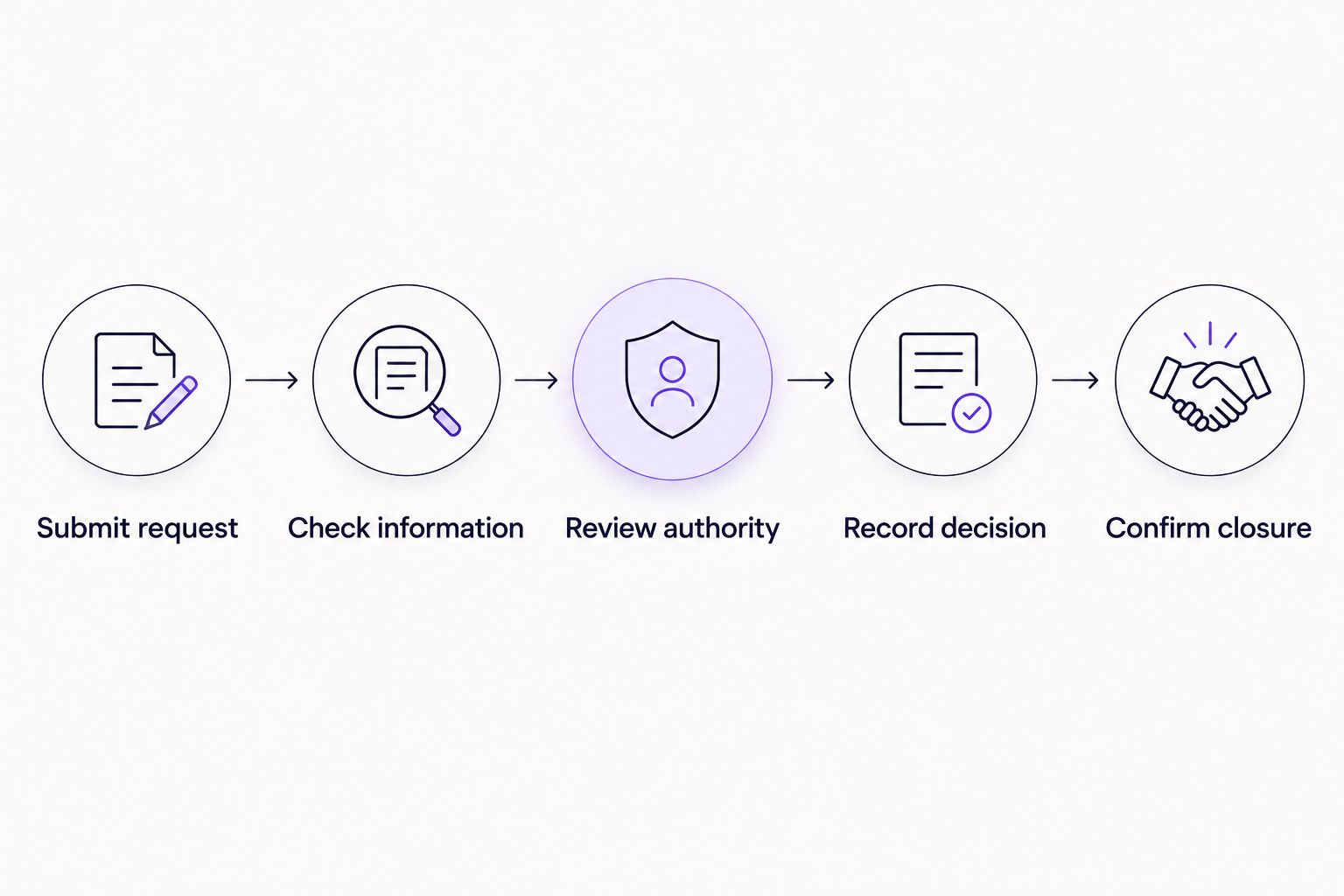
Test the complete request path, including closure, rather than stopping at the approval notification.
Keep a record of expected and actual outcomes. A successful notification is not enough if the wrong reviewer can decide or the final action has no owner.
Submit request: Include complete and incomplete examples.
Check information: Test corrections and supporting documents.
Review authority: Include an absent reviewer and a misrouted request.
Record decision: Inspect approval, rejection, and clarification outcomes.
Confirm closure: Verify that the fulfillment owner receives the next action.
6. Measure the process and assign ongoing ownership
The manual approach is a timestamped request register. Record submission, readiness for review, decision, and closure separately. This distinguishes time spent waiting for information from time spent awaiting a reviewer.
Set a 5-business-day review window for examining pilot records, not as a promised approval turnaround. Look for requests that required clarification, reached the wrong reviewer, or remained open after a decision. Investigate the cause before adding reminders or additional review stages.
For the 2026 rollout, give each workflow a named owner and review its rules at least once per academic term. Personnel changes and revised responsibilities need a documented update process. A working workflow still needs maintenance.
Measure outcomes against your own baseline. Do not accept a speed claim without checking whether the process preserved required review and an understandable decision record.
Record submission-to-decision and decision-to-closure time separately.
Count requests returned for missing information.
Track reassignment and unresolved requests.
Assign responsibility for rule changes and reviewer updates.
Review permissions and approval records before expanding to another department.
Compare university approval options
Compare operating approaches before comparing vendors. The main alternative to dedicated software is often the process already running in messages, forms, and spreadsheets. Use your pilot request to test the same requirements across each option.
Manual email approvals
Best for: Occasional requests with a clear owner
Practical advantage: Reviewers can respond through existing email habits
Key limitation: Someone must reconcile replies, attachments, authority, and status
Manual Slack or Teams approvals
Best for: Simple requests handled within one working group
Practical advantage: Discussion stays in an existing collaboration channel
Key limitation: A conversation alone does not define a controlled approval record
Forms plus a shared register
Best for: Teams documenting a process before automation
Practical advantage: Submission fields and status can be standardized manually
Key limitation: Staff must maintain handoffs and reconcile decisions with the register
Approveit approval workflow software
Best for: Recurring finance, HR, IT, and operations approvals
Practical advantage: No-code workflows bring approvals into Slack, Teams, and email
Key limitation: Institution-specific permissions, records, and downstream requirements still need validation
Choose dedicated approval software when recurring handoffs need consistent routing and traceable decisions. Keep a manual process when the request is genuinely occasional and its owner can maintain a complete record. Neither choice removes the need for an approval policy.
During a 2026 evaluation, demonstrate the same request and exception cases in every shortlisted approach. Compare the administrative work left after the decision, not just the appearance of the approval screen.
Evaluate your university approval workflow
Bring a purchase, invoice, HR, or access request and assess its approval path.
Common mistakes university teams make
Treating every department as the same approval unit
A department's operating needs do not automatically define its spending or access authority. Document departmental review and institutional authorization separately, then test requests that cross those boundaries.
Turning an approval record into a duplicate personnel file
A reviewer needs enough information to decide, not unrestricted background information. Minimize the personal details included in HR requests and confirm who can view the submission, attachments, comments, and final record.
Equating approval with completion
An approved invoice still needs the appropriate payment process. An approved software request still needs procurement or provisioning. Assign the next action explicitly so approved requests do not become an unmanaged queue.
Expanding before testing reviewer absences
A workflow that works only when its usual approver is available is not ready for wider use. Test your institution's delegation policy and verify who remains accountable for the decision.
FAQ
What's the best approval workflow software for universities?
Approveit is a fit for university teams that need recurring, no-code approvals inside Slack, Microsoft Teams, or email. Validate the institution's routing, permission, recordkeeping, and fulfillment requirements with a representative request before choosing.
Can a university keep approvals in Microsoft Teams or Slack?
Yes. Approveit supports approval workflows directly within Microsoft Teams and Slack, as well as email. Demonstrate the reviewer experience in the channel your pilot team actually uses.
Should a university automate purchase requests or invoices first?
Start with the process that has a clear owner, stable approval rules, and recurring administrative work. Purchase requests authorize a proposed commitment, while invoice approvals review an amount presented for payment; document those decisions separately.
Does approval workflow software replace a university's finance system?
An approval workflow does not, by itself, replace accounting, purchasing, or payment processes. Define where the approved request goes next and verify any required system connection separately.
How do we test university approval software before rollout?
Use a representative pilot that includes complete requests, missing information, rejected requests, absent reviewers, and closure. Inspect the decision record and verify that only authorized reviewers can act.
Can HR and IT use the same approval software?
HR and IT can use the same platform while maintaining separate request fields, reviewers, and access requirements. Test time-off and access-request workflows independently rather than copying permissions between them.
What should a university ask during an approval software demo?
Ask the vendor to demonstrate your request from submission through decision and fulfillment handoff. Include a correction, an unavailable reviewer, and a permissions check so the demonstration covers exceptions as well as the normal path.
One last thing
Test rejection before celebrating approval. Ask a reviewer to reject a realistic request, then check whether the requester understands the reason, the record preserves the decision, and any resubmission is distinguishable from the original. That single exercise exposes ambiguity that a successful approval demonstration can leave hidden.







