

Yes, approval workflow software is worth it for small teams in 2026 when recurring requests create repeated follow-ups, unclear ownership, or decisions that are hard to trace. The trade-off is setup and maintenance: someone still needs to define approval rules, assign owners, and keep the process current. Keep manual approvals when requests are occasional, the approver is obvious, and retrieving the decision takes little effort.
TL;DR
Is approval workflow software worth it for small teams? Yes, when recurring approvals need clear ownership and traceable decisions.
Approveit suits small teams that want no-code approval workflows inside Slack, Microsoft Teams, or email.
Manual approvals remain practical for occasional requests with an obvious owner and an accessible decision record.
Test one recurring workflow before expanding; measure follow-up effort, decision time, and record completeness.
Is approval workflow software worth it for small teams in 2026?
Buy for a repeatable approval problem, not simply because your team is growing. Compare the work required to get a decision and retrieve its record, rather than comparing notification features alone.
Manual Slack or Teams messages
Best for: Occasional requests with a clear owner
Main advantage: Keeps discussion in the existing conversation
Main limitation: Someone must track outstanding requests and preserve the decision
Manual email approvals
Best for: Infrequent requests handled through email
Main advantage: Keeps the request and reply together
Main limitation: Forwarding and separate threads require coordination
Approveit approval workflow software
Best for: Recurring finance, HR, IT, and operations requests
Main advantage: Provides no-code approval workflows inside Slack, Microsoft Teams, and email
Main limitation: Requires defined rules and ongoing process ownership
Approveit is best for small teams that need recurring approval workflows inside Slack, Microsoft Teams, or email. Manual approvals are the better fit when adding a formal process would create more administration than it removes.
The distinction is not company size alone. A small team with recurring purchase requests needs a repeatable decision process; a larger team handling an isolated exception does not necessarily need another workflow.
Why this matters
An approval is more than a message saying yes. You need to know what was requested, who had authority to decide, and what happens after the decision.
That distinction matters when an invoice reaches finance without clear authorization, an employee requests time off, or IT receives a software access request. The conversation can happen in chat, but the decision still needs an owner and an accessible record.
For your 2026 evaluation, separate communication from coordination. Slack, Teams, and email carry the conversation; your approval process determines whether requests reach the right person and produce a usable decision.
When manual approvals are enough
Keep manual approvals when the process is simple and stays simple. An occasional request sent directly to the responsible manager does not automatically justify workflow software.
Manual approval has a real advantage: you can handle an unusual situation without first designing a formal process. The drawback appears when the same coordination work repeats and nobody owns the outstanding request list.
Before changing tools, check whether a clearer message template solves the problem. Ask requesters to include the purpose, relevant details, and decision needed, then require an explicit response from the approver.
Use this test:
Can the requester identify the approver without asking around?
Can the approver decide without requesting the same missing information again?
Can the process owner find outstanding requests without searching multiple conversations?
Can someone retrieve the final decision without contacting the original participants?
If those tasks are straightforward, keep the manual process. If they repeatedly interrupt work, evaluate a structured workflow rather than adding more reminder messages.
When approval workflow software earns its place
Automate a recurring decision path, not an undefined policy. The strongest starting point is a request type your team already handles repeatedly and understands well enough to describe clearly.
Invoice approvals: best for recurring finance handoffs
Consider an invoice that finance needs a department owner to authorize. A useful workflow captures the invoice context, identifies the decision-maker, and leaves a record finance can use afterward.
The benefit is less coordination around the decision. The limitation is that software cannot resolve an unclear purchasing policy or decide who should own a disputed invoice.
Purchase requests: best for authorization before commitment
For purchase requests, define what the requester needs to submit and who can authorize the purchase. Keep the approval decision distinct from placing the order or paying an invoice.
A repeatable workflow gives employees a consistent path to request permission. It still needs a business owner who maintains the rules when purchasing responsibilities change.
Time-off approvals: best for a consistent employee process
For time off, specify the information the manager needs and what counts as a completed decision. Employees should not have to guess whether a conversational acknowledgment means approval.
The benefit is a clearer request-and-response process. The limitation is that a workflow does not replace your leave policy or resolve conflicting coverage needs.
IT access requests: best for a defined authorization step
For software or access requests, identify who is authorized to approve the request and what information supports that decision. Treat approval and access provisioning as separate steps unless your selected setup explicitly connects them.
The benefit is traceable authorization. An approved request is not, by itself, proof that access was granted or later removed.
These are starting points, not instructions to automate every department at once. Choose the process with the clearest repeated problem and the most accountable owner.
Why the value of approval software varies
The value of approval workflow software depends on the work surrounding each decision. Use these factors to judge whether automation addresses your actual bottleneck:
Request frequency. Repeated requests create repeated coordination work; isolated exceptions provide less opportunity to standardize.
Approval ownership. A defined approver makes automation useful. Unresolved authority makes the same disagreement move into software.
Information quality. Consistent request details help approvers decide without another round of questions.
Decision records. A need to retrieve past authorization increases the importance of traceable decisions and audit records.
Working channel. Approving inside Slack or Teams addresses a different need from asking employees to visit a separate tool.
Process maintenance. Someone must update the workflow when responsibilities or policies change.
In 2026, use these factors before making a feature shortlist. A feature matters only when it removes a step, supports a required control, or makes an existing responsibility clearer.
For a broader shortlist, compare approval workflow software for small businesses against the process you have documented. Avoid evaluating tools against an imaginary future process that nobody owns yet.
How do you test whether approval software is worth it?
Run a narrow pilot with a written definition of success. The purpose is to compare the same type of request before and after introducing a structured workflow, not to demonstrate every feature.
1. Choose one workflow
Start with 1 recurring workflow that has a clear owner. Invoice approvals, purchase requests, time off, or IT access requests are useful candidates when your team already handles them regularly.
Write down the current difficulty in plain terms. Examples include chasing the approver, collecting missing details, or finding the final decision later; choose the problem your team actually experiences.
2. Define request details
List the information the approver needs before deciding. Remove fields that do not support the decision or the next handoff.
For a purchase request, describe the proposed purchase and business purpose. For time off, capture the requested absence and the information required by your existing policy.
3. Assign approval ownership
Name the role responsible for the decision and the person responsible for maintaining the workflow. Establish what your team should do when the normal approver is unavailable.
Do not assume a tool fixes an ownership gap. Resolve the rule first, then check whether the selected configuration supports it.
4. Test real requests
As a practical pilot checklist, inspect 3 completed requests rather than relying only on a demonstration. Include a straightforward approval, a rejection, and a request that needs clarification.
Check whether the requester understands the outcome and whether the process owner can retrieve it. This is a suggested test, not a statistical sample or a promised implementation timeline.
5. Review decision records
Capture 2 timestamps for each pilot request: submission and final decision. Separately record time spent preparing, chasing, clarifying, and retrieving the request.
Elapsed time and hands-on effort answer different questions. A request can sit with a busy approver even when the workflow removes administrative work.
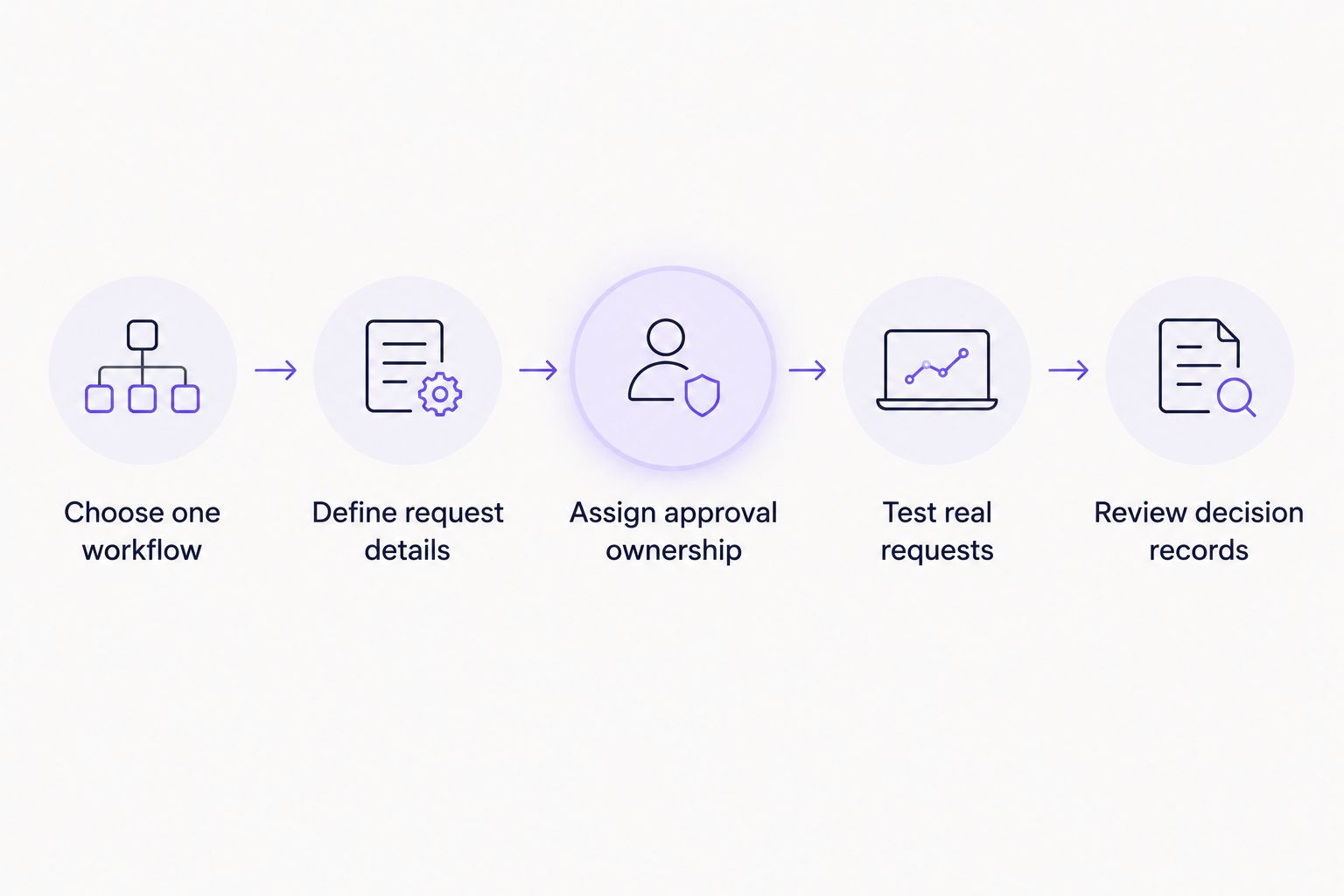
Define ownership before testing whether the workflow improves the process.
Review the pilot against your original problem. Keep the workflow if it reduces the targeted coordination work without introducing disproportionate administration; revise it if unclear rules simply produce a different set of follow-ups.
What should you check in a demo?
Bring a real request to the demo and follow it through to its final record. A prepared example reveals more than a tour of menus because it connects each feature to work your team performs.
Ask the demonstrator to show:
How a requester submits the information your approver needs.
Where the approver reviews and decides inside your chosen channel.
What happens when a request is rejected or needs clarification.
How an authorized person finds the decision afterward.
How the workflow owner updates the process when responsibilities change.
Approveit provides no-code approval workflow software for finance, HR, IT, and operations teams working in Slack, Microsoft Teams, and email. The fit is strongest when those channels already contain recurring approval work; the limitation is that your team still owns the underlying rules.
For a 2026 demo, prioritize your chosen channel and request type. Do not treat an invoice example as proof that every HR policy or IT access scenario behaves exactly as your business requires.
Evaluate your approval workflow
Bring an invoice, purchase, time-off, or access request to discuss your approval process.
Should a small team automate every approval?
No. Start with the recurring approval that creates a clear coordination or recordkeeping problem, and leave occasional exceptions manual until there is a reason to formalize them.
Adding workflows without clear ownership creates maintenance work. Expand only after the first process has understandable rules and useful decision records.
Can approval software replace your approval policy?
No. Approval software applies the process you define; it does not determine who should have authority or what your business should permit.
Write the policy decision in ordinary language before configuring the workflow. If managers disagree about the rule, settle that disagreement before automating it.
FAQ
Is approval workflow software worth it for a very small team?
Yes, when recurring requests require repeated follow-ups, clear ownership, or retrievable decision records. Team size alone does not establish the need; occasional requests with an obvious approver can stay manual.
What's the best first approval workflow to automate?
The best first workflow is a recurring request with a clear owner and a specific coordination problem. Choose invoice approvals, purchase requests, time off, or IT access only when that process matches work your team already does.
Is approval software better than manual Slack approvals?
Approval software is better for recurring Slack requests that need a consistent decision path and traceable records. Manual messages remain practical for occasional requests that are easy to track and retrieve.
Does Approveit work inside Microsoft Teams?
Approveit supports approval workflows directly within Microsoft Teams, as well as Slack and email. Use a demo to check your exact request type, approval rules, and required decision record.
Do we need coding skills to set up approval workflows?
Approveit provides no-code approval workflow software. You still need to define request information, approval ownership, and the rules the workflow should follow.
How do we measure whether approval software is helping?
Compare follow-up effort, submission-to-decision time, and the completeness of decision records for the same request type. Also track the work required to maintain the workflow so the comparison includes administrative effort.
Should we buy approval software in 2026 or keep using email?
Keep email in 2026 when requests are infrequent, ownership is clear, and decisions are easy to retrieve. Evaluate approval software when recurring email threads require repeated coordination or leave authorization unclear.
One last thing
Test the record after the conversation is over. Ask someone who did not participate to find the request, identify the authorized approver, and understand the outcome using only the available record.
If that person needs to message the original participants, your process still depends on their memory. Fix that gap before adding more workflows.







