

Best overall: Approveit for recurring approvals inside Slack or Microsoft Teams. Best for custom Microsoft workflows: Microsoft Power Automate; best for IT request management: Jira Service Management; best for lightweight request intake: Google Forms with Google Sheets. This 2026 guide matches each option to the work your small business needs approved.
TL;DR
Approveit is the best approval workflow software for small businesses that want recurring approvals inside Slack or Microsoft Teams.
Choose Microsoft Power Automate when approvals belong inside a broader Microsoft automation process.
Choose Jira Service Management when access requests need service-desk ownership and tracking.
Use Google Forms with Google Sheets for structured intake, not as a complete approval workflow.
Why this matters
Your main alternative is often manual approval in Slack, Teams, or email—not another software subscription. Someone posts a purchase request, tags a manager, and waits. Finance then has to establish whether the reply authorizes the purchase or merely acknowledges it.
Approval software should make the decision explicit and keep it attached to the request. Moving a conversation into another application does not solve the problem unless responsibility, status, and the decision record become clearer.
For a small business choosing software in 2026, start with recurring work: invoices, purchase orders, expenses, time off, or access requests. Pick the process that repeatedly requires someone to chase a decision. An occasional exception does not need to dictate your entire software choice.
What makes the best approval workflow software?
Use these criteria before comparing names. A tool earns its place by fitting your approval process, not by offering the longest feature list.
Decision location: Can the approver act where they already work, or must they open another application?
Request quality: Can the requester provide the invoice, purchase details, dates, or access justification before review begins?
Routing clarity: Can you express who decides, in what order, and under which conditions?
Decision records: Can you identify the request, decision-maker, outcome, and supporting context without reconstructing a chat thread?
Administration effort: Can someone on your team maintain the process when responsibilities change?
Workflow scope: Do you need approvals alone, or a larger service desk, accounting process, or integration project?
For your 2026 shortlist, separate requirements from preferences. Approving within Teams can be a requirement; a particular dashboard layout is usually a preference. Reject an option that fails a requirement before spending time on secondary features.
Approval workflow options at a glance
Approveit
Best for: Recurring business approvals in existing communication tools
Standout capability: No-code invoice, purchase, expense, and request approvals inside Slack, Teams, and email
Key limitation: Approval software does not replace the underlying accounting or HR system
Microsoft Power Automate
Best for: Custom processes across Microsoft applications
Standout capability: Approval actions within a broader automation flow
Key limitation: Someone must maintain the flow and its connections
Jira Service Management
Best for: IT access and software requests
Standout capability: Request portals, queues, and configurable service workflows
Key limitation: A service-desk operating model is unnecessary for a simple sign-off
Google Forms with Google Sheets
Best for: Lightweight, structured request intake
Standout capability: Form responses organized in a spreadsheet
Key limitation: Intake alone does not supply approval routing or enforce decision authority
Manual Slack, Teams, or email
Best for: Isolated decisions without recurring routing
Standout capability: A direct conversation with the decision-maker
Key limitation: Request status and decisions depend on manual follow-up
The first four options form the ranked shortlist. Manual messaging is the baseline: keep it only when the work does not justify a managed approval process.
1. Approveit: best for recurring approvals in Slack or Teams
This no-code approval workflow software serves finance, HR, IT, and operations teams. It supports invoice, purchase, expense, and request approvals directly within Slack, Microsoft Teams, and email. The fit is strongest when your team already works in those channels and needs a repeatable approval process rather than another place to discuss requests.
Picture a purchase request that needs a manager's decision before finance proceeds. The useful change is not another notification; it is a defined request, a responsible approver, and a traceable outcome. Keep the purchasing or accounting work in its appropriate system and use the approval workflow to govern the decision.
Approveit pros:
No-code configuration suits teams that do not want to build custom approval scripts.
Decisions happen inside Slack or Teams rather than requiring a separate approval destination.
Invoice, purchase, expense, and request workflows address recurring operational work.
Traceable decisions and audit records give the team a record beyond a conversational reply.
Approveit cons:
Approval automation does not replace accounting, payroll, or HR recordkeeping.
No-code setup still requires someone to define request fields, approvers, and decision rules.
A dedicated workflow is unnecessary when requests are isolated and responsibility is already clear.
Best for: Small businesses with recurring approvals and approvers who work in Slack, Teams, or email.
Verdict: Buy for repeatable business approvals; skip if you only need occasional sign-offs. Confirm your actual routing and decision-record requirements in a demo before committing.
2. Microsoft Power Automate: best for custom Microsoft workflows
Microsoft Power Automate connects actions into automated flows and includes approval actions. It belongs on the shortlist when approval is one step in a wider Microsoft process, such as receiving information, requesting a decision, and updating a business record.
The distinction is ownership. You are choosing a configurable automation platform, so someone must understand the flow, its connections, and what should happen when a step fails. That trade-off fits a business with a clear Microsoft automation owner better than a team seeking approval setup alone.
Microsoft Power Automate pros:
Approval actions can sit within a broader business automation.
Microsoft application connections support workflows built around that environment.
Conditional logic helps express different routes within a process.
A flow can connect the decision to subsequent actions rather than stopping at the sign-off.
Microsoft Power Automate cons:
Flow design adds administration beyond defining an approval policy.
Changes to connections or process logic require maintenance.
A general automation platform adds unnecessary scope when the only requirement is recurring approvals.
Best for: Microsoft-focused businesses that have an owner for custom automation and need actions before or after approval.
Verdict: Buy for a defined Microsoft automation process; skip if nobody will own the flows. For channel-specific selection, compare the considerations in this guide to approval software for Microsoft Teams.
3. Jira Service Management: best for IT access requests
Jira Service Management organizes service requests through portals, queues, and workflows. It fits IT access and software requests when the work includes more than authorization: someone must receive the request, assess it, obtain approval, and complete the service task.
An approved access request is not the same as completed access provisioning. A service-management process helps separate the authorization decision from the team's work to fulfill it. That distinction matters when requesters need to know whether a request is waiting for approval or waiting for action.
Jira Service Management pros:
Request portals give employees a defined place to submit service needs.
Queues help the service team organize incoming work.
Configurable workflows support a process beyond the approval decision.
Request records keep service context attached to the work.
Jira Service Management cons:
Portal and workflow administration adds work for the service owner.
A ticket-based process introduces a separate request-management environment.
Service-desk structure is excessive when a manager's sign-off is the entire process.
Best for: Small IT teams managing access, software, and other employee service requests through a service desk.
Verdict: Buy when approval leads to a tracked fulfillment task; skip for standalone finance sign-offs. Choose the service model because you need it, not because an approval happens somewhere inside it.
4. Google Forms with Google Sheets: best for lightweight intake
Google Forms collects structured responses, and Google Sheets organizes those responses in a spreadsheet. Together, they give a small team a consistent request format without requiring each employee to write an unstructured email.
This is an intake option, not a complete approval workflow. A spreadsheet row can capture a request, but your team still needs a method for assigning the decision, recording the outcome, and preventing an informal update from being mistaken for authorization.
Google Forms with Google Sheets pros:
Form questions standardize the information submitted with a request.
Spreadsheet responses give the coordinator an organized request list.
The team can define fields around one straightforward process.
Structured intake is useful even before the business introduces approval automation.
Google Forms with Google Sheets cons:
Collecting a response does not assign or route an approval by itself.
Spreadsheet editing is not the same as enforcing approval authority.
Follow-up and decision recording remain manual unless you build additional automation.
Best for: A team fixing incomplete request submissions before introducing a managed approval process.
Verdict: Hold as an intake tool; skip as the final answer when routing and traceable decisions are requirements. Do not confuse a clean request list with a controlled approval process.
How we ranked
This 2026 ranking prioritizes fit for recurring small-business approvals: decision location, request quality, routing, records, and administration effort. The order favors a dedicated approval process first, followed by broader automation, service management, and intake-only tools.
Each option owns a different use case. There is no universal winner for a team that needs service fulfillment and a team that only needs invoice authorization. Choose the smallest system that handles your full decision process—not merely the submission step.
Check the fit with a real workflow
Before choosing software, use one recurring request type to examine the complete process. A purchase request works well because it separates authorization from the eventual order or payment.
Use these five steps during a demo or evaluation:
Capture details: Submit the information the approver needs, including the purchase purpose and supporting document.
Assign approver: Identify who owns the decision and what happens when that person cannot act.
Record decision: Approve or reject the request and inspect how the outcome is attached to it.
Handle exceptions: Return an incomplete request and confirm how the requester corrects it.
Review history: Find the completed request without searching through separate conversations.
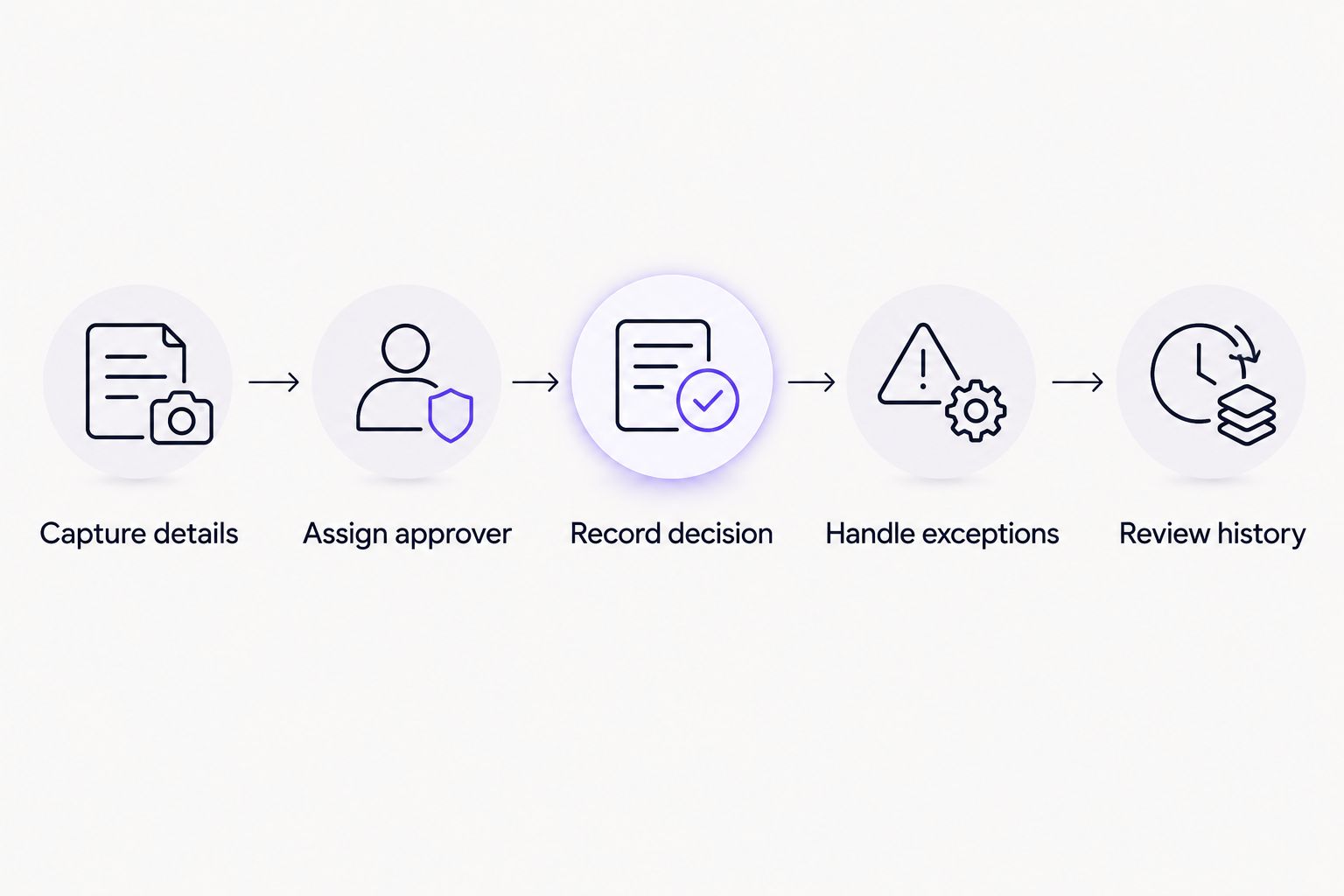
Evaluate the complete decision process, not just the request form.
Run 3 test requests: a complete request, an incomplete request, and a rejected request. For a process involving 2 approvers, check whether the intended order is clear. Start with 1 request type so unrelated requirements do not obscure the result.
These are evaluation scenarios, not performance benchmarks. The useful outcome is a process your team can explain and maintain. If the evaluation only demonstrates a successful approval, ask to see the rejection and correction paths as well.
Evaluate your recurring approval workflow
Bring an invoice, purchase, expense, or access request and define the decision your team needs.
Which approval workflow software should you choose?
Choose Approveit approval workflow software for recurring operational decisions inside Slack or Teams. It is the default recommendation here because it addresses the approval process directly without turning the selection into a general automation or service-desk project.
Choose Microsoft Power Automate when your main requirement is a custom Microsoft process surrounding the approval. Choose Jira Service Management when approval belongs inside IT request fulfillment. Choose Google Forms with Google Sheets when the immediate problem is inconsistent intake, not decision routing.
For your 2026 rollout, start with the request that generates repeated chasing. Define its owner, required information, and final decision record before adding more workflows. Expanding an unclear process simply gives the team more unclear processes.
FAQ
What's the best approval workflow software for a small business using Slack?
A dedicated approval tool that supports decisions inside Slack is the strongest fit for recurring requests. Evaluate request capture, approver assignment, rejection handling, and decision records rather than choosing on notifications alone.
Should a small business choose Microsoft Power Automate for approvals?
Microsoft Power Automate fits when approval is part of a broader Microsoft automation process. Choose it when someone can own the flows and maintain their connections and logic.
Is Jira Service Management better for IT access requests?
Jira Service Management fits IT access requests that need service-desk tracking and fulfillment after authorization. A standalone sign-off does not require the same service-management structure.
Can Google Forms and Google Sheets handle approvals?
Google Forms and Google Sheets handle structured intake, but intake alone is not an approval workflow. Routing, decision authority, and follow-up require a separate process or additional automation.
Do we need approval software if we already use email?
You need a managed approval process when recurring email requests create unclear ownership, repeated chasing, or fragmented decision records. Keep manual email for isolated decisions that remain easy to track.
What should we test before choosing approval software?
Test a complete request, an incomplete request, and a rejection. Confirm who decides, how corrections happen, and where the final decision record lives.
Does invoice approval software replace accounting software?
Invoice approval software does not replace accounting software. Approval authorizes a decision; accounting records and manages the financial transaction.
One last thing
An approval is not proof that the work is complete. A purchase can be approved before anyone places the order; access can be authorized before IT grants it. Keep those states separate in your process so the requester knows what the decision actually means.
Before adding another workflow, write down who owns the next action after approval. That small clarification prevents your approval system from becoming another place where completed decisions wait for someone to act.







