

Yes—a no-code approval tool is worth it for IT teams in 2026 when recurring access, software, and purchase requests need consistent routing and traceable decisions. Keep manual approvals for occasional, straightforward requests; automate when chasing decisions and reconstructing approval history become recurring work. The trade-off is process ownership: someone still needs to define approvers, maintain rules, and separate approval from the work that follows.
TL;DR
Is a no-code approval tool worth it for IT teams? Yes, when recurring requests need consistent routing and decision records.
Approveit fits IT teams that want no-code approval workflows inside Slack, Microsoft Teams, or email.
Keep manual approvals for occasional requests with a clear owner and limited follow-up.
Test access requests and software requests before expanding; approval does not establish that fulfillment happened.
Why this matters
An approval and a conversation are different things. A message can explain what someone wants without establishing who must decide, which request version they approved, or whether IT completed the work.
Approveit is best for IT teams that need recurring approval workflows inside Slack, Microsoft Teams, or email. Its no-code approval software addresses the decision process without requiring approvers to leave those channels. You can evaluate Approveit against a specific request rather than a general desire to automate everything.
For your 2026 evaluation, start with the handoff that fails today. If the delay happens after approval, improving approval routing alone does not fix fulfillment.
Is a no-code approval tool worth it for IT teams in 2026?
Yes, when the same approval pattern repeats and your team needs an accountable decision record. It is not automatically the right choice for a small number of unrelated requests that an identified owner already handles reliably.
Compare the operating models, not just the interfaces. Both approaches can involve Slack, Teams, or email; the difference is whether a defined workflow governs the request.
Manual approvals in Slack, Teams, or email
Best for: Occasional requests with a clear decision-maker
Main advantage: You can ask a question without first configuring a workflow
Main limitation: Your team must keep routing, follow-up, and decision records consistent
No-code approval workflow
Best for: Recurring requests with repeatable decision rules
Main advantage: You can define how requests reach approvers without writing workflow code
Main limitation: Someone must maintain the rules and handle exceptions
Manual approval is not inherently wrong. A direct message can be sufficient when the requester supplies the necessary context, the authorized person answers, and your team preserves the decision appropriately.
Automation earns its place when those conditions repeatedly break down. If IT keeps asking who approved a request or which manager should receive it, the problem is no longer just message delivery.
When manual approvals are enough
Best for: occasional requests that do not require a repeatable approval chain. Keep the process manual when an identified owner can review the request, communicate the decision, and preserve the relevant context without repeated chasing.
For example, a one-off question about an existing software entitlement does not necessarily need a new workflow. First establish whether it requires authorization at all; a support question and an access decision are not interchangeable.
The advantage is limited setup. The disadvantage is dependence on individual follow-through, especially when requests arrive through different channels.
Do not automate a process simply because it happens in chat. Automate because the decision rules repeat and applying them manually creates avoidable work.
When a no-code approval workflow earns its place
Best for: recurring IT requests with known approvers and a repeatable information requirement. Access requests, software requests, and equipment purchases are practical candidates when your organization can define who decides and what information they need.
Approveit provides no-code approval workflows for IT and operations teams within Slack, Microsoft Teams, and email. That fits teams that want to keep decisions in existing communication channels rather than introduce another destination for approvers.
The benefit does not remove the need for process design. An incomplete request still needs clarification, and an outdated approver rule still sends work to the wrong person.
When reviewing IT approval software, separate requirements into request collection, authorization, and fulfillment. Ask a vendor to demonstrate the boundary between each stage, not just a successful approval notification.
Why the value of no-code approvals varies
The value depends on the work surrounding each decision. Use these factors to decide whether approval automation addresses your actual bottleneck:
Recurring request patterns: Repeatable access and software requests give you a process to configure. Unrelated exceptions require individual judgment.
Approver ownership: Defined decision-makers make routing possible. Software cannot resolve an internal disagreement over who holds authority.
Request completeness: Approvers need enough context to decide. Automating an incomplete submission does not supply the missing business justification.
Communication channels: Approval inside Slack or Teams fits teams already using those channels. Confirm how the intended approvers will receive and act on requests.
Record requirements: Traceable decisions matter when IT must explain who authorized a change. Define which details your organization needs to retain.
Fulfillment ownership: Approval only establishes authorization. Assign responsibility for granting access, ordering equipment, or completing the software request.
For 2026 planning, prioritize the factor that creates the most repeated follow-up in your own request history. Do not assume every request type needs the same workflow.
How do you test whether approval automation is worth it?
Run a small pilot around an existing request type. The suggested quantities below are a test plan, not a claim about expected savings or an industry benchmark.
1. Select one request type
Choose a recurring software or access request with an identified owner. Avoid starting with a process that crosses every department or depends on unresolved policy decisions.
Write down the current starting point and completion point. A request submitted is not a request approved, and a request approved is not access granted.
2. Define request context
Specify what the approver needs: the requested application or resource, the requester, the business reason, and the access scope. Add other fields only when they support an actual decision.
Use 5 sample requests from your existing process to check whether the proposed information is sufficient. Include an incomplete request so you test clarification, not just the successful path.
3. Identify approver ownership
Name the role authorized to decide and establish how your organization handles an unavailable approver. Confirm whether a manager's approval is sufficient or whether another authorization is required.
Do not let a convenient notification recipient become the approver by accident. Routing must reflect authority, not merely availability.
4. Separate approval handoff
Define 3 stages: submission, decision, and fulfillment. Assign an owner to each stage, even if the same person handles more than one.
This separation prevents a successful decision notification from being mistaken for completed IT work. It also makes delays easier to locate.
5. Review decision records
Run 2 review cycles with the people who submit, approve, and fulfill requests. Ask each person to locate the request context, the decision, and the next action without relying on someone else's memory.
Record failures as process issues: missing context, wrong approver, unclear decision, or incomplete handoff. Use those findings to decide what to change before expanding.
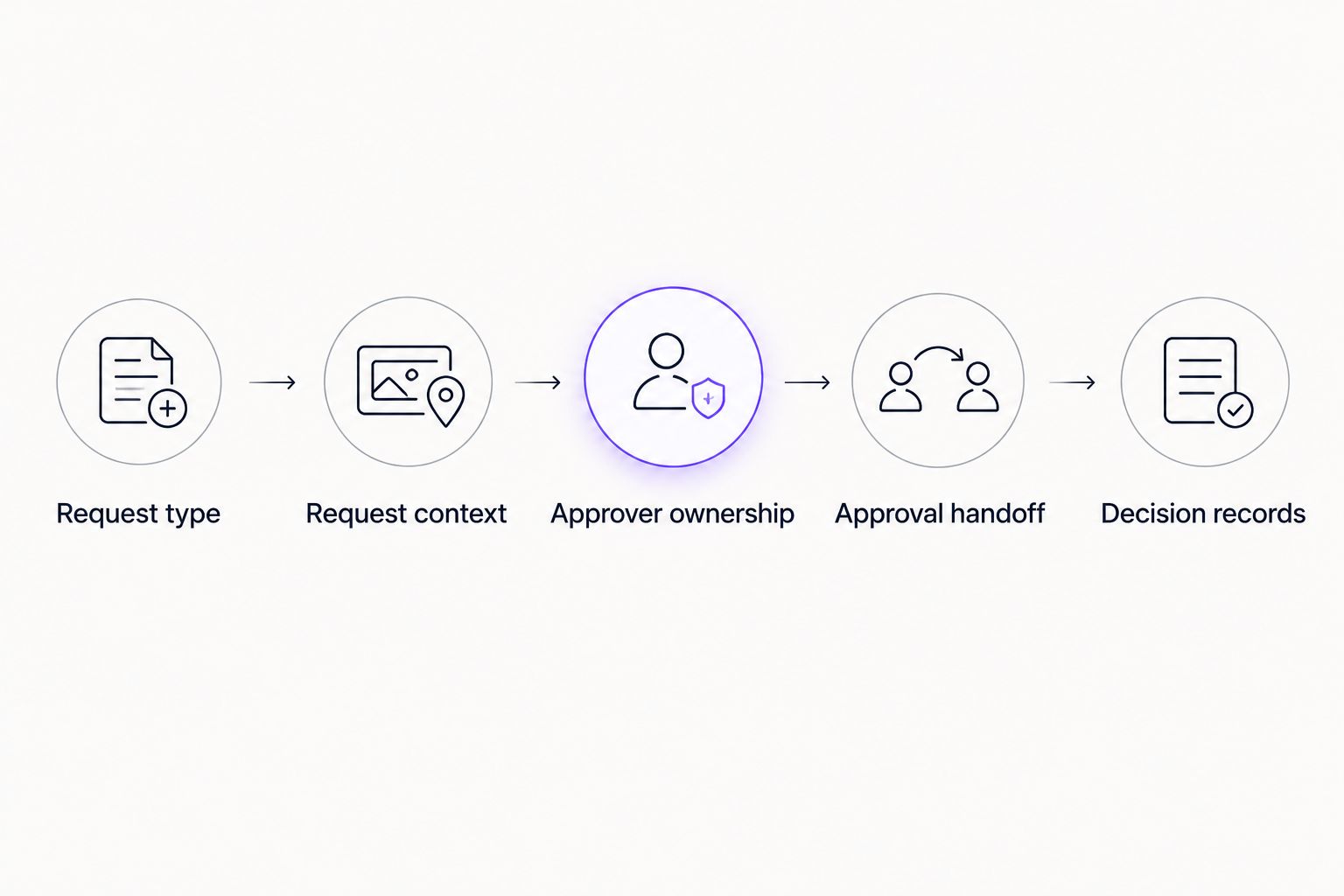
Test the full decision process, including the handoff after approval.
What should you measure before expanding?
Measure the parts of the process the pilot can actually change. For a 2026 business case, use your own request records rather than assigning a savings figure to every automated notification.
Separate elapsed waiting time from staff handling time. A request sitting overnight is different from an IT employee spending time locating the approver, repeating the context, and chasing an answer.
When estimating AI workflow automation savings, distinguish work removed from work merely transferred to configuration, review, or exception handling. Apply that same accounting to a no-code approval pilot: fewer manual messages do not prove lower total effort if someone must repair every request.
Keep a simple measurement sheet with these fields:
Request type and submission time.
Time spent clarifying missing information.
Time spent identifying or chasing the approver.
Decision time and recorded outcome.
Fulfillment owner and completion status.
Time spent maintaining or correcting the workflow.
Expand only when the pilot demonstrates a better process on the measures you chose. A shorter approval wait is useful, but not if the decision record becomes harder to explain or fulfillment loses its owner.
Review exceptions separately. A workflow that handles routine requests well can still need a clear manual path for requests outside its rules.
Can you automate IT approvals without writing code?
Yes, you can configure a no-code approval workflow without writing the workflow logic as application code. You still need to specify request information, approvers, and decision rules.
No-code describes how you configure the approval process. It does not establish support for every application, identity system, or downstream action your organization uses.
During evaluation, bring a real access request and ask where manual work remains. Confirm the exact integration and fulfillment requirements before treating approval automation as end-to-end IT automation.
Does approving in Teams mean access is granted automatically?
No. A Teams approval records an authorization decision; it does not, by itself, establish that an account or permission changed.
Require the demonstration to show the boundary between the decision and fulfillment. If your team needs automated provisioning, verify that capability for the specific system and requested action rather than inferring it from a Teams interface.
What should an IT approval software demo prove?
Ask Approveit to demonstrate a recurring IT request from submission through the decision and handoff. Use your team's request fields and approver rules, not an unrelated sample process.
For a 2026 evaluation, require clear answers to these questions:
Can the requester supply the context your approver needs?
Can the intended person review and decide inside your chosen channel?
Can your team trace the decision back to the request?
What happens when the request is incomplete or rejected?
Who maintains the workflow when responsibilities change?
Which actions remain manual after approval?
The advantage of a no-code approach is configuration without writing workflow code. Its limitation is that configuration still needs an accountable owner. Choose based on the demonstrated request path, including exceptions—not the cleanest screen in the presentation.
Evaluate your IT approval workflow
Bring an access or software request, its approvers, and the handoff your team needs to test.
FAQ
Is a no-code approval tool worth it for a small IT team?
Yes, when recurring requests create repeated routing, follow-up, or recordkeeping work. Team size alone does not establish the need; assess the requests and handoffs.
Should we replace manual Slack approvals?
Replace manual Slack approvals when repeatable decision rules need more consistent execution. Keep a straightforward manual process when occasional requests already have clear ownership and traceable decisions.
Can Approveit handle IT approvals inside Microsoft Teams?
Approveit supports approval workflows within Microsoft Teams for IT and other business teams. Confirm your specific request fields, approver rules, and fulfillment requirements during evaluation.
Does no-code mean IT has no setup work?
No-code removes the need to write workflow code, not the need to define the process. Your team must identify request information, decision-makers, exceptions, and ownership.
Will an approved software request automatically install the application?
An approval alone does not establish that software was installed. Verify the specific downstream action and integration before including installation in your expected workflow.
How do we prove approval automation saves time?
Compare staff handling time and elapsed waiting time before and during a pilot. Include configuration, maintenance, clarification, and exception handling rather than counting only messages removed.
What should we automate first in 2026?
Start in 2026 with a recurring request type that has clear approvers and defined information requirements. Expand after testing decisions, exceptions, records, and the fulfillment handoff.
One last thing
Test a rejection before you expand. A successful approval shows that a request can move forward; a rejection tests whether the requester understands the outcome and IT knows not to proceed.
Then inspect a request that changed after submission. Your team should be able to establish what was authorized before acting. The goal is not more approval messages. It is a decision your team can explain and execute correctly.







