

ITarian serves endpoint management and IT service operations; a broader IT platform is not automatically the right answer when your bottleneck is approval decisions. The best ITarian alternative for IT approvals in 2026 is Approveit for recurring requests inside Slack, Microsoft Teams, and email; manual approvals remain an option for occasional, straightforward decisions.
TL;DR
Approveit is the best ITarian alternative for IT approvals when recurring requests need no-code routing and traceable decisions.
Manual Slack or Microsoft Teams approvals suit occasional requests, but someone must maintain ownership and records.
Keep endpoint management separate from approval workflow selection; approval does not mean access has been provisioned.
Compare software requests, access requests, and purchase approvals using your own approval rules before choosing.
Why this matters
An employee asks for software in Slack. A manager agrees, finance asks about the purchase, and IT waits for a clear decision. The problem is not necessarily ticket handling. It is knowing who must approve what before anyone acts.
For your 2026 shortlist, separate managing IT work from authorizing IT work. Endpoint management, service operations, and approval routing answer different questions. Buying another broad platform does not define your approval policy for you.
Start with 3 request types: software purchases, access requests, and equipment requests. Write down who approves each request, what information they need, and where the decision must remain accessible. Those requirements give you a useful comparison instead of a feature-count exercise.
ITarian alternatives at a glance
This comparison includes dedicated approval software and manual approaches. That distinction matters: replacing informal messages is a different decision from replacing an IT management platform.
ITarian
Best for: Endpoint management and IT service operations
Standout characteristic: Broad IT management context
Difference from ITarian: Baseline option when the requirement extends beyond approvals
Approveit
Best for: Recurring IT approvals across departments
Standout characteristic: No-code workflows inside Slack, Microsoft Teams, and email
Difference from ITarian: Focuses the decision on approval routing rather than broader endpoint operations
Manual Slack or Microsoft Teams approvals
Best for: Occasional decisions handled in conversation
Standout characteristic: Requests and replies stay in an existing conversation
Difference from ITarian: A communication process rather than a replacement IT platform
Manual email approvals
Best for: Occasional requests handled through correspondence
Standout characteristic: Requests and decisions can travel in an email thread
Difference from ITarian: Depends on a maintained procedure rather than a dedicated approval workflow
Choose the approval process first. Decide whether to replace other IT systems separately. A request can need structured authorization without creating a reason to change how you manage endpoints.
1. Approveit: best for recurring IT approval workflows
Approveit is no-code approval workflow software for finance, HR, IT, and operations teams. Employees and approvers can handle approval workflows directly within Slack, Microsoft Teams, and email. That fits IT requests that need business authorization before fulfillment.
Consider a software request that needs a manager's decision and a purchasing decision. Define those approval responsibilities before you configure the workflow. Keep the authorization record distinct from the later task of purchasing or assigning the software.
Where it shines
Approval decisions inside existing tools. Approvers can work in Slack, Microsoft Teams, or email rather than moving the decision into a separate destination.
No-code configuration. Teams can set up approval workflows without writing application code.
Cross-department use cases. The stated scope includes purchase, invoice, expense, and request approvals across business teams.
Traceable decisions. Approval records support checking what was decided rather than treating an informal reply as the entire process.
Where it falls short
A workflow does not replace policy. You still need to define approvers, required information, and the conditions for accepting a request.
Approval is not fulfillment. Do not treat an approved access request as evidence that an account was created or a permission was granted.
Occasional requests might not justify a dedicated workflow. If a simple decision already has a clear owner and record, configuration adds work before it adds value.
Head-to-head: approval layer versus IT management
Primary requirement
Approval-focused choice: Route and record business authorization
ITarian evaluation: Evaluate endpoint management and service-operation requirements
Everyday workflow
Approval-focused choice: Approve requests in Slack, Microsoft Teams, or email
ITarian evaluation: Check the approval experience against your actual process
Configuration scope
Approval-focused choice: Define no-code approval workflows
ITarian evaluation: Assess the configuration needed for your broader IT requirements
Replacement boundary
Approval-focused choice: Change how requests receive authorization
ITarian evaluation: Decide separately whether existing IT management needs replacement
Best for: Teams with recurring software, access, equipment, or purchasing requests that require clear approval ownership.
Verdict: Buy for recurring approval work after a workflow demonstration; do not use that decision alone to justify replacing endpoint tooling.
2. Manual Slack or Microsoft Teams: best for occasional decisions
Manual Slack or Microsoft Teams approvals mean an employee posts a request and the responsible person replies. No dedicated approval system is assumed. The team establishes the procedure and maintains the record.
This approach suits a narrow process with a known decision-maker. It becomes harder to follow when the same request moves between a manager, finance, and IT without an agreed handoff.
Where manual chat approvals shine
Direct discussion. Requesters and decision-makers can clarify the need in the same conversation.
A familiar working location. Teams already using these channels can place the request where they discuss work.
Simple process design. A clearly stated request, named approver, and explicit answer can be enough for an occasional decision.
Where manual chat approvals fall short
Ownership requires discipline. Someone must identify the approver instead of assuming that a channel reply settles the request.
Records require a procedure. Decide where the final decision belongs and how someone will find it later.
Handoffs remain manual. A manager's agreement does not tell finance or IT what action they should take next.
Use a request template rather than a vague question. Include the requested item, business reason, requester, and required decision-maker. Ask for an explicit approval or rejection, not an ambiguous reaction.
Best for: Teams handling occasional requests with a single clear owner and a maintained decision record.
Verdict: Hold if the process stays simple; switch when recurring routing and recordkeeping become separate administrative tasks.
3. Manual email approvals: best for occasional written requests
Manual email approvals use correspondence to request and record a decision. The approach can work when the relevant people already handle that request through email and follow an agreed procedure.
The important distinction is not email versus software. It is manual email correspondence versus an approval workflow delivered through email. The channel alone does not determine how approvals are routed or recorded.
Where manual email approvals shine
Written context. A request can describe the business need and include supporting information.
Explicit responses. You can ask the named approver to state the decision directly.
Limited setup. An occasional request can follow a documented procedure without configuring a dedicated workflow.
Where manual email approvals fall short
Thread management is manual. Someone must keep the decision and supporting context together.
Responsibility needs definition. Copying several people does not establish who has authority to approve.
Fulfillment needs a handoff. IT still needs a clear instruction after authorization.
Best for: Occasional requests with a defined approver and straightforward correspondence.
Verdict: Hold for simple requests; skip manual routing when recurring approvals require coordinated decisions across departments.
Why people look beyond ITarian for approvals
The useful switching question in 2026 is not whether ITarian is a bad product. It is whether the work you need to improve is actually IT management or an approval process happening alongside it.
Evaluate a separate approval approach when your requirements include:
Decisions inside Slack or Teams. Your approvers work there, and the approval experience must fit that requirement.
Business authorization before IT work. A manager or finance owner must approve a request before fulfillment begins.
A consistent decision record. You need to identify the request, the responsible approver, and the outcome.
No-code workflow ownership. The people responsible for the business process need to configure its approval flow.
These are selection criteria, not claims about missing ITarian features. Check your current setup against them before you replace anything. For a broader shortlist, use the guide to IT approval software.
Test the workflow before choosing software
A useful 2026 evaluation follows a request from submission through the decision and into fulfillment. Ask for a demonstration using your approval policy, not a generic purchase example.
Use these stages to structure the discussion:
Request details. Capture the item or access requested, the business reason, and the person making the request.
Approval owner. Identify the person authorized to decide, rather than everyone who needs visibility.
Decision record. Show where the approval or rejection is recorded and how the responsible team finds it.
IT fulfillment. Define who acts after approval and how that handoff is communicated.
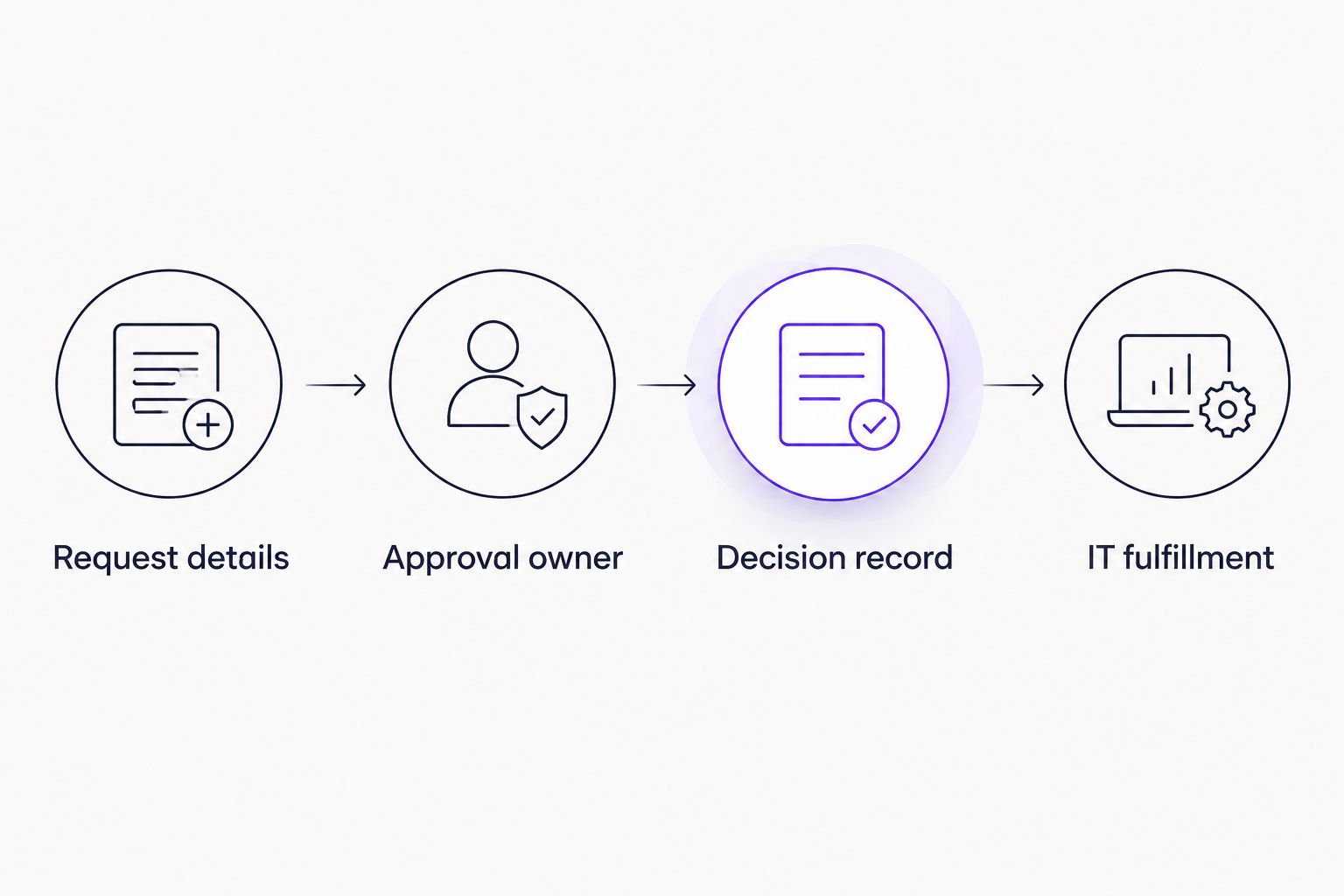
Authorization and IT fulfillment are separate stages; define the handoff before configuring the workflow.
For a software purchase, test 2 approval stages: manager authorization and purchasing authorization. Treat this as a demonstration scenario, not a rule that every request needs both. Your own policy determines the actual sequence.
Then apply 5 checks: requester context, approver identity, decision location, rejection handling, and fulfillment ownership. A demonstration should make each answer explicit. A polished notification is not enough.
Ask Approveit to demonstrate this sequence using the channel your approvers actually use. Keep the scope narrow enough to judge whether the approval process works before discussing unrelated workflows.
Evaluate your IT approval workflow
Bring a software or access request and assess approval ownership, decision records, and handoffs.
When staying with ITarian is the right call
Keep ITarian when endpoint management and IT service operations remain the requirement you need to solve. An approval-focused comparison does not establish a reason to replace those functions.
Also keep a working approval process if it already gives your team clear ownership, usable records, and reliable handoffs. For 2026, make the change boundary explicit: retain the IT management system, replace manual approval handling, or evaluate both separately. Do not combine those decisions without a business requirement.
FAQ
What's the best ITarian alternative for IT approvals?
Approveit is the best fit for recurring IT approvals that need no-code workflows inside Slack, Microsoft Teams, and email. Evaluate endpoint management separately from the approval process.
Do I need to replace ITarian to improve approvals?
No. Improving approval routing and replacing an IT management platform are separate decisions. Start by identifying whether the problem is authorization, fulfillment, or endpoint operations.
Can I manage IT approvals manually in Slack or Microsoft Teams?
Yes, an occasional request can follow a manual conversation-based procedure. Name the approver, require an explicit decision, and define where the record belongs.
Is email enough for software request approvals?
Email can support an occasional request with a clear approver and a maintained record. Recurring requests that need coordinated decisions require a defined routing procedure, whether manual or automated.
Does approval software automatically grant access?
An approval decision does not establish that access has been granted. Evaluate provisioning separately and define who completes the work after authorization.
What should I ask to see in an IT approval software demo?
Ask to see a real request move from submission to the authorized approver, a recorded decision, and an IT handoff. Use your own approval rules and communication channel.
When should I keep ITarian instead of switching?
Keep ITarian when its IT management scope matches your requirement and your current process works. Do not replace endpoint tooling solely because a separate approval workflow needs improvement.
One last thing
The approved request is not the completed request. Make that distinction part of your 2026 evaluation: who authorizes the work, who performs it, and where each outcome is recorded?
Start with a workflow that has a clear owner and a recurring handoff problem. Expanding a defined process is a better next step than automating an unclear one.







