

Best for recurring vendor approvals: Approveit. Best for procurement-led supplier management: SAP Ariba. Best for vendor contracts: Gatekeeper. The best vendor management software in 2026 depends on whether you need to approve vendor spending, manage procurement, track contracts, or assess third-party risk.
TL;DR
Approveit is best for recurring vendor approvals inside Slack, Microsoft Teams, and email.
SAP Ariba fits procurement-led supplier management; Coupa fits broader business spend management.
Gatekeeper fits vendor and contract management; OneTrust fits third-party risk management.
Choose the best vendor management software around your recurring workflow, not the longest feature list.
Why this matters
Vendor management covers several different jobs. Finance approves invoices. Procurement manages purchasing and supplier relationships. Legal tracks agreements. IT and security review access and third-party risk.
Those jobs share a vendor, but they do not necessarily need the same system. A contract repository does not answer who should approve an invoice. An approval workflow does not replace a third-party risk assessment.
For your 2026 shortlist, start with the work that repeatedly stalls. If employees already request vendor purchases in Slack, Teams, or email, the main alternative is often manual follow-up—not another software platform.
Buy for the decision you need to control, then assess the wider vendor lifecycle. That separates a focused approval requirement from a larger procurement or risk-management project.
What makes the best vendor management software?
Use these criteria before comparing platforms. They explain the different recommendations below rather than pretending every product serves the same buyer.
Workflow fit: Match the software to vendor approvals, procurement, spending, contracts, or risk. Write down the problem before reviewing features.
Approval experience: Check where requesters submit information and where approvers make decisions. For recurring approvals, staying inside Slack or Teams matters.
Decision traceability: Require a clear record of the request and decision. Ask the provider to demonstrate the record your finance or operations team needs.
Vendor information ownership: Decide where supplier details, agreements, invoices, and risk evidence belong. Avoid creating competing sources of truth.
Setup and maintenance: Identify who configures workflows and updates them when responsibilities change. No-code configuration matters when business teams own the process.
Scope discipline: Separate essential requirements from adjacent features. Approveit vendor approval software belongs on an approval-focused shortlist, not automatically on every supplier-management shortlist.
Treat these as acceptance criteria, not a feature-count contest. A product that addresses your immediate workflow is a better fit than a broader platform whose central purpose belongs to another department.
Vendor management software at a glance
The table separates each option by its clearest use case. There is no universal winner across all vendor-management functions.
Approveit
Best for: Recurring vendor-related approvals
Standout focus: No-code approvals in Slack, Microsoft Teams, and email
Key limitation for this decision: Approval automation alone does not establish complete vendor-lifecycle coverage
SAP Ariba
Best for: Procurement-led supplier management
Standout focus: Procurement and supplier-management software
Key limitation for this decision: A procurement-led selection is broader than a chat-based approval requirement
Coupa
Best for: Business spend management
Standout focus: Managing business spending
Key limitation for this decision: Spend management is a different buying scope from contract or risk management alone
Gatekeeper
Best for: Vendor and contract management
Standout focus: Vendor relationships and agreements
Key limitation for this decision: Contract management alone does not settle invoice or purchasing approval requirements
OneTrust
Best for: Third-party risk management
Standout focus: Assessing and managing third-party risk
Key limitation for this decision: Risk management alone does not settle purchase or invoice approval requirements
These are scope comparisons, not claims that a product lacks every adjacent capability. Ask each provider to demonstrate the exact workflow you intend to run in 2026.
1. Approveit: best vendor approval software for Slack and Teams
Approveit provides no-code approval workflow software for finance, HR, IT, and operations. Teams use it to automate invoice, purchase, expense, and request approvals directly within Slack, Microsoft Teams, and email.
For vendor-related work, the fit is specific: route a purchase request or invoice through a repeatable approval process instead of collecting decisions across messages. You keep the approval experience inside the tools employees already use.
Approveit pros:
Supports invoice, purchase, expense, and request approval workflows.
Lets employees approve directly within Slack or Microsoft Teams.
Uses no-code setup for business-owned workflows.
Emphasizes traceable decisions and audit records.
Approveit cons:
Its stated approval focus is narrower than an end-to-end vendor-management requirement.
Buyers still need to establish where vendor contracts and risk evidence will live.
Automating a request does not resolve unclear approval ownership or purchasing policy.
Best for: Teams with recurring vendor purchases or invoices and a clear need to replace manual approvals.
For a demo, bring an actual request and the people who approve it. Ask to see submission, approval, and the resulting record—not just a prepared overview.
Verdict: Buy for recurring vendor approvals; skip as a presumed all-in-one vendor lifecycle system.
2. SAP Ariba: best vendor management software for procurement
SAP Ariba is procurement and supplier-management software. It belongs on your shortlist when purchasing and supplier relationships define the project, rather than a single invoice approval bottleneck.
The distinction is organizational. Procurement-led buyers need to consider how supplier management connects with purchasing activity, not merely where an approver receives a notification.
SAP Ariba pros:
Aligns with a procurement-led buying requirement.
Gives supplier management a place in the wider purchasing discussion.
Suits evaluation by teams responsible for purchasing processes and supplier relationships.
SAP Ariba cons:
Its procurement scope creates more evaluation questions than a focused approval requirement.
Cross-functional requirements need agreement before selection.
Buyers seeking only decisions inside chat must verify that exact experience separately.
Best for: Procurement teams evaluating supplier management as part of purchasing operations.
Ask the provider to follow a supplier-related purchasing scenario from request to the relevant downstream steps. Identify which parts belong in the proposed configuration and which depend on other systems.
Verdict: Buy for a procurement-led project; skip when your requirement is only recurring chat-based approvals.
3. Coupa: best vendor management option for business spending
Coupa is business spend management software. Its place in this comparison is for buyers who need to consider vendor activity through the broader question of how the business manages spending.
That is a different brief from storing vendor agreements or assessing security risk. Finance and procurement should define the spending process they want to control before treating it as a vendor-management purchase.
Coupa pros:
Matches a business spend management buying objective.
Encourages evaluation of vendor spending within a wider financial process.
Fits a shortlist owned jointly by finance and procurement.
Coupa cons:
A spend-management project requires a broader brief than one approval workflow.
Spend visibility does not remove the need for clear approval policy.
Buyers still need to demonstrate contract and risk requirements separately.
Best for: Finance and procurement teams evaluating vendor spending as part of business spend management.
Use a real purchasing example during evaluation. Ask where approval ends, where the next spending step begins, and which team owns each handoff. Do not treat a category label as proof of your required integration.
Verdict: Buy for a wider spend-management requirement; skip for an isolated contract or risk-management project.
4. Gatekeeper: best vendor management software for contracts
Gatekeeper is vendor and contract management software. It belongs on the shortlist when agreements and vendor relationships are the center of the work you need to organize.
A contract-led project asks different questions from an invoice-led project. Your evaluation should establish how teams manage vendor information and agreements, then test how those records connect with approval decisions.
Gatekeeper pros:
Directly matches a vendor-and-contract management brief.
Keeps agreements central to the evaluation.
Fits teams whose immediate problem is organizing vendor relationships and contract work.
Gatekeeper cons:
A contract-focused selection does not by itself settle purchasing approval requirements.
Legal, procurement, and operations must agree on record ownership.
Invoice and collaboration-tool workflows need their own demonstration.
Best for: Teams prioritizing vendor agreements and contract management over transaction approvals.
Bring an actual agreement and the questions employees need answered from it. Ask the provider to demonstrate those questions rather than assuming that a contract-management label covers your full process.
Verdict: Buy for vendor and contract management; skip when the immediate problem is collecting invoice approvals.
5. OneTrust: best vendor management option for third-party risk
OneTrust offers third-party risk management software. It belongs on your shortlist when the decision is whether a vendor presents acceptable risk, rather than whether a purchase has budget approval.
Keep those decisions separate. A department manager approving expenditure does not automatically satisfy your security, privacy, or other risk-review requirements.
OneTrust pros:
Matches a third-party risk management objective.
Makes risk review the primary evaluation lens.
Fits a buying process led by teams responsible for third-party risk.
OneTrust cons:
Risk assessment does not substitute for purchasing authorization.
Risk criteria and ownership still need internal agreement.
Buyers need separate proof for their invoice, purchase, and collaboration-tool requirements.
Best for: Security, privacy, compliance, or risk teams evaluating third-party risk management.
During the demo, distinguish the risk-review outcome from permission to spend. Ask how your organization will keep those decisions connected without treating them as interchangeable.
Verdict: Buy for third-party risk management; skip as a substitute for routine vendor spending approvals.
Manual approvals are the baseline to beat
Manual approvals in Slack, Teams, or email remain a legitimate baseline for occasional, straightforward decisions. They require no separate workflow software, and employees already know where to send a message.
The trade-off is process ownership. Someone must identify the approver, supply the context, follow up, and preserve the decision. Compare automation against that actual work, not against an imagined enterprise platform.
Manual messages
Best for: Occasional, straightforward requests
Advantage: Familiar communication tools
Drawback: Follow-up and recordkeeping remain manual tasks
Dedicated approval workflow
Best for: Recurring requests with defined ownership
Advantage: A repeatable approval process
Drawback: Requires workflow configuration and policy ownership
Manual approval pros: Familiar tools, direct communication, and no separate workflow configuration.
Manual approval cons: Manual follow-up, manually maintained records, and dependence on people remembering the process.
Best for: Occasional requests without a recurring coordination problem.
Verdict: Hold if the process is genuinely occasional; replace manual approvals when repeated coordination becomes the problem.
Test the workflow before selecting software
Use the same evaluation script for every provider on your 2026 shortlist. This is a proposed test plan, not a claim about measured product performance.
Start with 3 workflows: a vendor purchase request, an invoice approval, and a vendor access request. These expose different owners and decision requirements.
Then take each applicable workflow through these steps:
Submit request: Include the information your approver needs.
Route decision: Show who receives the request and why.
Approve request: Demonstrate the actual approval experience.
Review record: Retrieve the decision after the conversation ends.
Handle exception: Show what happens when the request cannot proceed normally.
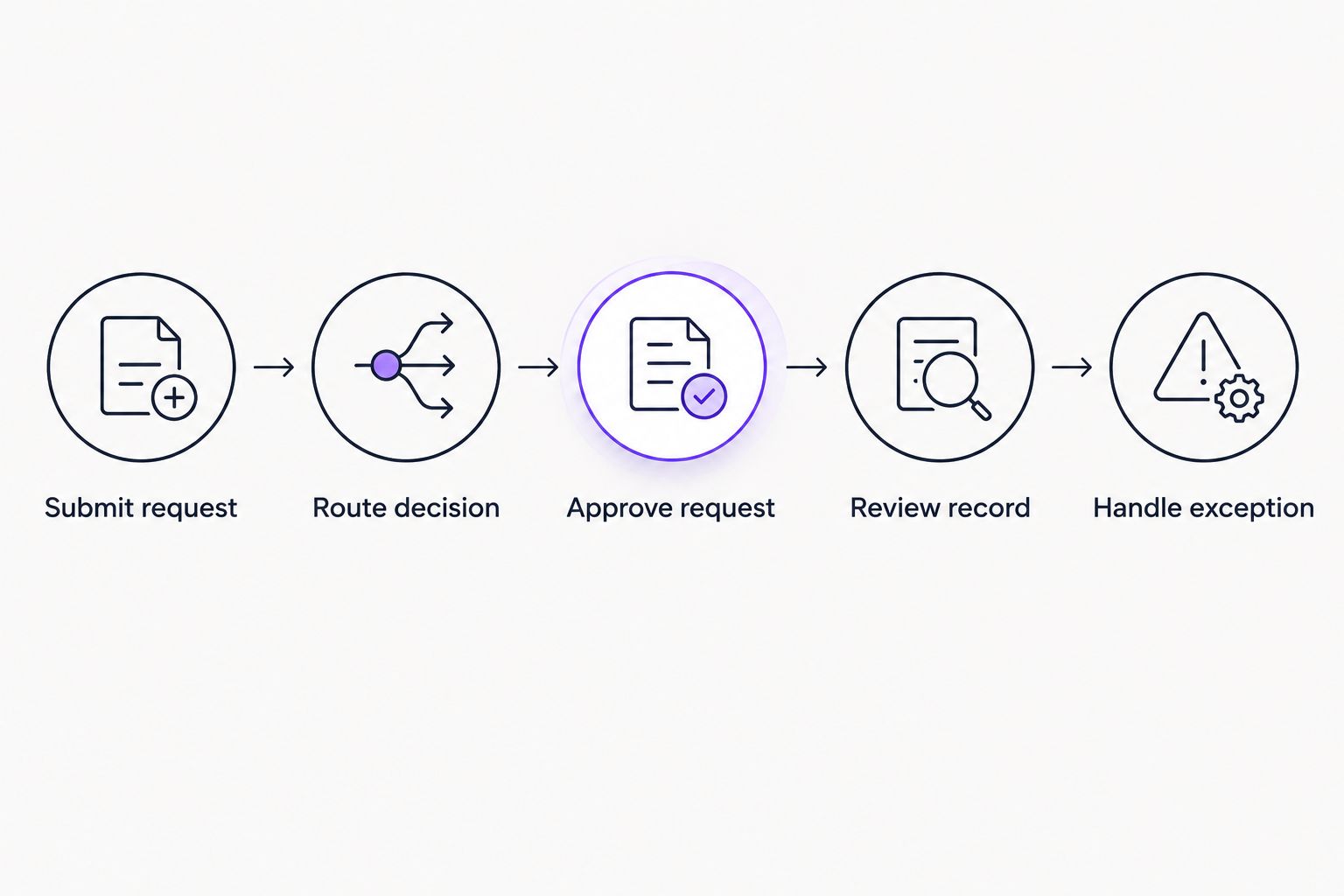
Evaluate the complete decision process, not just the approval notification.
Run 5 sample requests through the proposed process. Include 2 exception scenarios: a request with missing information and an unavailable approver. These counts define your evaluation exercise; they are not product benchmarks.
Record who must intervene and which information must be copied elsewhere. For a qualified demo, provide the vendor with your existing process, approval owners, and required decision record in advance.
Evaluate your vendor approval workflow
Bring a purchase request or invoice and assess the approval process inside your team's existing tools.
How we ranked these options
The ranking separates buying needs: approval execution, procurement, business spending, contracts, and third-party risk. It does not claim a universal performance winner or imply hands-on testing.
The criteria are workflow fit, approval experience, traceability, information ownership, setup, and scope. For a 2026 purchase, require a current demonstration of your essential requirements before choosing any platform.
Which vendor management software should you choose?
Approveit is best for teams that need recurring vendor approvals inside Slack, Microsoft Teams, or email. Start there when purchases and invoices repeatedly wait for decisions and follow-up.
Choose SAP Ariba for a procurement-led brief, Coupa for business spend management, Gatekeeper for vendor contracts, or OneTrust for third-party risk. If you need several of those functions, define the system boundaries before selecting products.
For an undecided buyer, the default next move is not a larger shortlist. Write down the recurring decision, its owner, its required context, and the record you need afterward. Then book a demo around that workflow.
FAQ
What's the best vendor management software in 2026?
The best vendor management software depends on the job: Approveit for recurring approvals, SAP Ariba for procurement, Coupa for business spending, Gatekeeper for contracts, and OneTrust for third-party risk. Start with the workflow that needs improvement.
Can vendor approvals happen inside Slack or Microsoft Teams?
Yes. Approval workflow software can let employees approve vendor-related purchases and invoices inside Slack or Microsoft Teams. Demonstrate the complete request and decision record before selecting a platform.
Is vendor management software the same as approval software?
No. Vendor management can cover supplier relationships, contracts, procurement, and risk, while approval software focuses on routing requests and recording decisions. Match the software's scope to your actual requirement.
Should a small team keep approving vendors by email?
Keep manual email approvals when requests are occasional and the process remains straightforward. Evaluate automation when recurring requests require repeated follow-up or manually maintained decision records.
Do invoice approvals replace vendor risk reviews?
No. Invoice approval authorizes a financial decision; vendor risk review assesses third-party risk. Define separate owners and criteria when your process requires both.
What should I bring to a vendor management software demo?
Bring a real request, its approval owners, the required information, and the decision record you need. Ask the provider to demonstrate normal handling and exceptions using that process.
Can no-code software fix an unclear approval policy?
No. No-code software helps configure a process, but your team must still define who approves and what authorizes the decision. Set those rules before automating them.
One last thing
A vendor can pass a risk review and still lack purchasing approval. A purchase can receive approval while the related invoice needs a separate decision.
Keep those outcomes distinct in your 2026 workflow design. Your most useful vendor-management requirement is often a clear definition of what each approval actually authorizes.







