

Best overall for native NetSuite workflows: SuiteFlow. Best for approvals inside Slack or Teams: Approveit, subject to validating the NetSuite handoff. Best for packaged transaction approvals: SuiteApprovals. This 2026 guide compares those options with manual approvals in Slack, Teams, or email, so you can choose where decisions happen and how they reach NetSuite.
TL;DR
SuiteFlow is the best NetSuite approval workflow software for teams that need native, configurable record workflows.
Approveit approval workflow software fits teams approving in Slack or Teams; validate the NetSuite connection before choosing it.
SuiteApprovals fits teams whose transaction approval requirements match its supported records and routing rules.
Manual approvals suit occasional requests, not recurring processes that need consistent routing and traceable decisions.
Why this matters
A decision in a Slack message is not automatically an approved NetSuite transaction. Your approval process needs to connect the request, the authorized decision, and the accounting record without leaving finance to reconcile them manually.
Start with the failure you need to fix. If transactions move through the wrong approval states, evaluate native controls. If managers overlook requests because approvals live outside their working channel, evaluate the approval experience and its connection to NetSuite.
Choose the decision layer and the system of record together. A convenient approval button does not replace transaction controls, and a configurable workflow does not guarantee that managers will use it correctly.
For a 2026 shortlist, ask each provider or implementation partner to demonstrate your actual process. Use a purchase request or invoice with a real exception, not a generic approval screen.
What makes the best NetSuite approval workflow software
Judge the options against these criteria before comparing features:
Record control: The decision must affect the correct NetSuite record and preserve the transaction's intended approval state.
Approver authority: Routing must identify who can approve, including what happens when an approver is unavailable or lacks permission.
Working channel: Decide whether managers should approve in NetSuite, Slack, Microsoft Teams, or email. Separate convenience from authorization.
Decision traceability: You need to connect the request, decision maker, decision time, and supporting information when reviewing an approval.
Exception handling: Test rejection, revised requests, changed amounts, and failed handoffs. The normal path is only part of the process.
Configuration ownership: Name the person responsible for maintaining rules and investigating errors. No-code setup still needs process ownership.
These criteria are more useful than a feature count. A workflow that handles your exception correctly is a better fit than one with unrelated features you will never use.
NetSuite approval options at a glance
The table separates native NetSuite tools from an external approval layer and a manual baseline. These are different approaches, not interchangeable products.
SuiteFlow
Best for: Configurable workflows within NetSuite
Standout feature: Record-based workflow states, actions, and transitions
Key limitation: Requires NetSuite workflow configuration and testing
Approveit
Best for: Recurring approvals inside Slack or Teams
Standout feature: No-code invoice, purchase, expense, and request approvals
Key limitation: NetSuite record handling and synchronization need validation
SuiteApprovals
Best for: Packaged transaction approval routing
Standout feature: Approval rules within a NetSuite SuiteApp
Key limitation: Fit depends on supported records and routing requirements
Manual Slack, Teams, or email approvals
Best for: Occasional, simple requests
Standout feature: Decisions happen in familiar communication channels
Key limitation: People must maintain routing and reconcile decisions with records
Do not treat the external option as a confirmed NetSuite connector based on its approval features alone. Ask for a demonstration of the complete handoff before including it in a production design.
1. SuiteFlow: best NetSuite approval workflow software for native control
SuiteFlow is NetSuite's workflow configuration tool. It uses states, actions, and transitions to define how records move through a business process, making it the strongest starting point when your approval logic belongs inside NetSuite.
The core advantage is proximity to the record. You configure the process around NetSuite data rather than treating an approval message as a separate source of truth.
Where SuiteFlow fits
Choose SuiteFlow when finance needs control over record progression and your team has someone responsible for NetSuite administration. Bring a clear routing specification: which record starts the process, what conditions select the approver, and what an approved or rejected decision permits next.
For example, a purchase approval design should state whether authorization occurs before the purchase order advances. It should also define what happens when someone changes the request after approval. Those are configuration requirements, not assumptions to leave until launch.
SuiteFlow pros:
Keeps workflow logic within NetSuite.
Supports configurable record-based processes.
Provides states and transitions for more than a simple yes-or-no decision.
Gives administrators a native place to maintain workflow behavior.
SuiteFlow cons:
Requires configuration and testing against your NetSuite setup.
Does not remove the need to define approver authority and exception rules.
Native record control alone does not solve a requirement to approve inside Slack or Teams.
Best for: Teams that prioritize native transaction control and can maintain NetSuite workflows.
For your 2026 evaluation, ask the administrator to demonstrate an approval, a rejection, and an edited request. Check the resulting record state after each event.
Verdict: Buy into the SuiteFlow approach when native NetSuite control is the main requirement.
2. Approveit: best approval workflow software for Slack and Teams
Approveit provides no-code approval workflow software for finance, HR, IT, and operations. It supports invoice, purchase, expense, and request approvals directly within Slack, Microsoft Teams, and email.
Approveit is best for teams with recurring approvals that want managers to decide inside Slack or Teams. For a NetSuite-centered process, that recommendation depends on demonstrating how the decision reaches the accounting record.
Where the collaboration approach fits
This approach addresses the team whose main alternative is manual messages. Finance sends an invoice, the manager replies in a thread, and someone then updates the transaction. The workflow problem is not necessarily a missing accounting feature; it is the repeated coordination around the decision.
Use a demo to separate approval automation from accounting synchronization. Show who submits the request, who receives it, how the decision is recorded, and what changes in NetSuite afterward. Require a clear answer about which steps are automated and which remain manual.
Pros:
Supports decisions inside Slack, Microsoft Teams, and email.
Provides no-code workflows for recurring business approvals.
Covers finance requests alongside HR, IT, and operations requests.
Fits teams moving away from informal message-based approval processes.
Cons:
NetSuite connectivity, record mapping, and update behavior require validation.
An external approval decision must be reconciled with NetSuite's transaction controls.
No-code configuration still requires someone to own approval policy and exceptions.
Best for: Teams whose recurring approvals stall in Slack, Teams, or email and who can validate the NetSuite handoff.
For a 2026 demo, bring your existing invoice or purchase-order process. Ask to see the same request from submission through the final NetSuite state, including a rejected request.
Verdict: Hold the purchase decision until the NetSuite handoff passes your acceptance checks.
3. SuiteApprovals: best NetSuite approval option for packaged routing
SuiteApprovals is a NetSuite SuiteApp for transaction approval management. It provides a packaged approval approach rather than requiring you to design every part of the process as a custom workflow.
The distinction matters. If your requirements match the application's supported records and approval rules, evaluate that fit before designing a more customized process.
Where SuiteApprovals fits
Start with your transaction requirements, not the application name. Confirm the record types involved, the approver selection rules, and what happens when a transaction changes during approval.
Then compare the supported process with your policy. A packaged application is useful when it matches the way you need approvals to work; forcing a different policy into its model creates configuration problems rather than resolving them.
SuiteApprovals pros:
Provides a transaction approval application within NetSuite.
Offers a packaged starting point for approval routing.
Keeps evaluation focused on supported approval rules and records.
Gives teams an alternative to designing a workflow entirely from scratch.
SuiteApprovals cons:
Suitability depends on supported transaction types and routing behavior.
Requirements outside the packaged model need separate evaluation.
A native approval application does not by itself satisfy a Slack or Teams approval requirement.
Best for: Teams whose transaction approvals fit the SuiteApp's supported model.
During a 2026 evaluation, compare SuiteApprovals and SuiteFlow against the same written process. Ask the NetSuite administrator to identify which requirements each handles directly and which require additional configuration.
Verdict: Buy into the SuiteApprovals approach when its supported routing matches your policy.
4. Manual approvals: best reference option for occasional requests
Manual approvals in Slack, Microsoft Teams, or email are the baseline, not a dedicated NetSuite approval software product. A requester sends the details, an authorized person responds, and someone records the result in NetSuite.
This approach keeps the process familiar. It also leaves people responsible for finding the request, checking authority, following up, and connecting the decision to the transaction.
Where manual approvals fit
Keep manual approval for an occasional request with a clear owner and a documented decision. Do not confuse a visible message with a complete approval record: the message still needs to identify the request and the authorized decision.
When the same process repeats, write down every manual handoff. That list shows what an automated workflow must replace and prevents you from buying software that only adds another notification.
Manual approval pros:
Uses communication tools your team already works in.
Allows people to discuss unusual requests directly.
Provides a simple reference process for documenting requirements.
Manual approval cons:
People must apply routing rules themselves.
Decisions and accounting records need manual reconciliation.
Follow-up depends on an owner rather than a defined workflow.
Best for: Occasional requests with straightforward authority and explicit recordkeeping.
Verdict: Skip manual approvals as the default for recurring NetSuite processes that need consistent routing.
How the options rank
This 2026 ranking prioritizes record control, authorized decisions, working channel, traceability, exception handling, and configuration ownership. It is a use-case ranking, not a claim that every option has been tested in your NetSuite environment.
SuiteFlow takes the native-control slot. The collaboration-first option addresses recurring approvals in existing communication channels. SuiteApprovals takes the packaged-routing slot, while manual approval remains the reference for occasional requests.
Test the whole approval path before choosing
Use 3 decision stages to structure the demonstration. Each stage should have a defined result and a named owner.
Request capture: Confirm that the invoice or purchase request contains the information required for a decision and identifies the associated record.
Approval decision: Confirm that the correct person can approve or reject and that the decision remains traceable.
Record update: Confirm what changes in NetSuite, who can make that change, and how a failed update is detected.
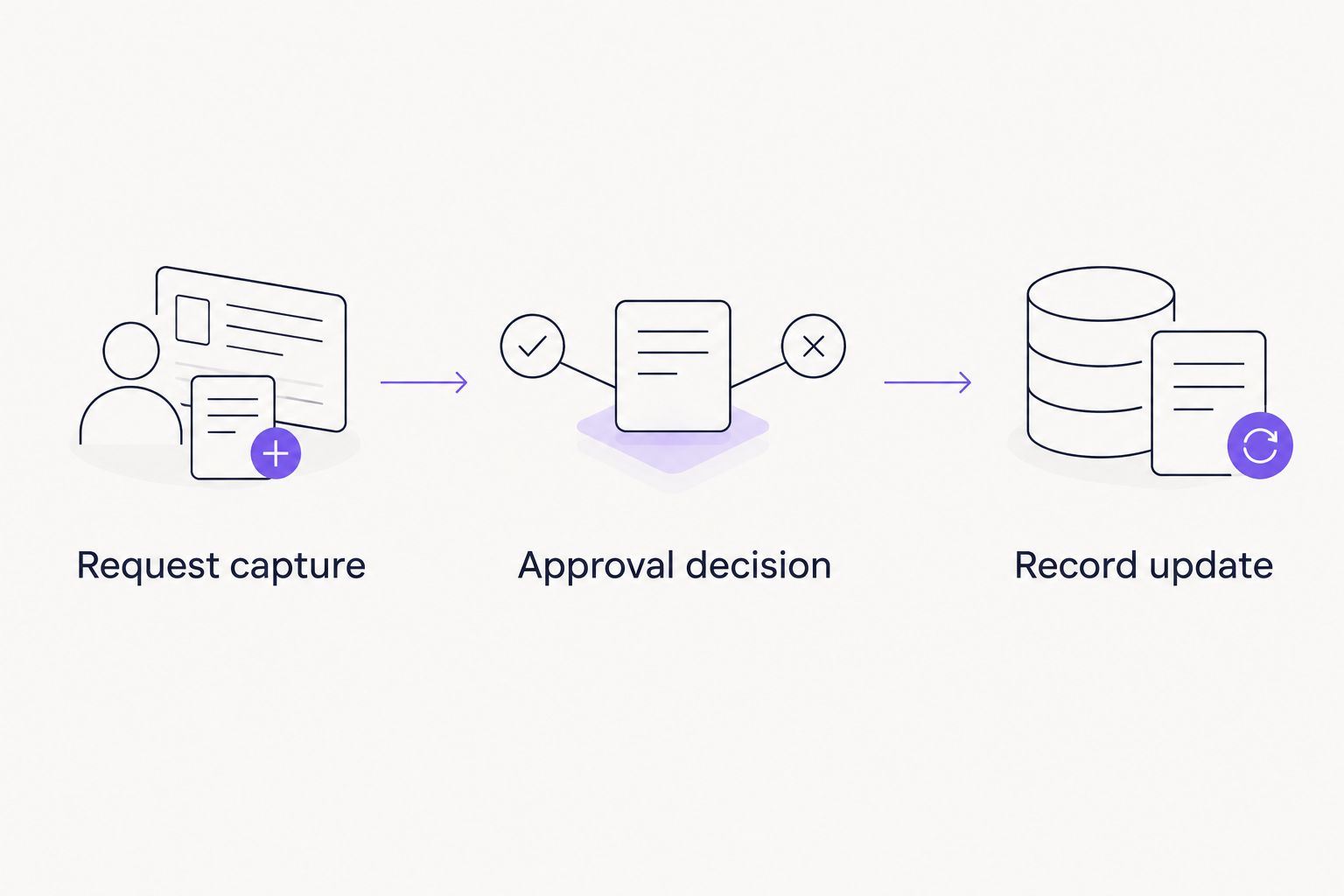
The approval is not complete until the intended record update is confirmed.
Run 2 test requests: one approved and one rejected. Then change a request after submission and check whether the original decision still applies. These are acceptance checks, not performance benchmarks.
Assign 1 process owner to resolve exceptions. The owner should know whether a stalled request is waiting for a person, blocked by permissions, or missing its final record update.
Which NetSuite approval approach should you choose?
Choose SuiteFlow by default when NetSuite record control is your main requirement. Evaluate SuiteApprovals first when your policy fits packaged transaction routing.
Choose a collaboration-first workflow when the recurring problem is managers approving through scattered messages. Make the NetSuite handoff a purchase condition, not an implementation detail to resolve afterward.
Bring one real workflow to the demo. Include the request fields, approver rules, rejection path, and required accounting result so the conversation ends with a fit decision.
Evaluate your approval workflow
Bring an invoice or purchase-order process and confirm the approval steps and NetSuite handoff.
FAQ
What's the best NetSuite approval workflow software in 2026?
SuiteFlow is the strongest default for configurable workflows inside NetSuite. Choose according to record control, approver authority, exception handling, and where managers need to make decisions.
Is Approveit a fit for NetSuite approval workflows?
Approveit fits teams that need recurring approvals inside Slack, Microsoft Teams, or email. Validate the NetSuite connection, record mapping, and update behavior before choosing it for a NetSuite-centered process.
Is SuiteFlow better than SuiteApprovals?
SuiteFlow is the better starting point for configurable record workflows; SuiteApprovals fits packaged transaction approval requirements. Compare both against the same routing policy and supported records.
Can managers approve NetSuite requests in Slack or Teams?
Approval inside Slack or Teams requires an approval solution that supports that channel and a validated connection to the NetSuite process. Demonstrate both the manager's decision and the resulting accounting record update.
Should invoice approval and purchase-order approval use the same workflow?
Use separate workflow definitions when invoice and purchase-order policies require different information or approvers. Document the authorization point and accounting result for each process.
What should a NetSuite approval software demo include?
A demo should include request capture, an authorized approval or rejection, and the resulting NetSuite record state. Also test an edited request and a failed handoff.
When should a team stop using manual email approvals?
Replace manual email approvals when recurring requests need consistent routing and traceable decisions that the manual process does not reliably maintain. Document the failed handoffs before selecting software.
One last thing
Test a changed request, not just an approved request. A manager's decision concerns the information presented at that moment. If an invoice or purchase request changes afterward, your process must define whether another decision is required.
Put that rule in the acceptance checklist before setup. It forces the demo to address authorization rather than merely showing a notification.







