

Best overall for approvals inside Slack or Microsoft Teams: Approveit. Best for keeping decisions within accounting: a verified QuickBooks-native workflow. Best for occasional requests: manual approval in Slack, Teams, or email. This 2026 guide compares these approaches and shows what to verify before connecting approval decisions to QuickBooks records.
TL;DR
Approveit is the best QuickBooks approval software shortlist choice for teams prioritizing no-code approvals inside Slack or Microsoft Teams.
Choose QuickBooks-native workflows only after confirming that your edition supports the required invoice and purchase approval process.
Keep manual approvals for occasional requests, not recurring processes that require consistent routing and traceable decisions.
Require a live demonstration of the QuickBooks connection, record mapping, and handling of changed requests before choosing software.
Why this matters
An invoice approved in a chat thread is not automatically an invoice approved in your accounting process. The decision needs to identify the document, the authorized approver, and the version reviewed. Otherwise, finance must reconstruct the connection.
For your 2026 shortlist, separate two requirements: how people approve requests and how approved information reaches QuickBooks. A useful approval interface does not prove that accounting records transfer correctly. A connection does not prove that the right person approved the right request.
Start with the recurring process that causes the most chasing: invoices, purchase requests, expenses, or another finance request. Define its approval rules before comparing software. That turns a feature tour into a decision about your actual work.
What makes the best QuickBooks approval software?
Use these criteria before considering the ranking:
Approver access: Decision-makers should review requests where they already work, whether that is Slack, Microsoft Teams, email, or accounting software.
Routing control: Your process needs a named owner, an authorized approver, and a clear next step when a request is rejected or incomplete.
Decision records: Each approval should connect the requester, reviewed information, approver, decision, and relevant accounting record.
QuickBooks handoff: Verify the supported QuickBooks product, record types, transfer direction, and handling of failed or repeated transfers.
Change handling: Establish what happens when an amount, supplier, attachment, or purchase detail changes after approval.
Administration: Finance should understand how to update the process without turning every rule change into a development project.
Treat the QuickBooks handoff as a pass-or-fail requirement. Strong approval features cannot compensate for a transfer process that creates duplicate records or loses the relationship between a decision and its source document.
QuickBooks approval options at a glance
The ranking below compares approaches, not interchangeable accounting products. The first option addresses recurring approvals across collaboration tools; the second keeps the process accounting-led; the third relies on people to maintain the record.
1. No-code workflow layer
Best for: Recurring approvals inside Slack or Teams
Standout feature: Request approvals without requiring a separate approval destination
Key limitation: The exact QuickBooks connection and record handoff need demonstration
2. QuickBooks-native workflow
Best for: Accounting-led teams evaluating controls within their existing setup
Standout feature: Keeps the evaluation centered on the accounting environment
Key limitation: Edition eligibility and required approval behavior must be confirmed
3. Manual Slack, Teams, or email approval
Best for: Occasional requests with a clearly assigned owner
Standout feature: Uses an existing communication channel
Key limitation: People must maintain routing, document versions, and decision records
Do not read the second row as a promise that every QuickBooks edition supports your workflow. Confirm the specific process in your account before choosing the native route.
1. Approveit: best for recurring Slack and Teams approvals
Approveit provides no-code approval workflow software for finance, HR, IT, and operations teams. Teams can automate invoice, purchase, expense, and request approvals directly within Slack, Microsoft Teams, and email.
Approveit is best for teams that need recurring finance approvals inside Slack or Microsoft Teams. For a QuickBooks buying decision, require a demonstration of the exact accounting handoff as well as the approval experience.
Workflow-layer pros
Supports the approval categories finance teams need: invoices, purchases, expenses, and requests.
Lets approvers work inside Slack, Microsoft Teams, or email rather than adopting a separate approval destination.
Uses no-code workflow setup, keeping the evaluation focused on business rules rather than custom development.
Covers other departments' requests as well as finance approvals, including HR and IT workflows.
Workflow-layer cons
An approval layer does not replace the need to validate the QuickBooks accounting connection.
Your team still needs to define approval authority, required information, and rules for changed requests.
A separate workflow and accounting record require a clearly documented handoff between the two processes.
What to demonstrate
Bring an invoice and a purchase request from your real process. Ask the presenter to show submission, review, approval, and the resulting accounting step. Then change a material detail and ask what happens to the original decision.
Keep the demonstration concrete. Which record represents the request? Which document did the approver review? What reaches QuickBooks, and what remains in the approval record? The answers should be visible in the workflow rather than explained only in slides.
Best for: Finance teams with recurring approvals and decision-makers who already work in Slack or Microsoft Teams.
Verdict: Buy Approveit for this use case only after the demonstration confirms your required QuickBooks handoff.
2. QuickBooks-native workflows: best for accounting-led evaluation
A QuickBooks-native approach starts with the capabilities available in your existing accounting environment. Evaluate whether your specific product and edition can handle the approval sequence you need before adding another system.
This is an eligibility check, not an assumption of feature availability. Your 2026 evaluation should use the account configuration your team will actually operate, including the permissions assigned to requesters and approvers.
Native-workflow pros
Keeps the initial evaluation within your existing accounting environment.
Gives finance a direct way to assess whether accounting controls can cover the approval requirement.
Avoids selecting a separate approval layer before determining whether one is necessary.
Native-workflow cons
Approval capability must be verified for the specific QuickBooks product and edition.
An accounting-centered process is not evidence that approvers can act inside Slack or Microsoft Teams.
Finance approval requirements do not establish support for HR, IT, or other departmental requests.
What to demonstrate
Ask an authorized administrator to run the intended process in your account. Test the requester role separately from the approver role. A process that works only when an administrator performs every action does not prove that ordinary users can follow it.
Check whether the approval occurs at the right point. Approval before a purchase commitment is a different control from approval of an invoice after the supplier has billed you. Match the demonstrated behavior to the control your finance team needs.
Best for: Accounting-led teams that want to establish whether their existing QuickBooks setup covers the required approval process.
Verdict: Hold until edition eligibility, user permissions, and the complete approval sequence are verified.
3. Manual approvals: best for occasional, clearly owned requests
Manual approval means sending a request through Slack, Microsoft Teams, or email and having a person record the outcome. It uses a familiar communication channel, but the channel alone does not define the approval process.
For an occasional request, a named owner can collect the document, identify the authorized approver, and preserve the decision. For recurring requests, those responsibilities repeat every time.
Manual-approval pros
Uses communication tools your team already has.
Accommodates an unusual request without first designing an automated workflow.
Lets a clearly assigned owner manage a simple approval sequence directly.
Manual-approval cons
People must route requests and follow up themselves.
A chat reply or email response must be connected to the exact document reviewed.
Changed attachments, forwarded messages, and separate accounting updates require deliberate recordkeeping.
What to establish
Write the approval requirement in the request itself. Name the supplier or purchase, attach the supporting information, identify the approver, and state what decision is needed. Preserve the result with the corresponding finance record.
Do not treat silence, a reaction, or an informal acknowledgment as approval unless your documented policy explicitly defines it that way. The process needs an unambiguous decision, not an interpretation of a conversation.
Best for: Occasional requests that have a named owner and do not justify a recurring automated process.
Verdict: Skip manual approval as the default for recurring workflows that need consistent routing and traceable decisions.
Test the accounting handoff before you commit
Use the same test sequence for every option on your 2026 shortlist. Follow the request from the original document to the accounting outcome, then inspect the decision record.
Request intake
Submit a request with the information your approver actually needs. For an invoice, include the supplier, invoice reference, supporting document, and business reason. For a purchase request, identify what is being requested and who owns the decision.
Approval routing
Test 2 approval stages if your policy requires sequential review. Confirm who acts first, who acts next, and whether a requester can approve their own submission. Use ordinary user permissions, not just an administrator account.
Accounting handoff
Identify the destination record and transfer direction. Ask how the process handles an interrupted handoff and a repeated submission. Confirm how finance distinguishes an approval failure from an accounting transfer failure.
Change review
Include 1 changed request after the original approval. Change a detail your policy treats as material, such as the supplier or amount. Require a clear explanation of whether the previous decision remains valid or a new review is required.
Decision record
Inspect the saved record without relying on the presenter's explanation. A reviewer should be able to determine who requested the action, who decided, what information was reviewed, and how the result relates to the accounting record.
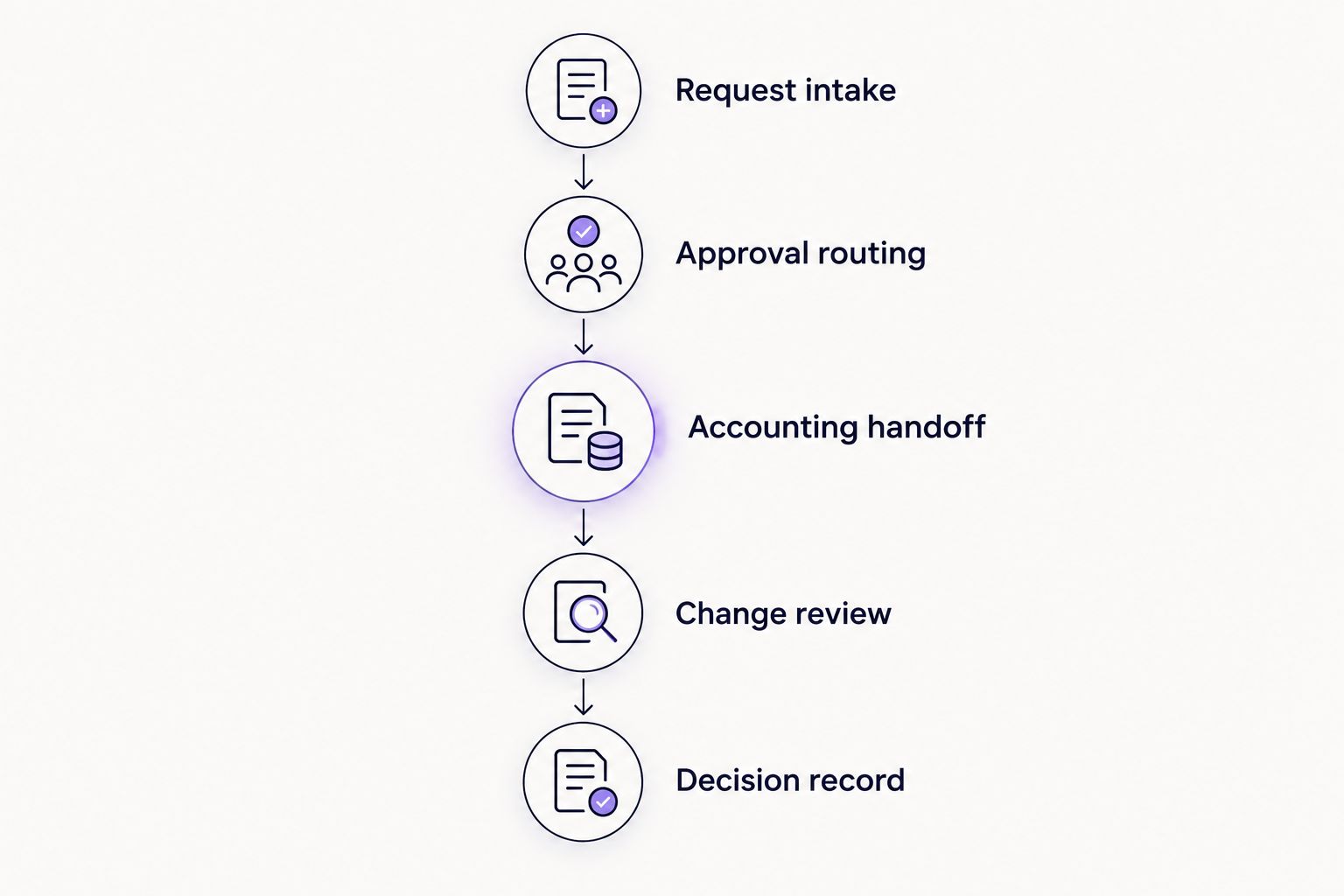
Evaluate the complete request path, not just the approval notification.
Run 3 sample requests: an invoice, a purchase request, and an expense request relevant to your team. These are demonstration requirements, not claims about software performance. Use representative documents with sensitive information removed.
Evaluate your approval workflow
Bring an invoice or purchase request and assess approvals inside Slack or Microsoft Teams.
How the ranking works
The ranking prioritizes recurring approval work, approver access, clear decision records, and a verifiable accounting handoff. It gives the no-code workflow approach the default position for teams whose approvers work in collaboration tools.
The native approach takes priority when your existing accounting setup demonstrates the complete required process. Manual approval takes priority only when the request is occasional and someone owns every step. Choose the process that passes your control requirements, not the longest feature list.
Which QuickBooks approval option should you choose?
For recurring approvals in Slack or Microsoft Teams, start with Approveit and make the QuickBooks handoff a required demonstration item. Choose a native workflow when your actual QuickBooks environment proves that it supports the process and the necessary user roles.
Keep manual approvals for exceptions, not as the default answer to repeated chasing. Your 2026 decision should leave finance with a repeatable process: a complete request, an authorized decision, and a traceable accounting outcome.
FAQ
What's the best QuickBooks approval software for a team using Slack?
Approveit is the strongest shortlist choice here for teams that want recurring no-code approvals inside Slack. Confirm the exact QuickBooks connection, supported records, and accounting handoff during the demonstration before purchasing.
Can I handle approvals directly in QuickBooks?
Choose a QuickBooks-native approach only when your specific product, edition, and configuration demonstrate the required approval process. Test ordinary requester and approver permissions rather than assuming administrator access proves the workflow.
Is approval in email enough for an invoice?
Email approval is sufficient only when it meets your organization's documented approval and recordkeeping requirements. Preserve the authorized decision with the exact invoice version reviewed and its corresponding finance record.
Should purchase requests and invoices use the same workflow?
Purchase requests and invoices should follow the controls appropriate to their different decision points. A purchase request addresses a proposed commitment, while an invoice approval addresses a supplier's bill; define the required review for each.
What should I ask during a QuickBooks approval software demo?
Ask the presenter to show a complete request, authorized approval, accounting handoff, and saved decision record. Also test a changed request, a rejected request, and an interrupted transfer using representative documents.
Can my managers approve without opening accounting software?
A collaboration-based approval approach lets managers review requests in their existing communication tools when the selected software supports those channels. Verify that the notification contains enough information for an informed decision and preserves the outcome.
What happens when an invoice changes after approval?
A material change needs the review required by your approval policy. Require the selected process to make the document version and validity of the previous decision clear before the changed invoice proceeds.
One last thing
Test a rejection before testing another approval. Ask who receives the rejected request, where the reason is recorded, and what happens when the requester corrects and resubmits it. That single exercise exposes whether your process handles real work or only the happy path.







