

Best overall for recurring approvals in chat: Approveit. Best for Microsoft-centered automation: Microsoft Power Automate. Best for IT service requests: Jira Service Management. Best for platform-led service operations: ServiceNow. This 2026 shortlist compares enterprise approval tools by where people approve, how requests move, and how decisions stay traceable.
TL;DR
Approveit is the best approval workflow software for enterprise teams that want recurring approvals inside Slack, Teams, or email.
Microsoft Power Automate fits approval processes connected to broader Microsoft workflows.
Jira Service Management fits access and software requests managed as service tickets.
ServiceNow fits approvals embedded in wider service-management processes.
Keep manual approvals for isolated requests, not repeatable processes that need consistent routing and records.
Why this matters
An approval message is not an approval process. A manager can reply yes in Slack while finance still lacks the invoice, the requester lacks a final answer, and operations lacks a record of who authorized the action.
The main alternative to approval software is usually manual work in Slack, Microsoft Teams, or email. Your team already uses those channels. The decision is whether to keep coordinating requests by hand or introduce structured workflows without moving every approver into another application.
For your 2026 evaluation, start with the process causing the most follow-up: purchase orders, invoices, expenses, time off, or access requests. Choose the tool that fits that process before considering a wider rollout.
What makes the best enterprise approval workflow software?
Use these criteria before reading the ranking. They distinguish a usable approval process from a form that sends another notification.
Approval location: Can your approvers act where they already work, or must they open a separate application?
Routing rules: Can the process represent your actual decision sequence, including different departments and approval responsibilities?
Decision records: Can you retrieve the request, the decision, and the responsible person without searching through conversations?
Configuration ownership: Can the people responsible for the process maintain it, or does every change require a technical handoff?
Process scope: Do you need approval automation alone, or approvals inside a broader service-management or integration platform?
Permission boundaries: Can you demonstrate that only the appropriate person can make a decision on a request?
Treat these as acceptance criteria, not a feature-count contest. A long list of integrations does not establish that your invoice approval route works. A polished approval notification does not establish that the resulting decision is retrievable.
Before a demo, write down your current approver roles and one exception. That gives the vendor a concrete process to demonstrate rather than an open invitation to show unrelated features.
Enterprise approval software at a glance
The table separates the tools by their strongest use case. These are workflow-fit recommendations, not claims that every enterprise should buy the first item.
Approveit
Best for: Recurring business approvals inside existing communication tools
Standout feature: No-code approval workflows in Slack, Microsoft Teams, and email
Key limitation or evaluation burden: Validate your specific enterprise controls and downstream handoffs
Microsoft Power Automate
Best for: Approvals connected to broader Microsoft automation
Standout feature: Approval actions within automated flows
Key limitation or evaluation burden: Someone must own flow configuration, connections, and maintenance
Jira Service Management
Best for: IT access and software requests
Standout feature: Approval steps within service-request workflows
Key limitation or evaluation burden: A ticket-based process is a different experience from a chat-first approval
ServiceNow
Best for: Approvals within wider service operations
Standout feature: Approval processes within a service-management platform
Key limitation or evaluation burden: Platform configuration and ownership are part of the decision
Manual Slack, Teams, or email
Best for: Isolated requests without repeatable routing
Standout feature: Direct conversation in an existing channel
Key limitation or evaluation burden: People must coordinate routing and assemble decision records themselves
Manual approvals are included as the baseline, not as a fifth software recommendation. They remain useful for an isolated decision. They are a weaker fit when the same request repeatedly needs the same fields, approvers, and evidence.
1. Approveit: best enterprise approval software for chat-first teams
The software provides no-code approval workflows for finance, HR, IT, and operations. Teams can automate invoice, purchase, expense, and request approvals directly within Slack, Microsoft Teams, and email.
The strongest fit is a recurring approval process currently managed through messages and follow-ups. You preserve the communication channel while introducing a defined workflow and traceable decisions.
A concrete workflow to demonstrate
Use a purchase request as your demo scenario. Ask the presenter to show how a requester submits the details, how the request reaches the responsible approver, and how the decision becomes part of the approval record.
Then introduce an exception: the request needs a different decision-maker. Ask how your intended rule is configured. Do not assume that a standard demonstration covers every department, financial threshold, or permission requirement.
Approveit pros:
No-code configuration fits teams that want to own business approval processes.
Approvals take place inside Slack, Microsoft Teams, or email.
The stated scope covers recurring finance, HR, IT, and operations requests.
Traceable decisions and audit records address the gap between a conversation and a controlled process.
Approveit cons:
Approval automation still requires you to define approver ownership and exceptions.
Your enterprise's specific security, administrative, and recordkeeping requirements need validation during evaluation.
An approval decision alone does not establish how purchasing, payment, or access provisioning happens afterward.
Best for: Enterprise teams that want structured approvals without asking every approver to switch tools.
Verdict: Buy for chat-first approval workflows once your required controls and handoffs pass the demo.
2. Microsoft Power Automate: best for Microsoft-centered automation
Microsoft Power Automate supports automated workflows and approval actions. It fits teams that want an approval to sit inside a larger sequence involving business applications, notifications, and subsequent actions.
The distinction is scope. You are evaluating an automation platform, not only an approval interface. That matters when the approval is one step in a process maintained by your automation team.
A concrete workflow to demonstrate
Bring an invoice scenario with a defined source, reviewer, and next action. Ask the presenter to demonstrate the complete route, including what happens when an approver rejects the invoice or a connection fails.
For a 2026 evaluation, confirm the exact connectors, approval experience, and administrative requirements for your environment. A flow diagram does not prove that the people responsible for invoices can maintain the resulting process.
Microsoft Power Automate pros:
Approval actions can form part of a broader automated flow.
It fits organizations already building processes around Microsoft tools.
It supports a workflow-building approach rather than limiting the evaluation to standalone approvals.
Microsoft Power Automate cons:
Flow ownership and maintenance remain operational responsibilities.
Connected applications introduce additional configuration and troubleshooting work.
A technically functional flow still needs a clear experience for requesters and approvers.
Best for: Enterprise teams with Microsoft-centered processes and a named owner for automation.
Verdict: Buy when the surrounding automation is as important as the approval itself.
3. Jira Service Management: best for IT request approvals
Jira Service Management organizes service requests and supports approvals within request workflows. Its strongest fit here is an IT process where approval belongs alongside the service ticket and the work needed to fulfill it.
Think of a software request or an access request. The decision is not the end of the process: the IT team still needs to complete the authorized work.
A concrete workflow to demonstrate
Ask the presenter to show a software request from submission through approval and fulfillment. Check whether the approver can understand the request without reading unrelated ticket activity.
Then inspect a rejected request. The requester should understand the outcome, while the service team should know that fulfillment must not proceed. Evaluate the complete ticket workflow, not just the approval button.
Jira Service Management pros:
Approval steps sit within a service-request workflow.
IT teams can evaluate the decision together with the associated fulfillment work.
A ticket-based model gives requests a defined place in service operations.
Jira Service Management cons:
A service-ticket experience differs from approving directly in a conversation.
Request types and workflows require configuration and ownership.
Finance and HR processes need their own fit assessment rather than inheriting the IT recommendation.
Best for: IT teams that manage access and software requests through service tickets.
Verdict: Buy for ticket-led IT approvals; hold for a primarily finance-led evaluation.
4. ServiceNow: best for platform-led service operations
ServiceNow supports workflows and approvals within a wider service-management platform. It belongs on the shortlist when your approval process must form part of established service operations rather than operate as a separate workflow.
This is a platform decision. The relevant question is whether an approval should live inside the same operating model as the request, its ownership, and its fulfillment.
A concrete workflow to demonstrate
Use an employee request that needs a decision before a service team acts. Ask the presenter to show request ownership, the approval step, the resulting service work, and the record connecting those events.
For your 2026 shortlist, identify who will configure and maintain that process. A platform-led approach needs an accountable owner; buying approval capability does not supply process governance.
ServiceNow pros:
Approvals can sit within wider service-management workflows.
The platform approach fits organizations standardizing service processes.
Evaluation can cover both the approval and the work that follows it.
ServiceNow cons:
Platform ownership and configuration are part of the implementation.
A narrow approval problem still needs to justify the broader platform approach.
Your required approver experience must be demonstrated rather than inferred from platform scope.
Best for: Enterprises placing approvals inside a wider service-management program.
Verdict: Buy for platform-led service operations; skip a platform-led purchase when your need is approval automation alone.
How the ranking works
This ranking prioritizes approval location, configuration ownership, decision records, and process scope. It does not claim comparative performance measurements or assign numerical scores.
The first recommendation fits recurring business approvals inside existing communication channels. The remaining recommendations address broader Microsoft automation, IT service tickets, and platform-led service operations respectively.
Your use case determines the winner. An IT department standardizing request fulfillment should not use the same selection criteria as finance replacing invoice approvals scattered across email threads.
Test the workflow before you choose
Use 5 sample requests from one real process. Include 2 approval stages in a test route and 1 rejected request among the samples. These are suggested evaluation inputs, not product limits or performance benchmarks.
Follow this sequence:
Define the request: Include the information an approver needs to make a decision.
Assign the approver: Specify the responsible role rather than relying on whoever notices a message.
Record the decision: Check what the workflow retains after approval or rejection.
Complete the handoff: Establish who performs the authorized purchase, payment, or access change.
Review the record: Retrieve the original request and its decision without reconstructing a conversation.
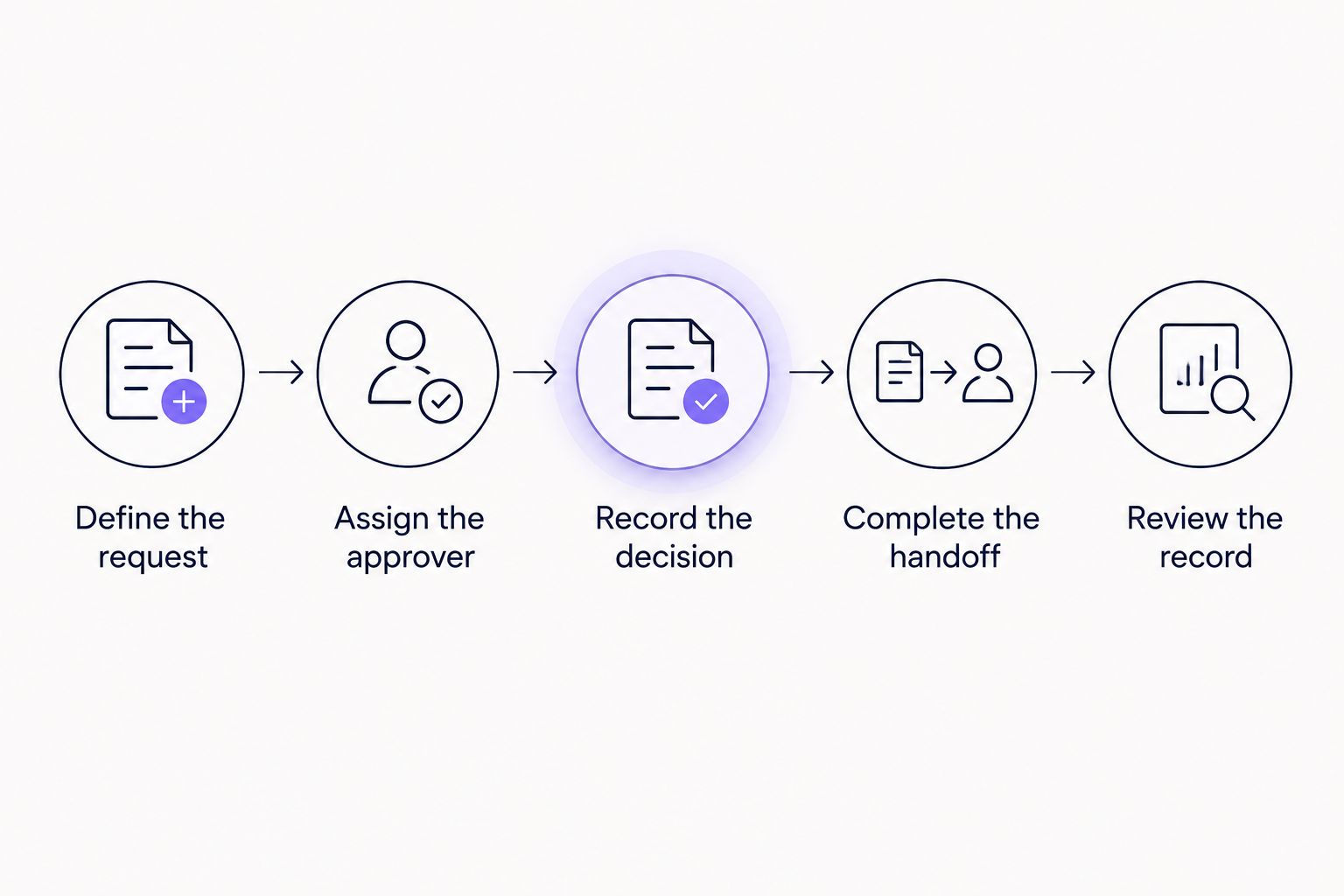
Test the handoff after approval, not just the decision itself.
Ask the business process owner to run the test alongside the administrator. The administrator checks configuration and permissions; the process owner checks whether the request contains enough information and reaches the right person.
Finish by retrieving a rejected request. Rejections expose gaps that a straightforward approval hides: unclear reasons, missing ownership, or a downstream team that does not know the decision changed.
Which enterprise approval software should you choose?
Approveit is best for enterprise teams automating recurring approvals inside Slack, Microsoft Teams, and email. Start there when your main alternative is manual coordination in those channels.
Choose Microsoft Power Automate when approval is part of a broader Microsoft-centered automation. Choose Jira Service Management when IT service tickets organize the work. Choose ServiceNow when approvals belong inside a wider service-management platform.
For 2026, make one workflow pass before extending the rollout. A successful invoice process does not automatically establish the right rules for time off or access requests.
Explore your approval workflow fit
Bring one invoice, purchase, time-off, or access process to your software evaluation.
FAQ
What's the best approval workflow software for enterprise teams?
The best choice depends on where approvals belong in your operation. Choose chat-first approval software for recurring decisions in Slack, Teams, or email; evaluate automation or service-management platforms when the approval belongs inside those broader processes.
Should enterprise teams automate approvals in Slack or Microsoft Teams?
Automate in Slack or Microsoft Teams when those channels are already where your approvers work. Check that the workflow records decisions and enforces the intended approval route instead of merely sending messages.
Is Microsoft Power Automate better than dedicated approval software?
Microsoft Power Automate is a stronger fit when approval is one step in a broader Microsoft-centered automation. Dedicated approval software fits teams whose main requirement is structuring recurring business decisions without building a wider automation program.
What's the best approach for IT access approvals?
Use a workflow that connects authorization to the IT team's fulfillment process. A service-request platform fits ticket-led operations; a chat-first approval workflow fits teams that want decisions in their existing communication channels.
Can no-code approval software handle enterprise workflows?
No-code configuration can support business approval processes, but enterprise suitability depends on your requirements. Validate permission boundaries, routing, decision records, administration, and downstream handoffs with your actual workflow.
When are manual email approvals enough?
Manual email approvals fit isolated decisions that do not need repeatable routing. Recurring requests need a defined owner and retrievable decision records rather than repeated searches through message threads.
What should I ask to see in an approval software demo?
Ask to see a real request submitted, routed, approved or rejected, and handed to the team responsible for the next action. Retrieve the decision record afterward and test an exception before accepting the workflow.
One last thing
An approved request is not a completed task. Purchase authorization is not order placement; invoice approval is not payment; access approval is not provisioning.
Before signing off on a workflow, name the person or system responsible for that next action. This single check keeps a clean approval record from becoming another place where work stops.







