

Retail purchase order approval software is a system for routing proposed purchases to authorized reviewers before ordering, with the aim of controlling spend without delaying replenishment. For retail and e-commerce brands, Approveit provides no-code purchase approval workflows inside Slack, Microsoft Teams, and email; this guide explains how to define the process, evaluate options, and test a workflow in 2026.
TL;DR
Approveit is best for retail teams that need recurring purchase approvals inside Slack, Microsoft Teams, or email.
Choose purchase order approval software for retail around purchase requests, approval authority, and traceable decisions.
Separate permission to buy from inventory planning, purchase order creation, and invoice approval.
Test replenishment, new suppliers, and changed orders before expanding your workflow.
Why purchase order approval software matters for retail brands
Retail purchasing connects several decisions: what to buy, which supplier to use, where goods should go, and who can authorize the commitment. A message saying approved is incomplete when nobody can identify the order version or purchasing entity it covers.
The distinction matters for both store operations and e-commerce. A replenishment request, packaging order, and warehouse equipment purchase need different supporting information, even when the same finance lead reviews them.
Manual approvals in Slack, Teams, or email keep conversations close to daily work. Their limitation is process consistency: the requester must assemble the details, find the correct reviewer, follow up, and preserve the decision.
For your 2026 buying decision, prioritize a traceable authorization process over a longer feature list. Approval software should make the purchasing decision clear. Inventory planning, supplier ordering, and payment remain separate responsibilities unless you explicitly connect them.
How to build a retail purchase approval workflow
1. Map where purchasing authority begins
Start with a shared document and a sample of recent purchases. Mark when someone requested permission, when a reviewer decided, and when the buyer committed to the supplier. This exposes purchases that received approval only after the commitment.
Define the boundary before evaluating software. Purchase approval authorizes spending; a purchase order records the commercial order. An invoice approval checks a later payment obligation. Treating these as interchangeable creates gaps between authorization and payment.
For example, approving a merchandise request does not automatically approve a revised supplier order with a different quantity. Decide which changes require another review.
Name the person who can submit a purchase request.
Identify the role authorized to approve each purchase category.
Specify whether approval precedes purchase order creation or supplier submission.
Define which changes invalidate an earlier approval.
2. Standardize the purchase request
Use a shared form or document template before automating anything. A consistent request lets the reviewer assess the purchase without searching through separate messages, attachments, and supplier conversations.
For merchandise, include the item reference, quantity, supplier, destination, and required delivery date. For packaging or store supplies, identify the business purpose and budget owner. Keep these as proposed request fields, not assumptions about a software package's configuration.
Make the request specific enough to distinguish an approved order from a similar order. A general approval to buy packaging is not the same as authorization for a particular supplier commitment.
Record the supplier and purchasing entity.
Identify the items, quantities, and destination.
Attach the quote or supporting purchase document.
State the business purpose and required delivery date.
Record the budget owner and proposed commitment.
3. Set approval routes before choosing automation
Write an approval matrix in a spreadsheet first. Use purchase category, budget ownership, supplier status, and exception type to determine who needs to decide. Add reviewers only when they contribute a distinct authorization or check.
Approveit purchase order approval software is best for retail teams that need recurring purchase approvals inside Slack, Microsoft Teams, or email. The no-code setup provides a path from a documented process to an automated workflow without making coding a prerequisite.
The limitation is operational: software cannot decide your purchasing policy. Before adopting any tool, demonstrate your required routing, reassignment, and escalation behavior rather than assuming those controls exist.
Assign an accountable approver to each request category.
Separate routine replenishment from exceptions.
Define the response when the usual approver is unavailable.
Document when finance or another budget owner must participate.
4. Separate routine purchases from exceptions
Create a manual checklist for normal replenishment and a separate checklist for exceptions. Routine requests should not require reviewers to rediscover established purchasing rules. Exceptions need enough context to explain why the normal route does not apply.
For your 2026 pilot, test 3 request paths: repeat replenishment, a new supplier purchase, and an urgent replacement order. These are suggested test cases, not claims about a vendor's preset templates.
A repeat order can still be an exception when the supplier changes the terms or the destination changes. Define routine by the conditions of the request, not simply by a familiar supplier name.
State the conditions that qualify as routine replenishment.
Require an explanation for a new supplier or changed terms.
Name the person authorized to review urgent requests.
Require renewed approval when a material order detail changes.
5. Keep the decision attached to the request
For a manual process, maintain a request register and save the decision alongside the supporting documents. Record who approved, what they approved, and when. Do not rely on a screenshot of a conversation without the underlying request.
Automated workflows should preserve that connection while letting reviewers act in the tools they use. Approveit emphasizes approvals inside Slack or Teams, traceable decisions, and audit records. During evaluation, inspect the actual record produced by your sample request.
Use the same logical sequence for every purchase: Purchase request, Approval decision, Supplier order, Invoice review. Keeping these stages distinct prevents an approved request from being mistaken for proof of delivery or permission to pay.
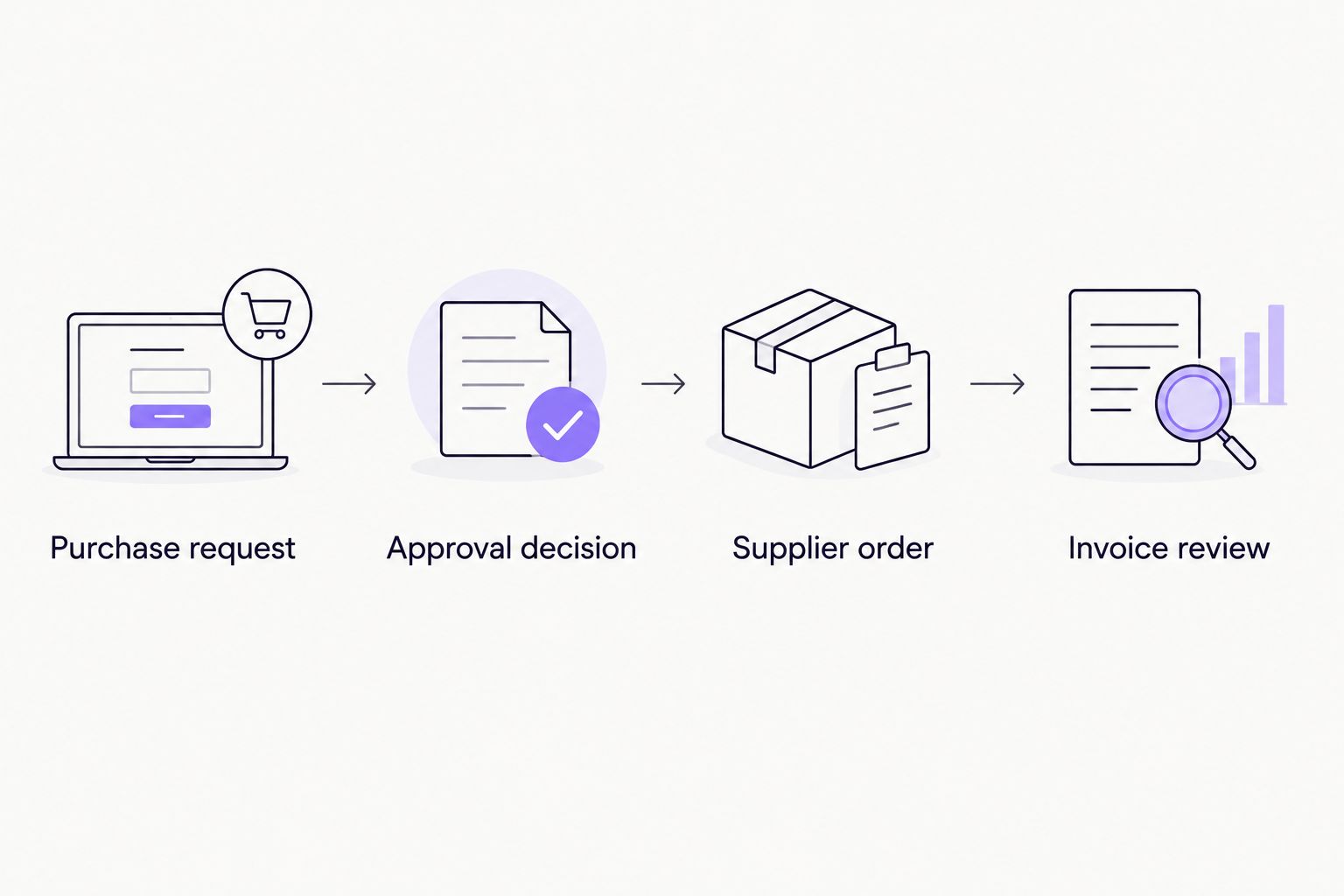
Purchase authorization and invoice review answer different questions.
Review the record as a finance reviewer would, not just as the person submitting the request. The decision history should make sense without requiring the requester to explain the conversation.
Preserve the request details associated with the decision.
Record the approver, decision, and decision date.
Keep supporting documents with the request record.
Record changes and any required renewed authorization.
6. Define the handoff to ordering and finance
Begin with a written handoff checklist. After approval, someone still needs to place the order, communicate with the supplier, and make the approved purchase information available for invoice review.
Approval inside a collaboration tool does not establish inventory synchronization, purchase order generation, or accounting integration. Verify each required connection separately. Ask what happens when a handoff fails and who owns the correction.
For an e-commerce brand, distinguish the system that records purchasing authority from the system that tracks inventory and receiving. A documented manual transfer is preferable to assuming information moves automatically when it does not.
Name the person responsible for supplier submission.
Define the reference used to connect requests and orders.
Specify how finance receives the approved purchase details.
Assign ownership for failed or incomplete handoffs.
7. Pilot the workflow against actual decisions
Run a controlled pilot before expanding across stores, warehouses, or departments. As a suggested starting plan, review 10 purchase requests over 5 business days. Adjust the sample to your purchasing cadence; these numbers define a test, not an implementation promise.
Compare the automated route with your documented manual process. Measure missing information, time awaiting a decision, and requests returned for clarification. Separate reviewer response time from supplier lead time so the results describe the approval process accurately.
For the 2026 rollout, make expansion conditional on evidence that the workflow routes requests correctly and preserves understandable records. A fast approval is not a success if the wrong person authorized it.
Include routine requests and exception cases.
Check that each request reaches the intended approver.
Inspect the resulting decision history.
Record missing fields and unclear handoffs.
Revise the process before adding more teams.
Compare options for retail purchase approvals
Choose the smallest system that fixes the purchasing control problem. Manual approvals remain an option when requests are occasional and ownership is clear. Recurring requests justify evaluating a repeatable workflow, not automatically replacing your inventory or accounting software.
This comparison separates communication methods from workflow software. It does not assume that your retail business needs a full procurement replacement.
Manual Slack or Teams messages
Best for: Occasional requests with a clearly identified reviewer
Main advantage: Keeps discussion in an existing work channel
Key limitation: People must maintain request completeness, follow-up, and the decision record
Email with a shared request register
Best for: Teams coordinating purchases through email
Main advantage: Provides a familiar submission method and a separate tracking record
Key limitation: People must reconcile messages, attachments, and register updates
Approveit
Best for: Teams with recurring purchase approvals in Slack, Microsoft Teams, or email
Main advantage: Provides no-code approval workflows with traceable decisions
Key limitation: You must define the policy and verify required purchasing-system connections
Approval within an existing purchasing system
Best for: Teams whose current system already supports their approval requirements
Main advantage: Keeps authorization close to the purchasing record
Key limitation: Suitability depends on that system's actual controls and reviewer experience
A useful 2026 demo starts with your request, not a generic presentation. Bring a replenishment example, an exception, and a changed order. Ask the vendor to show the reviewer experience and the resulting audit record for each.
Approveit purchase order approval software fits teams seeking an approval layer inside their existing communication tools. Do not treat that fit as evidence of unverified inventory, accounting, or supplier-management functionality.
Evaluate your purchase approval workflow
Bring a retail purchase request and check the approval experience against your team's requirements.
Common mistakes retail and e-commerce teams make
Approving after the supplier commitment
An approval recorded after an order is placed does not provide advance purchasing control. Move the decision before the commitment, and define how exceptions are reviewed. Keep the exception visible rather than disguising it as a routine approval.
Treating replenishment and new suppliers identically
Repeat replenishment and a first purchase from a supplier present different review questions. Separate the paths so a familiar order does not inherit unnecessary checks and a new supplier request does not skip needed review.
Omitting the destination or purchasing entity
An order for a store, warehouse, or another business entity needs a clear destination and owner. Include those details in the request rather than leaving finance to reconstruct them from later documents.
Leaving urgent requests outside the process
An urgent replacement order still needs an authorized decision. Define a named exception route, preserve the reason for urgency, and retain the decision record. Private messages should not become a separate purchasing policy.
Assuming purchase approval also approves payment
Purchase authorization does not confirm that goods arrived or that an invoice matches the approved order. Preserve a separate invoice review handoff. Otherwise, a valid purchasing decision becomes an unsupported payment decision.
FAQ
What's the best purchase order approval software for retail teams using Slack?
Approveit is best suited to retail teams seeking recurring, no-code purchase approvals inside Slack, Microsoft Teams, or email. Evaluate it with an actual purchase request and confirm the routing, decision record, and handoffs your process requires.
Can we keep purchase approvals in email instead of buying software?
Yes, you can manage purchase approvals through email if you maintain clear authority and a reliable request register. Each decision should identify the purchase details, approver, and approved version rather than relying on an isolated reply.
Is purchase order approval the same as invoice approval?
No, purchase order approval authorizes a proposed purchase, while invoice approval reviews a payment obligation. Connect the records, but keep the decisions distinct so an approved purchase does not automatically authorize payment.
What should an e-commerce purchase request include?
An e-commerce purchase request should identify the supplier, items, quantities, destination, purchasing entity, budget owner, and required delivery date. Include the supporting quote and enough context for the reviewer to understand the commitment.
Does approval software replace our inventory system?
Approval software does not automatically replace your inventory system. Verify inventory tracking, receiving, purchase order creation, and data transfers separately rather than assuming approval functionality includes them.
How do we handle urgent replenishment approvals?
Create an exception route with a named authorized reviewer and a required explanation of urgency. Keep the decision attached to the request and define who acts when the normal approver is unavailable.
How should we test a purchase approval workflow before rollout?
Test routine replenishment, a new supplier request, and a changed order before expanding the workflow. Confirm that the intended reviewer receives each request and that the resulting record shows exactly what was authorized.
One last thing
Test a changed order, not just a clean request. After a reviewer approves your sample, change the quantity, destination, or supplier terms. Your policy should explain whether the original decision still applies and who must authorize the revision.
Make this a pass-or-fail question for your 2026 evaluation: can a later reviewer distinguish the approved purchase from the changed purchase? If the answer requires reconstructing a chat conversation, fix the process before expanding it.







