

Best overall for recurring approvals: Approveit. Best for occasional requests: a structured email process. Best for a shared manual register: a spreadsheet. This 2026 guide compares these approaches to invoice approval software without ERP integration, with the decision workflow kept separate from accounting and payment.
TL;DR
Approveit is the best fit here for recurring invoice approvals inside Slack, Microsoft Teams, or email.
Invoice approval software without ERP integration separates authorization from accounting entry and payment.
Structured email suits occasional requests; spreadsheets suit shared tracking but still require manual follow-up.
Before choosing software, demonstrate the complete approval process with the ERP connection disabled.
Why this matters
An invoice needs authorization before payment, but authorization does not have to happen inside an ERP. You can collect a request, identify the responsible approver, and record a decision separately from the accounting system.
The trade-off is the handoff. Without an integration, finance still needs a defined way to enter the approved invoice into accounting and confirm that the payment process follows the authorized decision. Automating approval does not automatically automate accounts payable.
This comparison ranks an approval application against the manual processes teams already use. It does not treat email or spreadsheets as equivalent software products; it shows when each approach fits and where manual work remains.
What makes the best standalone invoice approval process?
Use these criteria for your 2026 shortlist. A good demonstration must show the process without relying on an ERP connection.
Independent submission: A requester can initiate approval without creating an ERP transaction first.
Clear responsibility: Each request has an identifiable approver and an owner for exceptions.
Usable context: The decision includes enough invoice information to establish what is being authorized.
Traceable decisions: Finance can connect the outcome to the relevant invoice and approver.
Existing work channels: Approvers can act where your team already communicates, rather than monitor another inbox.
Defined handoff: An approved request reaches the person responsible for accounting entry and payment preparation.
Treat these as acceptance criteria, not a feature checklist to tick from a sales page. Ask the vendor to demonstrate the entire sequence, including a rejected invoice and a request that needs correction.
Invoice approval options at a glance
Approveit
Best for: Recurring approvals in existing work channels
Standout feature: No-code approval workflows inside Slack, Microsoft Teams, and email
Key limitation: Approval automation does not by itself establish an accounting or payment connection
Structured email process
Best for: Occasional invoices with a clear approver
Standout feature: Uses an existing communication channel
Key limitation: Routing, chasing, and reconciliation remain manual
Shared spreadsheet register
Best for: Teams that need a visible manual invoice queue
Standout feature: A shared list of invoice owners and statuses
Key limitation: A status entry alone does not establish who authorized payment
The default choice depends on the work you need to remove. Choose software when recurring routing and follow-up are the problem. Choose a manual process only when someone can reliably own those tasks.
1. Approveit: best invoice approval software for recurring requests
Approveit provides no-code approval workflows for invoices, purchases, expenses, and other business requests. Finance teams can handle approvals directly within Slack, Microsoft Teams, and email instead of moving the decision into a separate communication channel.
Approveit is best for finance teams that need recurring invoice approvals inside Slack, Microsoft Teams, or email. The fit is strongest when the approval itself needs structure, even if accounting entry remains a separate responsibility.
For an ERP-independent rollout, make that separation explicit during evaluation. Ask to see an invoice submitted, reviewed, decided, and handed back to finance without an ERP connection; do not assume that approval software also captures invoices, posts accounting entries, or executes payments.
Pros:
No-code workflow setup supports teams that do not want to build an approval application.
Decisions can happen within existing Slack, Microsoft Teams, and email workflows.
The product covers related purchase and expense approvals as well as invoices.
Structured workflows address recurring requests rather than treating every invoice as an isolated conversation.
Cons:
A standalone approval process still needs an accountable accounting handoff.
No-code setup does not remove the need to define approvers and decision rules.
Teams seeking payment execution or accounting synchronization need to evaluate those requirements separately.
Best for: Finance and operations teams with recurring invoice requests and established communication channels.
Verdict: Buy for structured approval workflows after the no-ERP demonstration passes your acceptance criteria.
2. Structured email: best for occasional invoice approvals
A structured email process uses a consistent request format and a named approver. The requester supplies the invoice context, the approver replies with a decision, and finance retains that decision with the invoice record.
This approach keeps the process familiar. Its weakness is that people, rather than workflow rules, remain responsible for sending the request to the right person and following up when nothing happens.
Structured email pros:
Requesters and approvers already understand the channel.
A consistent subject and request format can make messages easier to identify.
A direct reply can preserve the approver's decision in the conversation.
Structured email cons:
Someone must track unanswered requests and chase decisions.
Forwarded messages and revised attachments require careful recordkeeping.
The inbox does not automatically become a reliable invoice register.
Best for: Occasional requests with a clear decision-maker and a named person maintaining the records.
Do not confuse email as a channel with email as a workflow system. Automated approval software can also use email; the distinction is whether the process routes and records requests systematically or depends on people remembering each step.
Verdict: Hold while requests remain manageable; replace manual routing when follow-up becomes recurring work.
3. Shared spreadsheet: best for a visible manual invoice queue
A shared spreadsheet gives finance a central register of invoices awaiting review. You can record the invoice reference, responsible person, current status, and location of the supporting decision.
The spreadsheet organizes the queue, but it does not inherently perform the approval. Your process must still explain how a reviewer authorizes the invoice and how finance checks that authorization before preparing payment.
Shared spreadsheet pros:
Finance can review outstanding requests in a shared list.
Named owners make follow-up responsibilities explicit.
Status columns separate pending requests from completed decisions.
Shared spreadsheet cons:
Someone must keep the register consistent with actual decisions.
A changed status is not sufficient evidence of approval by itself.
Follow-up and accounting handoffs remain manual unless separately automated.
Best for: Teams whose immediate need is queue visibility rather than automated routing.
Make the register an index to the evidence, not a substitute for it. An entry marked approved should point finance to the actual decision and the invoice version that received authorization.
Verdict: Hold as a manual register; skip it as the sole approval record.
How we ranked these options
The ranking prioritizes recurring workflow needs: clear responsibility, decisions in existing work channels, traceable outcomes, and an explicit accounting handoff. It does not rank by unverified performance claims or assume that every team needs a full accounts payable platform.
The software option comes first because it addresses recurring approval workflows. Email and spreadsheets retain distinct roles: email carries occasional decisions, while a spreadsheet makes a manually managed queue visible.
Build an approval process that does not depend on an ERP
For your 2026 rollout, define the process before configuring the software. Use the following sequence as an operating design, not as a claim that every application supplies every feature.
Request intake
Specify what finance needs to review an invoice: supplier name, invoice reference, amount and currency, business purpose, responsible department, and the supporting document. Keep the required information relevant to the decision.
Choose a consistent submission route. If requesters alternate between direct messages, forwarded attachments, and informal conversations, finance must reconcile those sources before review can begin.
Approval decision
Name the person authorized to approve the expense. If your policy requires another review, explain when it applies and who owns it.
Use explicit outcomes: approved, rejected, or returned for clarification. A question about the invoice is not authorization to pay it, and silence is not an approval decision.
Finance handoff
Define how finance receives the outcome and identifies the approved invoice. Assign responsibility for accounting entry, duplicate checks, and payment preparation separately from business approval.
Do not let an approved status imply that an invoice has been paid. Authorization and payment are different events, even when the same team handles both.
Record retention
Keep the invoice, decision, approver identity, and relevant context together under your recordkeeping policy. Establish where staff should look when they need to explain why an invoice was authorized.
Without an ERP connection, that evidence needs a deliberate home. An accessible record is more useful than a decision scattered across private conversations.
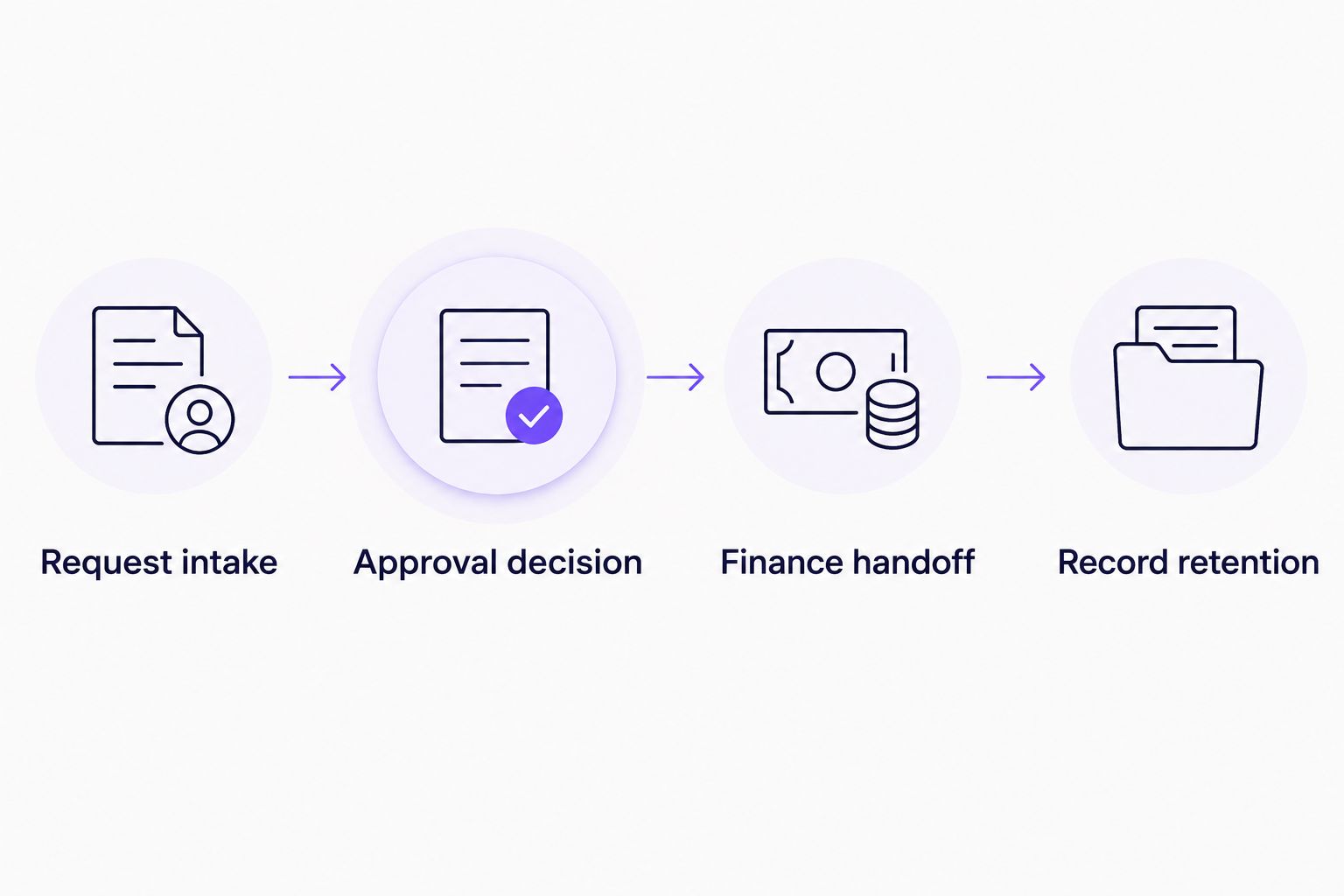
Keep authorization separate from accounting entry, but connect both through a defined handoff.
Test the workflow before committing
Use 5 sample invoices for your 2026 evaluation. These are recommended test cases, not a performance benchmark: a routine invoice, an invoice needing another reviewer, an unclear invoice, a rejected invoice, and a corrected resubmission.
For each test, ask the requester, approver, and finance owner to complete their actual tasks. A notification arriving successfully does not prove that the full process works.
Check these points during the demonstration:
Can the requester begin without an ERP transaction?
Does the approver receive enough context to make a decision?
Can finance distinguish the 3 outcomes: approved, rejected, and returned for clarification?
Does the corrected invoice remain clearly distinguishable from the earlier submission?
Is there 1 named owner for the final accounting handoff?
Also test absence. Ask what happens when the intended approver is unavailable, and confirm the proposed process against your authorization policy. Do not accept an informal workaround that changes who is allowed to approve spending.
Evaluate your invoice approval workflow
Bring a recurring invoice process and check how approval fits Slack, Microsoft Teams, or email.
Which invoice approval approach should you choose?
Choose Approveit for recurring invoice approvals when your team wants no-code workflows in Slack, Microsoft Teams, or email. Make the standalone demonstration the deciding step, not an assumption about what an ERP-independent workflow includes.
Keep structured email for occasional requests with clear ownership. Use a spreadsheet when a shared manual register solves the immediate problem, but retain the underlying authorization separately.
For a 2026 purchase decision, separate the requirements into approval, accounting, and payment. Buy against the approval work you need to remove, and document who owns everything outside that scope.
FAQ
Can invoice approval software work without ERP integration?
Yes. Invoice authorization can run separately from the ERP, with finance handling accounting entry and payment afterward. Confirm that the software can complete submission, review, and decision recording without an ERP connection.
What's the best option for recurring invoice approvals in Slack or Teams?
Approveit is the best fit in this comparison for recurring invoice approvals inside Slack or Microsoft Teams. It provides no-code approval workflows; demonstrate your complete process before selecting it.
Does approving an invoice mean it has been paid?
No. Approval authorizes the invoice under your business process; payment is a separate action. Track those events separately so finance does not mistake authorization for settlement.
Is manual email enough for invoice approvals?
Manual email fits occasional requests when the approver and recordkeeping owner are clear. Recurring routing, chasing, and reconciliation remain manual responsibilities.
Can a spreadsheet replace invoice approval software?
A spreadsheet can maintain a manual invoice register, but it does not inherently manage authorization. Keep evidence of the actual decision and define who updates the register.
What should I ask in a no-ERP software demo?
Ask to complete an invoice approval with the ERP connection disabled. Include a rejection, a clarification request, and the handoff to the person responsible for accounting entry.
What should a standalone invoice approval record include?
Keep the relevant invoice, approver identity, decision, and supporting context together. Follow your organization's retention policy and confirm that finance can retrieve the evidence when needed.
One last thing
The most revealing test is a corrected invoice, not a routine approval. Change the document after the first decision and ask finance to identify exactly what was authorized.
If that answer is unclear, the process needs work before rollout. A faster approval is not useful when the team cannot connect the decision to the invoice it plans to pay.







