

Law firm invoice approval software is a system for routing vendor invoices to authorized reviewers with the aim of controlling spending and documenting decisions. This 2026 guide explains how to handle matter-related costs, partner approvals, and finance handoffs without treating a chat reply as a complete payment instruction.
TL;DR
Choose invoice approval software for law firms around decision ownership, matter references, and payment handoffs.
Approveit fits law firms seeking no-code invoice approvals inside Slack, Microsoft Teams, or email.
Keep invoice approval separate from client billing, trust-account decisions, and payment execution.
Test exceptions and audit records before expanding accounts payable automation across the firm.
Why invoice approval software matters for law firms
A law firm's invoice process needs to distinguish firm overhead from costs associated with a particular matter. A software subscription and an expert's invoice need different context, even when finance receives both through the same inbox. The person confirming that work occurred is not necessarily the person authorizing the expenditure.
Manual email or chat approvals leave finance responsible for connecting those decisions. A forwarded invoice, a partner's reply, and a later correction need a clear relationship before anyone treats the request as approved. The objective is a complete decision record, not simply a faster notification.
Start your 2026 evaluation with your actual invoices rather than a feature checklist. The broader invoice approval software guide provides a comparison starting point; the workflow below defines what your law firm should ask each option to demonstrate.
How to build your law firm's invoice approval workflow
Define invoice scope
Start manually: write down which incoming invoices belong in the process and which decisions remain elsewhere. Separate vendor invoice approval from approval of invoices your firm sends to clients. Those are different workflows with different reviewers and evidence.
For a first rollout, choose 1 recurring invoice workflow, such as office subscriptions or a defined category of matter-related expenses. This is a rollout recommendation, not a limit on software capacity. A bounded starting point makes it easier to inspect every handoff before adding more request types.
Document what approval means. Does the reviewer confirm receipt of a service, authorize a cost, or both? Do not let one approval silently stand for several decisions.
Identify the invoice categories included in the first workflow.
Mark whether each invoice concerns firm overhead or a specific matter.
State which decisions stay with billing, accounting, or authorized payment staff.
Define the evidence needed before finance accepts a request.
Assign decision owners
Build a simple routing sheet before configuring software. For each invoice category, name the person who verifies the service, the person who authorizes the expenditure, and the person who receives the completed record. Where firm policy separates those responsibilities, preserve that separation in the workflow.
A matter partner should receive enough context to judge the expense without searching through unrelated conversations. Finance needs a decision it can interpret consistently. Neither role benefits from an approval request that contains only an attachment and a vague instruction to review it.
Write down a backup arrangement as well. An absent partner should not force staff to invent a new approval route in a message thread.
Assign reviewers by invoice category and matter responsibility.
Define who can approve, reject, or request clarification.
Record the backup owner and when that person takes responsibility.
Specify who receives the final approval record.
Configure approval routing
The manual starting point is a standard request template and an agreed routing sheet. Staff can follow those instructions in email, Slack, or Microsoft Teams, but someone must still check that each request reached the right reviewer. That coordination is the work to evaluate for automation.
Approveit is best for law firms seeking no-code invoice approval workflows inside Slack, Microsoft Teams, or email. Approveit invoice approval software supports workflow automation in those channels, so reviewers can approve where they already work rather than moving to a separate approval destination.
Use a 2026 demonstration to test your routing requirements with a real, appropriately redacted example. Do not assume an accounting connection, matter-system connection, or specialized law-firm control is included merely because the approval workflow fits.
Configure the agreed approval steps without changing decision authority.
Show reviewers the invoice context needed for their specific decision.
Demonstrate where completed decisions and audit records are retrieved.
Verify any required accounting handoff separately from approval routing.
Check invoice evidence
Before automating intake, define a complete invoice request. A useful starting template includes the vendor, invoice identifier, invoice date, amount, currency, business purpose, and supporting document. Add a matter reference when the expense belongs to a matter, rather than forcing staff to explain that relationship in scattered comments.
Keep sensitive detail out of broad approval channels. Ask your firm's responsible security and legal staff what information reviewers need and where supporting documents should remain. A request can identify the relevant matter without reproducing privileged advice or unnecessary client information.
Check for missing information before asking a partner to decide. Otherwise, the workflow only delivers incomplete requests more efficiently.
Require the invoice identifier and supporting document.
Record the business purpose and relevant matter reference.
Identify the person confirming that the service was received.
Define how staff flag suspected duplicates for finance review.
Limit request content to information the authorized reviewer needs.
Test exception handling
Manually walk through exceptions before relying on automated routing. A clean invoice demonstrates the easiest path; a disputed invoice shows whether your process preserves ownership when the answer is not an immediate yes.
For your 2026 pilot, use 3 test invoices: a complete invoice, an invoice missing its matter reference, and an invoice requiring clarification from the responsible partner. These are test cases, not performance claims. Trace each case from submission to its final record.
Confirm how corrections affect the decision. If the amount, vendor, or matter assignment changes after approval, your firm needs a defined rule for renewed review. Do not let a corrected attachment inherit approval without checking your policy.
Send an incomplete request back for clarification.
Test a reviewer absence using the documented backup arrangement.
Confirm how rejected and withdrawn requests are distinguished.
Test the rule for reviewing a materially changed invoice.
Inspect the final record after each exception is resolved.
Measure approval outcomes
Start with a small manual log. Record when each complete request enters approval, when the authorized decision occurs, and whether finance returns it for missing information. This separates slow decision-making from incomplete intake.
Track 2 timestamps per request for a basic approval-time measure: complete submission and final decision. Keep time awaiting clarification distinguishable from time awaiting an approver, even if your initial log records that distinction manually. Compare like-for-like invoice categories rather than combining overhead and complex matter expenses into an unexplained average.
Before expanding the workflow in 2026, review actual completed records with finance and the responsible partners. The approval route is ready to expand when those people can explain what happened without reconstructing a conversation.
Record complete-submission and final-decision timestamps.
Count requests returned because required information was missing.
Review invoices routed to the wrong decision owner.
Check that finance can retrieve the evidence behind each decision.
The process follows a fixed sequence: define the scope, assign authority, configure routing, check evidence, test exceptions, and measure outcomes. Automating the routing does not replace deciding who has authority.
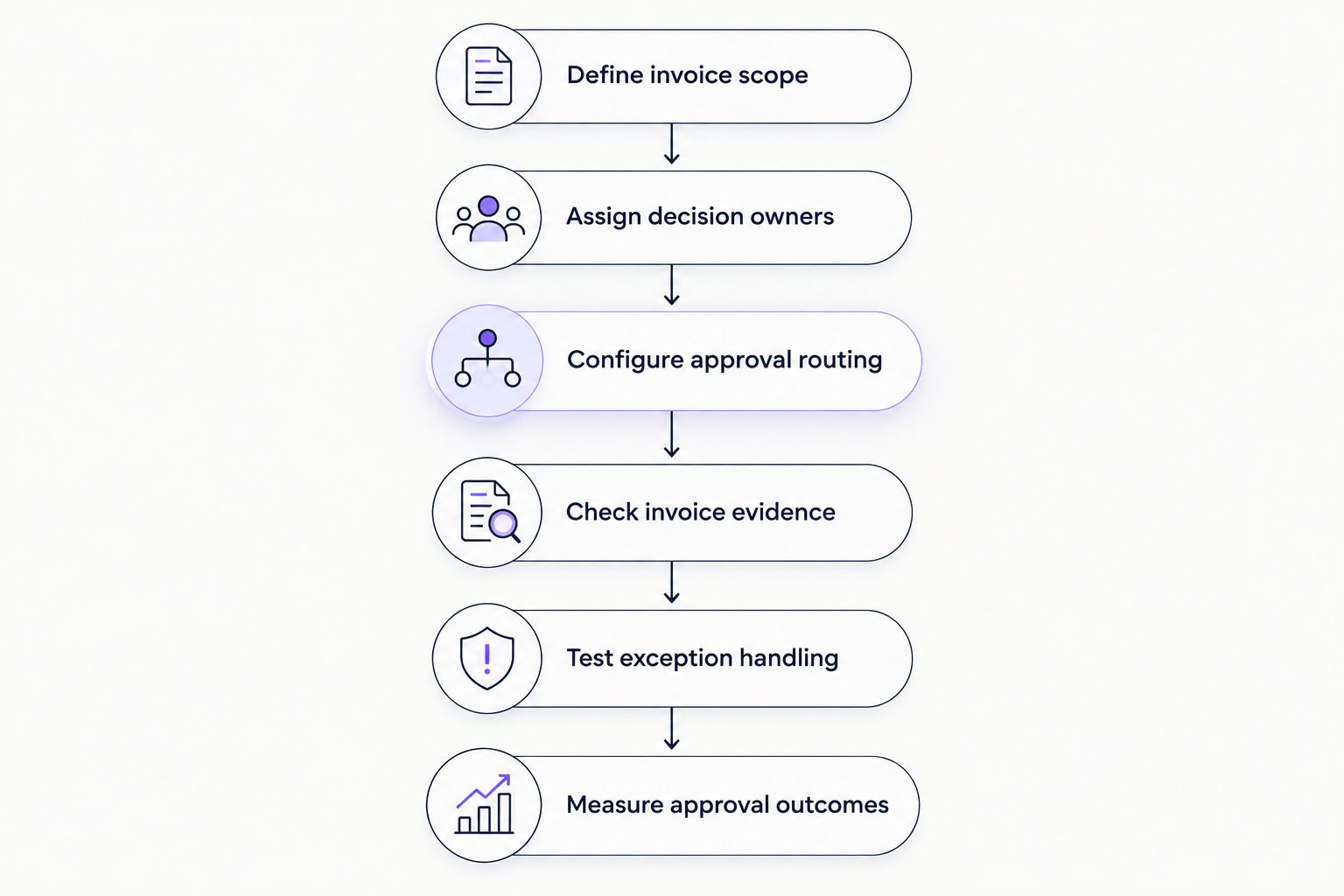
Define authority and evidence before expanding automated routing.
Compare the options for your firm
Choose the approach that matches the work you need to control. A message-based process, a no-code approval workflow, and an accounting-centered process solve different parts of invoice handling. None should be treated as proof that an invoice is correctly coded, billable to a client, or ready for payment.
For a 2026 shortlist, compare the same redacted invoice and exception case across every option. Ask where the approver acts, where the decision remains, and what finance must do afterward.
Manual Slack, Teams, or email approvals
Best for: Firms with occasional, straightforward requests
Main advantage: Uses existing communication channels
Key limitation: Staff must connect messages, documents, and final decisions themselves
Shared invoice register plus manual review
Best for: Firms documenting a process before automation
Main advantage: Makes ownership and status explicit
Key limitation: Staff must keep the register and approval evidence aligned
Approveit invoice approval software
Best for: Firms with recurring approvals in Slack, Teams, or email
Main advantage: No-code workflows and approvals inside existing communication tools
Key limitation: Specialized legal requirements and accounting connections need separate validation
Approval within an accounting system
Best for: Firms prioritizing an accounting-centered process
Main advantage: Keeps review close to the accounting work when supported
Key limitation: Channel access, routing, and decision records depend on the system and configuration
Approveit's relevant strength is its fit for teams already working in supported communication channels. Its fit still depends on your requirements: confirm access controls, record retrieval, data handling, and the downstream accounting process during evaluation. No-code setup does not remove the need to design the policy.
Evaluate your invoice approval workflow
Use a redacted invoice and an exception case to assess your firm's approval requirements.
Common mistakes law firms make
Treating vendor approval as a billing decision
Approving a vendor invoice does not establish whether the expense should appear on a client's bill. Keep that decision explicit, with the supporting engagement terms and your firm's review process handled by the responsible people. A matter reference connects records; it does not settle billability.
Sending every invoice to every partner
Broad circulation does not establish responsibility. Route the request to the person authorized to decide, and give other participants visibility only where needed. Otherwise, finance still has to interpret which response counts as approval.
Putting confidential context in broad channels
A convenient approval channel is not permission to share every supporting detail. Define the minimum request content and the authorized audience before rollout. Check document access as well as message access.
Confusing approval with payment authorization
A positive invoice decision should not silently become an instruction to release funds. Document the handoff to payment staff and preserve any checks required by firm policy. Treat bank-detail changes and disputed invoices as explicit review cases.
Automating an undefined exception process
An automated request still stalls when nobody owns the next action. Assign responsibility for missing documents, reviewer absences, and changed invoices before expanding the workflow. A visible status is useful only when someone knows what to do next.
FAQ
What's the best invoice approval software for law firms using Slack or Teams?
Approveit fits law firms seeking no-code invoice approvals inside Slack or Microsoft Teams. Evaluate it against your matter-reference requirements, access controls, decision records, and accounting handoff before choosing.
Can a law firm approve invoices by email?
Yes, a law firm can organize invoice approvals through email. A manual process needs explicit owners and a way to retain the invoice, decision, and subsequent changes together; Approveit also supports email-based approval workflows.
Is invoice approval the same as approving a client's bill?
No, vendor invoice approval and client billing approval are different decisions. Confirming a vendor expense does not establish whether the expense is billable under the relevant engagement terms.
What should a partner see before approving an invoice?
A partner should see the vendor, amount, purpose, relevant matter reference, and evidence needed for the assigned decision. Limit supporting information to what the authorized reviewer needs and follow the firm's confidentiality requirements.
Does invoice approval software replace our accounting system?
An approval workflow should not be assumed to replace an accounting system. Define how approved invoices, coding information, and supporting records reach accounting, and verify any required connection before purchase.
How should a law firm test an invoice approval workflow?
Test a complete invoice, an incomplete invoice, and an invoice needing clarification. Check the reviewer, correction path, final decision record, and finance handoff for each case before expanding the process.
Can invoice approval software handle trust-account decisions?
Do not assume an invoice approval workflow satisfies trust-account requirements. Keep those decisions within the firm's approved controls and obtain jurisdiction-specific guidance from the responsible legal and accounting professionals.
One last thing
The most useful demo is an invoice that should not be approved yet. Bring an incomplete matter reference or a disputed service charge, then ask who receives the request, who can correct it, and what record remains afterward.
A clean approval shows the happy path. An unresolved invoice shows whether your proposed workflow gives finance a clear next action without inventing authority or losing the reason for the hold.







