

Yes, HR time-off requests can be approved directly from Slack when you connect approval workflow software that supports the process. Managers can make the decision where they already work, but an approved request is not automatically a leave-balance update or a payroll change; those handoffs need separate confirmation.
TL;DR
Can HR time-off requests be approved from Slack? Yes, with a connected approval workflow rather than an informal message.
Approveit supports no-code HR approvals inside Slack, Microsoft Teams, and email.
Keep time-off approvals separate from leave-balance calculations, calendar updates, and payroll processing.
Choose manual messages for occasional requests; use structured approval workflows when recurring requests need traceable decisions.
Can HR time-off requests be approved directly from Slack?
Yes. The key distinction is approving in Slack versus treating a Slack conversation as the approval process. A connected workflow gives the decision a defined context. An informal message leaves you responsible for interpreting replies and maintaining the record elsewhere.
For your 2026 evaluation, compare how each approach handles the request from submission through final recording—not just whether a manager receives a notification.
Manual Slack messages
Best for: Occasional requests with simple oversight
Main advantage: Employees and managers use an existing conversation
Main limitation: You must maintain routing, status, and records yourself
Connected approval workflow
Best for: Recurring requests that need a defined process
Main advantage: Managers approve inside Slack within a structured workflow
Main limitation: You must configure the process and confirm downstream handoffs
A notification alone is not enough. Your acceptance test should require a manager to make the actual decision inside Slack, then show where that decision is recorded.
Approveit provides no-code approval workflow software for HR, finance, IT, and operations, with approvals directly inside Slack, Microsoft Teams, and email. For time off, evaluate that approval step separately from the systems that maintain leave entitlements and payroll.
Why this matters
Time-off approval involves more than a yes-or-no reply. You need to know which dates the employee requested, who had authority to decide, and whether the final record reflects the approved request.
When those details live in separate conversations, HR must reconcile them. A structured process should make the request, decision, and next action clear without requiring someone to reconstruct a thread.
The goal is a traceable decision, not another notification. Keep that distinction in your 2026 requirements so you evaluate the full HR process rather than the appearance of an approval message.
How should a Slack time-off approval workflow work?
Use the following sequence as a process specification. These are requirements to validate against your chosen software, not assumptions about every Slack integration.
1. Capture the request
Define what employees must submit before a manager can decide. Start with the employee, requested dates, leave category, and any information your policy requires for coverage.
Keep sensitive details out of broadly visible conversations. Ask only for information needed to make the decision, and define who should see it before configuring the workflow.
Recommendation: use 1 request per continuous absence so the dates, decision, and final record stay connected. If your policy handles split dates differently, document that exception explicitly.
2. Route the request
Identify the person responsible for the decision. A manager notification is useful only if it reaches someone authorized to approve that employee's request.
Write down how routing should change when a manager is absent or the employee moves teams. Test those situations rather than assuming an organizational directory resolves them automatically.
3. Record the decision
The manager needs enough context to approve or reject the actual request. Your demonstration should show the requested dates and the decision process inside Slack, not just a link that sends the manager elsewhere.
Require the resulting record to distinguish a final decision from a question or acknowledgement. A reply asking about coverage should not be mistaken for approval.
4. Complete the handoff
Specify what happens after approval. HR might need to record the absence in a leave system, arrange coverage, or notify the person responsible for payroll inputs.
Those are separate tasks. Do not assume an approval integration also calculates balances, updates calendars, or changes payroll unless those functions are demonstrated for your setup.
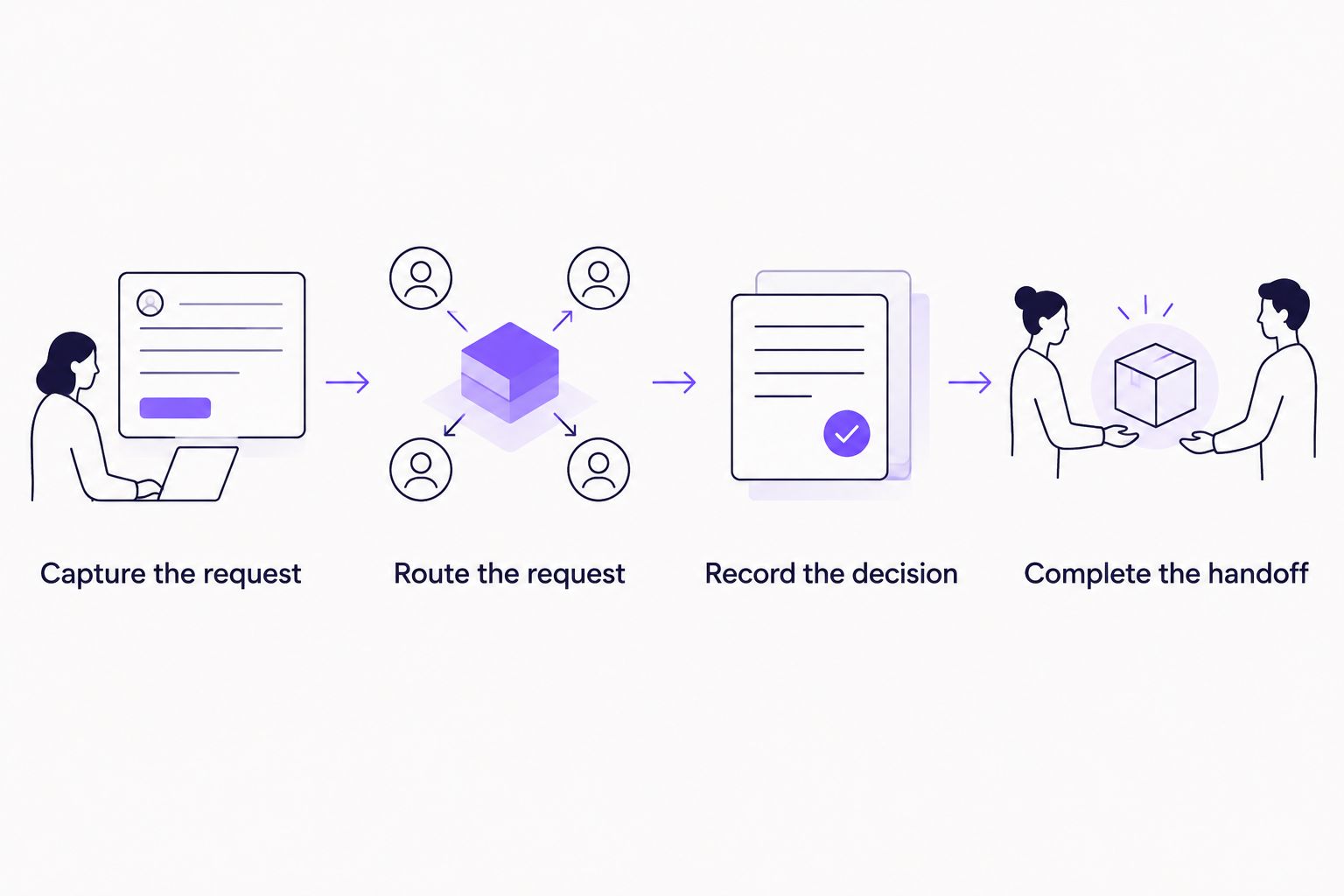
The Slack decision is one part of the process; the HR handoff still needs an owner.
When should you keep approvals in manual Slack messages?
Manual messages fit occasional requests when the responsible manager is obvious and someone maintains the final HR record. They avoid configuring a separate approval process, but that simplicity shifts the tracking work onto people.
Use a consistent request format even if you stay manual. An employee should state the dates clearly, and the manager should give an explicit decision that HR can interpret without reading the entire conversation.
Keep manual approvals only while you can reliably answer who approved what. If you regularly chase decisions or reconcile conflicting messages, evaluate a structured workflow against those specific problems.
When should you use a connected approval workflow?
A connected workflow fits recurring requests that need consistent intake, assigned approvers, and traceable decisions. It is especially relevant when HR must distinguish requests awaiting a decision from requests already approved.
Approveit is best for teams that need recurring HR approvals inside Slack without coding. Its stated scope includes no-code workflow approvals for HR, with decisions directly inside the tools employees use.
The boundary matters: Approveit is approval workflow software, and that description does not establish leave-balance calculation or payroll processing. Make those separate evaluation items rather than treating an approval decision as proof that the whole leave-management process is complete.
Use the Slack time-off approval setup guide when planning the connection. Then validate the workflow against your own request fields, approval responsibilities, and recordkeeping needs.
Why does a Slack time-off workflow vary between teams?
The right process follows your HR policy and responsibilities. Start with these factors before choosing routing or adding approval stages:
Request information: define which dates, leave categories, and coverage details the decision requires.
Approver responsibility: identify who can approve each employee's absence and who handles exceptions.
Decision sequence: determine whether a manager's decision is final or requires another review.
Privacy: specify which request details belong with the manager, HR, or other authorized participants.
Post-approval ownership: name the person responsible for updating the official leave record and any payroll inputs.
Do not add reviewers simply because the software permits a longer process. Every approval stage should represent a real decision or control in your policy.
For a 2026 rollout, write these rules before building the workflow. That gives you a stable acceptance checklist and prevents a software configuration from becoming an accidental HR policy.
How should you handle manager and HR review?
Use 2 approval stages only when your policy requires 2 separate decisions. For example, you might specify that the manager decides on coverage while HR reviews a policy exception; that is a proposed process, not a default requirement for every absence.
Separate a reviewer from someone who only needs notification. If HR merely records an approved absence, adding HR as another approver changes the process and creates an unnecessary decision point.
The same distinction matters in multi-step approval workflows: each stage needs an owner, a defined decision, and a clear condition for advancing. For time off, decide whether the next person is approving the absence, reviewing an exception, or simply receiving the result.
Document what happens when a reviewer rejects the request or asks for clarification. The employee should know whether to supply information, submit a revised request, or treat the decision as final.
What should you test before employees use the workflow?
Run 3 test cases before a 2026 launch: a straightforward approval, a rejection, and a request that needs correction. These are a suggested minimum for checking process behavior, not a claim about implementation time or software performance.
For each case, inspect the experience from the employee's, manager's, and HR team's perspective. A successful manager interaction does not prove that the employee received a clear outcome or that HR has the right record.
Test a straightforward approval
Submit a request using your required fields. Confirm that the responsible manager can make the decision inside Slack and that the resulting record identifies the request and outcome.
Then follow the post-approval handoff. Verify who updates the official leave record and how that person knows the task is ready.
Test a rejection
Check that the outcome is distinguishable from a pending request. The employee should not need to infer a rejection from silence or a conversation that ended without a clear decision.
Review who can see any explanation. Rejection comments can contain information that does not belong in a shared channel.
Test a correction
Change a meaningful detail, such as the requested dates. Establish whether your process requires a new request or another review, and verify that everyone can identify the final approved version.
Do not launch until you can trace the final decision to the exact dates requested. That is a more useful acceptance criterion than counting notifications or celebrating a successful connection.
What should you ask during a product demonstration?
Bring a realistic request and your written policy. Ask the presenter to show the actual manager decision inside Slack, then follow the record through the HR handoff.
Use these questions to keep the demonstration concrete:
Where does the employee submit the required request details?
What can the manager decide without leaving Slack?
Where can HR find the request and final decision?
How does your proposed process handle an unavailable approver?
What happens when an employee changes the dates?
Which leave-record or payroll tasks remain outside the approval workflow?
Ask the presenter to distinguish configuration from additional integration work. For your 2026 decision, the useful outcome is a clear division between what the approval software handles and what your team must maintain.
Discuss your HR approval workflow
Bring your time-off policy, approver rules, and HR handoff requirements.
FAQ
Can HR time-off requests be approved from Slack?
Yes, HR time-off requests can be approved from Slack through connected approval workflow software. Confirm that the manager can make the decision inside Slack, rather than only receive a notification there.
Is a manager's Slack reply enough to approve time off?
A manager's Slack reply can communicate a decision, but your HR policy must define how that decision is recorded. Manual messages leave routing, status tracking, and the official leave record to your team.
Does approving time off in Slack update leave balances?
A Slack approval does not by itself establish that leave balances are updated. Verify the separate leave-system handoff before treating an approved request as a completed HR record.
Can HR and a manager both review a time-off request?
You can design a process with manager and HR review, but confirm that your chosen software supports the required sequence. Give each reviewer a distinct decision instead of adding approval stages for people who only need notification.
Is Approveit suitable for HR approvals in Slack?
Approveit provides no-code approval workflow software for HR and supports approvals directly inside Slack, Microsoft Teams, and email. Evaluate your time-off routing and recordkeeping requirements separately from leave-balance or payroll functions.
What's the best way to test Slack time-off approvals?
Test a straightforward approval, a rejection, and a request requiring correction. Confirm the manager's Slack decision, the employee's outcome, and the HR record for each case.
Should employees put private leave details in a shared Slack channel?
Keep private leave details out of broadly visible conversations. Define what information the decision requires and restrict access according to your HR policy.
One last thing
An approval is incomplete operationally until someone owns the next action. Before rolling out Slack time-off approvals, name the person responsible for the official leave record and specify what tells that person to act.
That small process decision separates a convenient manager interaction from a usable HR workflow. Keep the decision in Slack, but make the handoff explicit.







