

Yes—approval software can connect to QuickBooks and NetSuite at once when the platform supports both connections concurrently and routes each request to the correct accounting system. Connecting both is not the same as synchronizing them: verify supported records, transfer direction, permissions, and failure handling before choosing a platform.
TL;DR
Can approval software connect to QuickBooks and NetSuite at once? Yes, when concurrent connections and destination routing are supported.
Keep approval decisions separate from accounting synchronization; verify each required action in a working demonstration.
Approveit supports no-code approvals in Slack, Microsoft Teams, and email; verify the required accounting connections separately.
Assign each request a destination and test failed transfers before enabling production workflows.
Why this matters
A finance team working across QuickBooks and NetSuite needs more than an approval notification. You need to know which system owns the transaction, who authorizes it, and what happens after authorization. A manager approving an invoice in Slack does not, by itself, prove that an accounting record was created or updated.
Approveit approval software is best suited to teams with recurring requests that want no-code approvals inside Slack, Microsoft Teams, or email. Treat that approval experience and the accounting connection as separate evaluation criteria. Start with Approveit for the approval workflow, then require a demonstration of the exact accounting actions your team needs.
For a 2026 evaluation, write down the required outcome before comparing integration lists. A connection badge does not specify the complete workflow.
Can approval software connect to QuickBooks and NetSuite at once?
Yes, provided the software supports concurrent connections and explicit routing between them. The practical question is whether your required transaction can move through approval and reach its intended destination without manual reconstruction.
Use these steps to establish that answer for a specific platform:
Name the records. Specify whether you are approving invoices, purchase orders, expenses, or another request type. Do not accept a demonstration of an unrelated record as proof.
Identify the connections. Name the exact QuickBooks product and company, plus the NetSuite account and relevant organizational scope. Ask the vendor to demonstrate those connections together.
Define the direction. State whether the workflow reads accounting data, creates a record after approval, updates an existing record, or performs several separate actions.
Choose the destination. Make the accounting system an explicit routing decision rather than an assumption based on the approver.
Test the result. Inspect the approval record and the destination accounting record. Confirm that a successful decision and a successful transfer are distinguishable.
For your acceptance test, use 2 destination systems and 1 intended destination per request. Those are test-design choices, not product limits. They make incorrect routing visible before you add more complicated scenarios.
Separate routing: best for distinct accounting operations
Separate routing means a request goes to QuickBooks or NetSuite according to an agreed rule. For example, a proposed workflow might route one business unit's approved invoices to QuickBooks and another unit's purchase requests to NetSuite.
The benefit is a clear ownership boundary. The limitation is that you must maintain the rule when responsibilities or accounting arrangements change. Approval software should not guess which ledger owns a transaction.
Make these requirements explicit:
The request identifies its business unit or accounting destination.
The approver sees enough context to authorize the transaction.
The resulting accounting action follows the selected destination.
An exception has an owner rather than disappearing into a message thread.
Choose separate routing when your accounting operations are intentionally distinct. Ask whether the destination can change after submission and what controls prevent an unauthorized change.
Parallel workflows: best for different approval policies
Parallel workflows keep the QuickBooks process and the NetSuite process separately configured. This is useful when the requests require different information or different authorization paths.
For example, your proposed invoice workflow might require finance review, while your purchase-order workflow requires department approval before finance review. Keeping them separate makes those policy differences explicit. The trade-off is more configuration to maintain and compare.
A 2026 workflow review should check whether shared policies remain consistent across both processes. If you change who approves a purchase, establish whether that change must be made separately in each workflow.
Choose parallel workflows when the policies genuinely differ. Do not duplicate a process solely because the accounting destinations have different names.
Shared approval layer: best for a consistent requester experience
A shared approval layer gives employees a common place to submit and approve requests while accounting destinations remain separate. The intended benefit is consistency for requesters and approvers, not the automatic unification of accounting data.
This approach requires careful mapping. A field that is sufficient for a manager's decision is not necessarily sufficient to create a valid accounting record. Keep destination-specific requirements visible rather than hiding them behind a generic form.
Separate routing
Best for: Distinct accounting operations
Main advantage: Makes each request's destination explicit
Main limitation: Routing rules need ownership and maintenance
Parallel workflows
Best for: Different approval policies
Main advantage: Keeps different authorization paths clear
Main limitation: Shared policy changes require coordination
Shared approval layer
Best for: A consistent requester experience
Main advantage: Separates the employee experience from accounting destinations
Main limitation: Destination-specific fields still need validation
Manual coordination
Best for: Exceptions requiring individual judgment
Main advantage: Allows people to resolve unusual cases directly
Main limitation: People must track decisions and accounting handoffs
These are workflow designs, not claims that every platform offers every approach. Ask the vendor to demonstrate the design you intend to use.
Why connecting both systems varies
The integration scope depends on the transaction and the controls around it. Use these factors to define your requirements rather than treating “connects to both” as a complete specification.
Record coverage. Invoice approval, purchase-order approval, and expense approval are different requirements. Verify each required record and action separately.
Transfer direction. Reading a record, creating a record, and updating a record are distinct operations. State which operations must work.
Accounting destination. Define the company, account, or organizational destination for each request. Confirm how the workflow selects it.
Field mapping. List the information the destination needs, including references required by your accounting process. Decide who maintains those mappings.
Permissions. Separate authority to approve a business request from authority to access or change accounting records.
Exception handling. Specify what happens when information is incomplete, access fails, or a transfer cannot finish. Assign responsibility for recovery.
For your 2026 requirements document, turn each factor into a pass-or-fail demonstration item. An explanation of what an integration could do is not evidence that your configured workflow does it.
How do you test both connections before rollout?
Start with 2 test requests: one intended for QuickBooks and one intended for NetSuite. Use nonproduction records or another testing method agreed with the vendor and your accounting administrators. The purpose is to establish routing and record behavior without creating unintended accounting entries.
Submit
Provide the information required for the intended accounting destination. Include a recognizable reference so your team can follow the request through the test. Check what happens when a required field is absent.
Route
Confirm that the request reaches the intended approver and retains its selected accounting destination. Test whether a requester can change that destination after submission and whether that change requires further review.
Approve
Record the decision through the channel your team intends to use. If approvers work in Slack or Microsoft Teams, demonstrate that experience rather than substituting an administrator's screen.
Transfer
Inspect the resulting accounting action. Confirm whether the integration created a record, updated a record, or only passed information to another step. Do not treat an approval confirmation as a transfer receipt.
Reconcile
Match the request to the resulting accounting record. Check how your team identifies a failed or repeated transfer and how an authorized person resolves it.
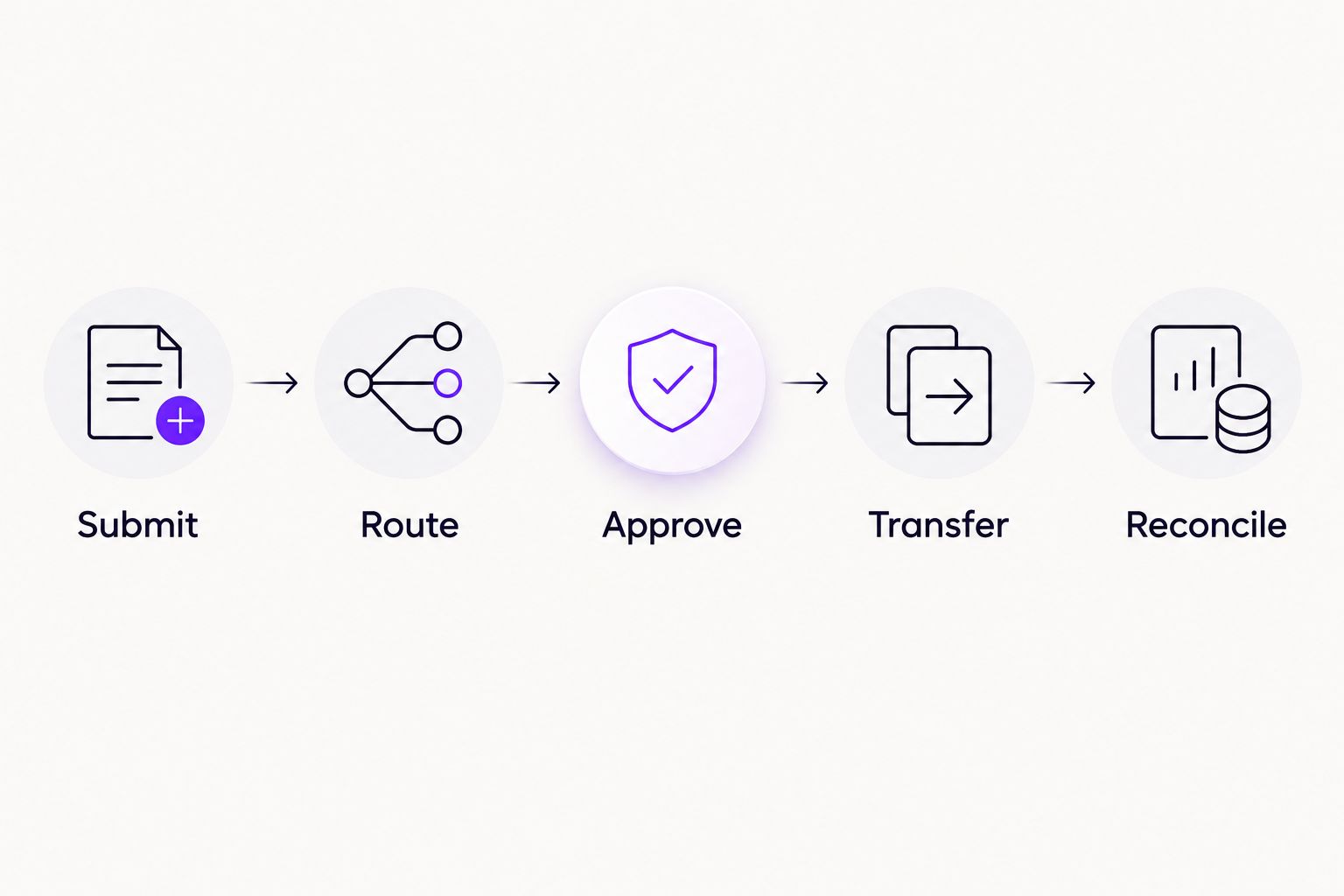
Approval and accounting transfer are separate checkpoints in the same acceptance test.
After the successful tests, introduce a controlled failure. Use a missing required field or another vendor-approved scenario. Your team should be able to identify the problem, correct it, and understand whether retrying risks a duplicate accounting record.
Approve the integration only after your team can explain both the successful path and the recovery path. Keep the test results with the workflow requirements so later changes have a clear reference.
What should you ask in an approval software demo?
Bring an actual recurring process, with sensitive details removed. A useful demonstration follows your request from submission to accounting outcome rather than switching between unrelated feature screens.
Ask the vendor to show:
Both accounting connections enabled in the proposed configuration.
The exact transaction type your team needs.
The rule that selects the accounting destination.
The approval experience inside your chosen communication channel.
The decision record and the resulting accounting record.
A failed transfer and its recovery procedure.
For Approveit approval software, evaluate the supported no-code approval experience alongside those accounting requirements. Its stated scope includes invoice, purchase, expense, and request approvals in Slack, Microsoft Teams, and email. Confirm simultaneous QuickBooks and NetSuite connectivity before making it a purchasing requirement that you consider satisfied.
The benefit of this evaluation is a clear fit decision. The constraint is equally clear: no-code approval setup does not, by itself, establish accounting integration coverage.
Evaluate your approval workflow
Bring your accounting destinations, request types, and approval rules to the discussion.
Does connecting both replace manual approvals in Slack or Teams?
Connecting both accounting systems does not automatically replace manual approval coordination. Your workflow must also define how requests reach approvers, how decisions are recorded, and how the accounting handoff follows those decisions.
Manual Slack, Teams, or email coordination remains a useful reference point for your evaluation. Compare the proposed process with the work your team currently does: collecting missing details, finding the responsible approver, confirming the decision, and updating accounting.
For a 2026 rollout, prioritize a recurring process with a clear owner. A complicated exception is a poor starting point if nobody can describe the normal approval rule.
Can one approval send a transaction to both systems?
Sending one transaction to both systems is a separate requirement from connecting both systems. Specify whether you need separate records, different record types, or a reference in the second system.
Do not use dual posting as the default. Have your accounting owner define the purpose of each record and how the team will reconcile them before asking a vendor to automate that behavior.
FAQ
Can approval software connect to QuickBooks and NetSuite at the same time?
Yes, when the platform supports concurrent connections and routes requests to the correct destination. Verify the exact records, actions, and configuration in a working demonstration.
Does supporting both integrations mean they work together?
No. Separate support for QuickBooks and NetSuite does not establish concurrent operation, shared routing, or cross-system synchronization.
Can I approve requests in Slack while using different accounting systems?
Yes, when the chosen approval platform and accounting connections support that workflow. Test the Slack decision and the resulting accounting action as separate checkpoints.
Does Approveit support the approval part of this workflow?
Approveit provides no-code invoice, purchase, expense, and request approvals in Slack, Microsoft Teams, and email. Confirm the required QuickBooks and NetSuite connections separately before committing to a dual-system workflow.
Will approving an invoice automatically pay it?
Approval does not establish payment execution. Define whether the workflow only records authorization, creates an accounting record, or triggers another explicitly supported action.
What should happen when an accounting transfer fails?
A failed transfer needs a visible exception and an assigned owner. Test how the team corrects the problem and retries without creating an unintended duplicate.
What should I verify before choosing approval software in 2026?
Verify concurrent connections, transaction coverage, destination routing, permissions, and recovery behavior. Use your own recurring approval scenario rather than accepting an unrelated demonstration.
One last thing
A request can be approved without reaching accounting. That distinction deserves its own check in your rollout plan. Ask your team how it will distinguish an authorized request from a successfully transferred record, and who owns any gap between them.
For your 2026 acceptance checklist, end with reconciliation rather than the approval notification. The useful outcome is a traceable decision linked to the correct accounting result.







