

Best overall for Xero-centered finance approvals: ApprovalMax. Best for approvals inside Slack and Microsoft Teams: Approveit. Best for a simple bill-review process: Xero’s built-in approvals. The best Xero approval software in 2026 depends on whether you need accounting-specific controls, approvals in your existing communication tools, or a basic review before payment.
TL;DR
ApprovalMax is the best Xero approval software shortlist option for accounting-centered bill and purchase-order approvals.
Approveit fits teams that want invoice and purchase approvals inside Slack, Microsoft Teams, or email.
Xero’s built-in approvals suit simple bill reviews; manual messages suit occasional exceptions, not recurring approval queues.
Choose with a live workflow demonstration that covers approval rules, decision records, and the Xero handoff.
Why this matters
A bill awaiting approval and a bill ready for payment are different things. Your approval process needs to preserve that distinction without making finance chase managers across conversations.
For a 2026 shortlist, start with the problem you need to solve. Accounting-centered approval software addresses finance documents and accounting handoffs. A broader workflow tool also addresses employee requests, access requests, and other decisions outside the ledger.
Approveit is best for teams that want invoice and purchase approvals inside Slack, Microsoft Teams, or email. If your main requirement is a Xero-specific bill workflow, make the accounting connection the deciding factor rather than the notification channel.
What makes the best Xero approval software?
Use these criteria before comparing names. A tool belongs on your shortlist only if it handles your actual approval process, not just a clean example selected for a demonstration.
Xero handoff: Identify what enters Xero, what returns to the approval tool, and which action changes the accounting record.
Approval rules: Show how the workflow assigns responsibility, handles an unavailable approver, and prevents an incomplete request from progressing.
Decision records: Require a traceable connection between the request, supporting documents, approval decision, and responsible person.
Approver experience: Match the decision channel to how managers work. Slack, Teams, email, and an accounting application are different experiences.
Workflow scope: Decide whether you need bill approvals alone or purchase requests, expenses, employee requests, and IT requests as well.
Exception handling: Test a rejected request, a changed invoice, and an approver who cannot act. Normal approvals are only part of the process.
For invoice-specific requirements, use the invoice approval software guide to separate document review from the broader accounts-payable process.
Xero approval options at a glance
The order below follows the detailed sections. Each option serves a different operating need; the ranking is not a claim that every team should buy the same tool.
Approveit
Best for: Teams that approve requests in Slack, Teams, or email
Standout capability or approach: No-code invoice, purchase, expense, and request approval workflows
Key limitation: Require a demonstration of the exact Xero handoff before selection
ApprovalMax
Best for: Finance teams centered on Xero bills and purchase orders
Standout capability or approach: Dedicated approval workflows connected to Xero
Key limitation: Finance-document workflows are a different scope from broad HR and IT request management
Xero’s built-in approvals
Best for: Simple bill review within the accounting application
Standout capability or approach: Keeps basic bill approval in Xero
Key limitation: Basic review is not a substitute for a separately defined multi-stage approval process
Manual Slack, Teams, or email approvals
Best for: Occasional, unusual decisions
Standout capability or approach: Flexible conversations without configuring a dedicated workflow
Key limitation: People must maintain the queue, follow-ups, and decision records
1. Approveit: best for Xero teams approving in Slack or Teams
Approveit provides no-code workflows for invoice, purchase, expense, and other request approvals directly within Slack, Microsoft Teams, and email. Its scope extends beyond finance to HR, IT, and operations requests.
That makes it a relevant option when managers already work in those channels and the same organization needs several kinds of approvals. Treat the Xero connection as a separate buying requirement: the workflow demonstration should show the accounting handoff, not stop at an approved message.
Approveit pros:
Supports approval decisions inside Slack, Microsoft Teams, and email.
Covers finance requests alongside HR, IT, and operations workflows.
Provides no-code workflow setup rather than requiring a custom-coded process.
Emphasizes traceable decisions and audit records.
Limitations to evaluate:
Channel-based approval does not, by itself, establish which accounting action happens in Xero.
A broad request workflow still needs finance-specific rules for documents, ownership, and exceptions.
Best for: Teams replacing recurring manual approval conversations while keeping managers in their existing communication tools.
Bring an invoice, a purchase request, and an access request to the evaluation. Ask the demonstrator to distinguish what each workflow records and what happens after approval. This keeps the discussion tied to operating requirements rather than a list of integrations.
Verdict: Hold until the Xero handoff is demonstrated; choose this approach when in-channel approvals and cross-department workflows are the priority.
2. ApprovalMax: best for Xero-centered finance controls
ApprovalMax provides approval workflows for accounting documents and integrates with Xero. Its bill and purchase-order approval focus makes it a direct shortlist option when finance wants a dedicated approval layer around accounting work.
Start the evaluation with how your team handles a bill, then examine purchase commitments. A purchase-order approval and an invoice approval answer different questions, so do not accept a demonstration of one as proof that the other fits.
ApprovalMax pros:
Has a direct Xero integration rather than serving only as a general communication channel.
Supports bill approval workflows.
Supports purchase-order approval workflows.
ApprovalMax cons:
Accounting-document approval does not establish suitability for HR time-off or IT access workflows.
A dedicated tool still requires your team to define approval responsibility and exception rules.
Best for: Finance teams whose main requirement is controlled approval of Xero bills and purchase orders.
For a 2026 buying decision, inspect the full accounting lifecycle. Ask what happens when finance changes a document after submission, an approver rejects it, or a request needs another review. Require the demonstration to show the resulting Xero record as well as the approval history.
Use the purchase-order approval software guide if your main problem is authorizing purchases before the supplier invoice arrives.
Verdict: Buy for a Xero-centered finance process after the demonstration confirms your approval rules and exception handling.
3. Xero’s built-in approvals: best for simple bill review
Xero includes bill approval within its accounting workflow. Keeping a simple review there avoids introducing a separate application solely to move a bill through a basic approval step.
This is a sensible starting point when your process needs straightforward review rather than several independent decisions. Write down the rules first; otherwise, a simple-looking workflow can conceal responsibilities that the team still handles manually.
Xero built-in approval pros:
Keeps bill review close to the accounting record.
Avoids adding a separate workflow application for a basic process.
Provides a starting point for defining which bills are ready for the next accounting action.
Xero built-in approval cons:
A basic bill review is not equivalent to a custom multi-stage approval policy.
Keeping approvals in the accounting application does not meet a requirement to decide directly inside Slack or Teams.
Best for: Teams with a simple bill-review requirement and approvers willing to work in Xero.
Describe the smallest acceptable workflow in plain language: who reviews the bill, what they check, and what happens after their decision. If those rules require separate departmental approval, conditional routing, or approval before a purchase exists as a bill, assess a dedicated workflow instead.
Verdict: Hold your current setup when basic Xero bill review meets the policy; skip it as the sole solution when your process requires more.
4. Manual Slack, Teams, or email: best for occasional exceptions
Manual approvals use conversations to collect a decision. Someone sends the request, the approver responds, and another person carries that decision into the accounting process.
This approach is flexible for an unusual request that does not justify a repeatable workflow. For recurring approvals, the same flexibility leaves people responsible for routing, reminders, completeness checks, and recordkeeping.
Manual approval pros:
Lets people discuss unusual context in familiar communication channels.
Does not require configuring a dedicated workflow for an isolated decision.
Allows an exception to receive individual attention.
Manual approval cons:
Someone must reconcile the conversation with the invoice or purchase record.
A reply does not enforce a required sequence of approvers.
Follow-ups and decision records depend on consistent human handling.
Best for: Infrequent exceptions with a clearly assigned owner and a defined place to record the outcome.
For manual approvals in 2026, establish a minimum record: the request, the decision-maker, the decision, and the date. Keep the supporting document attached to that record rather than relying on someone to find an old conversation later.
Verdict: Skip manual messages as the default for recurring approvals; keep them for exceptions with explicit ownership.
Test the workflow before choosing
A useful demonstration follows your request from submission to accounting action. Do not evaluate notifications separately from the control they are supposed to support.
Use 1 recurring workflow, 2 sample requests, and 3 decision outcomes as your demonstration checklist. These are test instructions, not performance benchmarks: choose a normal request and an exception, then inspect approval, rejection, and a request for changes.
Request details
Start with the information the approver needs. For an invoice, that includes the document, supplier, amount, business purpose, and responsible owner. For a purchase request, establish what is being authorized before the invoice exists.
Approval rules
Show how the request reaches the correct person. Ask what happens when that person is absent and whether a changed request needs another decision. The policy should remain explicit throughout the demonstration.
Decision record
Inspect the record after each outcome. You should be able to connect the decision to the request and its supporting information without reconstructing a conversation from memory.
Xero handoff
Finish in the accounting process. Ask which record changes, which action a person must still take, and how the team recognizes a failed or incomplete handoff. An approval notification alone does not answer those questions.
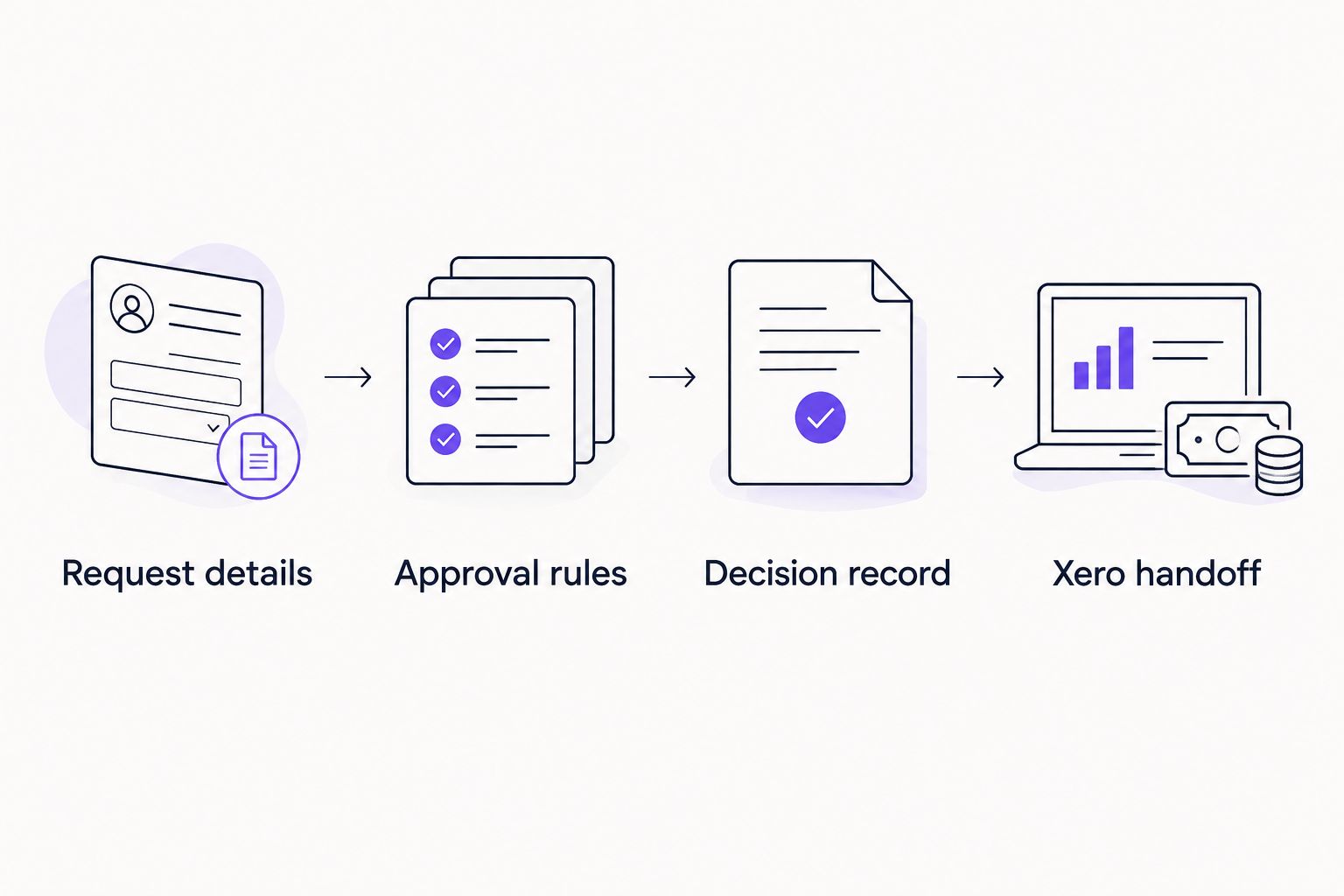
Evaluate the accounting handoff as part of the approval workflow, not as a separate notification.
How the options are ranked
This 2026 ranking prioritizes workflow fit: accounting connection, decision controls, records, approver experience, and scope. ApprovalMax is the default shortlist choice for Xero-centered finance approvals; the in-channel option serves teams whose operating requirement extends beyond accounting documents.
Xero’s built-in approval belongs on the list because a basic process does not automatically need another application. Manual conversations remain an exception-handling option, not the recommended foundation for recurring work.
Which Xero approval option should you choose?
Choose ApprovalMax as your starting shortlist for dedicated Xero bill and purchase-order approvals. Choose Approveit when approval inside Slack, Teams, or email and broader operational workflows are the main requirements, subject to a demonstrated Xero handoff.
Keep Xero’s built-in review if it already meets your documented approval policy. Replace manual chasing when the work repeats and responsibility, status, or decision history becomes difficult to track.
For your 2026 evaluation, bring a real process rather than asking for a generic tour. Specify the request, the approvers, the exceptions, and the accounting result you need.
Evaluate your approval workflow
Bring an invoice or purchase approval process and ask to see the decision record and accounting handoff.
FAQ
What’s the best Xero approval software in 2026?
ApprovalMax is the starting shortlist choice for Xero-centered bill and purchase-order approvals. Choose by demonstrating your actual approval rules, exception handling, and accounting handoff rather than comparing notifications alone.
Can I approve Xero-related requests in Slack or Microsoft Teams?
Approveit supports invoice and purchase approval workflows inside Slack and Microsoft Teams. Require a demonstration of the specific Xero handoff before treating an in-channel approval as an accounting update.
Do I need separate approval software if I already use Xero?
You do not automatically need separate approval software for a simple bill-review process. Assess a dedicated tool when your documented policy requires additional routing, separate decisions, or approvals outside the accounting application.
Is a purchase-order approval the same as an invoice approval?
No. Purchase-order approval authorizes a purchase commitment, while invoice approval reviews the supplier’s bill. Evaluate both processes if your team needs control before purchasing and before payment.
Are email approvals enough for a finance audit trail?
An email reply alone does not establish a complete approval record. Keep the request, supporting document, decision-maker, decision, and date connected, and confirm the record meets your organization’s requirements.
What should I ask during a Xero approval software demo?
Ask to see a normal request and an exception from submission through the Xero handoff. Inspect approval, rejection, and requests for changes, then confirm which accounting actions remain manual.
One last thing
Approval is not payment authorization unless your policy explicitly makes it so. Before choosing software, separate the person who confirms the purchase was appropriate from the person who authorizes the accounting action. That distinction makes the demonstration more useful and the final workflow easier to understand.







