

Instead of chasing invoice approvals through Slack messages, connect Approveit to your Slack workspace and configure a no-code approval workflow so finance can collect invoice details, route requests, and keep decisions traceable. This guide covers the connection, approval rules, and testing needed for a dependable Slack invoice approval workflow in 2026.
TL;DR
Approveit is best for finance teams with recurring invoice approvals in Slack.
Build your Slack invoice approval workflow around complete invoice details, named approvers, and traceable decisions.
Confirm workspace installation permissions before connecting accounts; Slack access alone does not establish approval authority.
Test approval and rejection before moving live invoices into the workflow.
Why this matters
An invoice posted in Slack is not the same as an approval request. Finance still needs to establish what was reviewed, who had authority to decide, and whether the decision applies to the current invoice.
Approveit invoice approval software is best for finance teams with recurring approvals in Slack. The benefit is structured approval without asking reviewers to move their decisions into another communication tool. The trade-off is setup: you must define the request information and approval responsibilities before the workflow is useful.
Use this distinction when reviewing your 2026 process:
Manual Slack messages
Best for: Occasional requests with direct oversight
Main benefit: Starts with a conversation
Main limitation: Finance must establish approval status and preserve decision context
Structured invoice approvals
Best for: Recurring requests with defined reviewers
Main benefit: Connects invoice requests with an approval process and traceable decisions
Main limitation: Requires configuration, permissions, and testing
Neither approach makes an invoice payable by itself. Approval and payment execution are separate responsibilities.
Before you start
Accounts and access: Have access to your approval software account and the intended Slack workspace. Involve the person responsible for Slack app installation if your organization restricts it.
Invoice materials: Prepare a representative invoice, its supporting context, and the people authorized to review it. Use a test copy without sensitive supplier or banking information.
The non-obvious gotcha: Confirm that approvers can open the invoice evidence. A Slack notification does not grant access to a document stored elsewhere, and workspace membership does not establish financial approval authority.
For your 2026 rollout, write down the process owner before configuring anything. That person resolves routing questions and decides when a changed invoice needs another review.
Slack connection
Treat the connection as an access decision, not just an installation task. Confirm the destination workspace and the people involved before authorizing the app.
Sign in to Approveit and open its Slack integration setup. Keep your intended Slack workspace available so you can check the destination during authorization.
Start the connection and review the Slack authorization screen. Confirm the workspace shown and read the requested permissions before granting access.
Have the authorized workspace administrator complete any required installation approval. Do not use an unrelated workspace simply because you can install apps there.
Return to the approval workspace and confirm that the Slack connection is established. Check that the people who will submit and review requests have the required access.
Agree where invoice-related discussion belongs. Keep the request itself as the reference point for the decision rather than treating unrelated messages as authorization.
Expected result: The intended Slack workspace is connected, and your test requester and approver can participate in the approval process.
Do not connect accounting systems merely to complete this stage. This guide establishes an approval workflow; it does not assume a particular accounting integration, payment connection, or synchronization behavior.
Invoice request configuration
A useful invoice request gives reviewers enough information to make a decision without searching through a separate conversation. Define that information before choosing how the request looks.
Create a workflow for invoice approvals. Give it a specific purpose, such as supplier invoice review, rather than using a general request process with unclear ownership.
Define the information requesters must supply. Include the supplier name, invoice number, invoice date, amount, currency, business purpose, and responsible budget owner.
Establish how reviewers will access the invoice and supporting evidence. Use a document reference that the intended reviewers can open, following your organization's information-sharing rules.
Explain what counts as a complete submission. For example, require the requester to identify the department responsible and explain any discrepancy with the original purchase authorization.
Assign a finance owner to check completeness. Keep this responsibility distinct from the authority to approve the underlying expense.
Expected result: A requester can submit an invoice with enough context for a reviewer to understand the obligation and inspect the supporting evidence.
These are recommended information requirements, not prescribed interface field names. Keep your form aligned with the actual decisions your finance team makes.
For the 2026 version of your request instructions, include a short definition of each ambiguous business term. A requester should know whether the amount means the invoice total, the outstanding balance, or another figure your finance policy specifies.
Avoid collecting supplier banking details in ordinary request descriptions unless your approved security process requires it. An invoice approval should not become an uncontrolled channel for changing payment instructions.
Approval routing and decision rules
The routing should answer a business question: who is authorized to approve this invoice? Do not start with everyone who wants a notification.
Name the responsible approver for the initial workflow. Use a person with documented authority for the expense, not simply the most active person in the Slack channel.
Write the reviewer's decision criteria. State whether the reviewer checks business purpose, delivery of goods or services, budget responsibility, or another defined requirement.
Separate finance checks from business approval. If your policy requires sequential reviews, configure the necessary sequence and test that a request does not finish before the required decisions are complete.
Define the rejection process. Tell requesters what to correct, who handles questions, and when a replacement request is necessary.
Document the handoff after approval. Identify who checks the completed decision and moves the invoice into the separate payment process.
Expected result: Every request has an accountable reviewer, a clear decision standard, and a defined next action after approval or rejection.
Keep notification access separate from approval authority. Someone who can read an invoice conversation is not automatically entitled to authorize the expense.
For a first rollout, use 1 invoice type and 1 clearly defined approval path. Expand only after the participants can explain the route without referring to an informal side conversation.
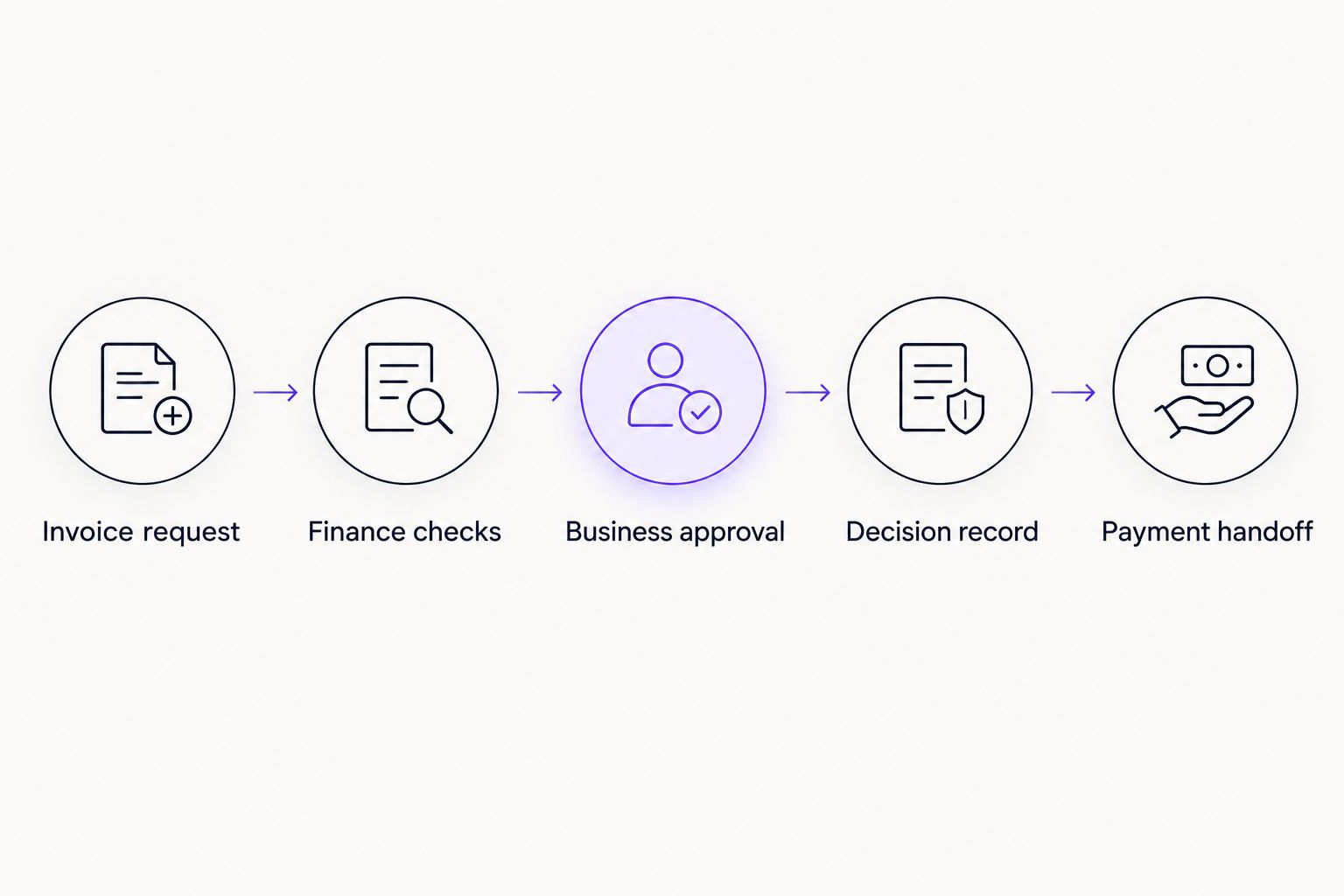
The approval decision comes before the separate payment handoff.
Use the same process names in your internal instructions: invoice request, finance checks, business approval, decision record, and payment handoff. Consistent language helps requesters distinguish a completed review from a completed payment.
End-to-end testing
Do not judge the setup by whether a Slack message arrives. Judge it by whether an authorized person can review the right invoice and finance can identify the resulting decision.
Submit 1 test invoice through the configured workflow. Use representative information and a document reference the reviewer is permitted to open.
Ask the assigned approver to review the request in Slack. Have the approver inspect the invoice evidence rather than approving from the notification alone.
Complete an approval and inspect the resulting request record. Confirm that finance can identify the invoice, the decision, and the person who made it.
Run a separate rejection test. Confirm that the requester understands the outcome and the correction process you defined.
Check any required review sequence. Verify that the workflow follows your policy rather than assuming the initial reviewer completes every approval requirement.
Record the test outcome in your 2026 launch checklist. Assign an owner to fix each problem before admitting live invoices.
Expected result: The approved and rejected test requests have understandable outcomes, and finance knows exactly what to do next.
Run at least 2 test requests: one approved and one rejected. These are test requirements for your rollout, not a claim about product performance or setup duration.
Second workflow: review invoices against purchase authorization
Use a purchase-referenced invoice workflow when reviewers need to establish whether an invoice matches a previously authorized purchase. This is a process variant, not a claim of automatic document matching.
The benefit is clearer review context. The limitation is that someone still needs to supply the correct purchase reference and assess discrepancies unless you have separately verified a matching integration.
Add the purchase-order reference or other purchase authorization to your invoice request instructions.
Require the requester to explain differences between the invoice and the authorization. Include changes in scope or quantities where relevant.
Assign the business reviewer to confirm that the invoiced goods or services were received as expected.
Define who resolves exceptions before approval. Keep unresolved discrepancies out of the payment handoff.
Test a matching request and a request with a discrepancy before adopting the variant.
Expected result: The reviewer can connect the invoice to its purchase authorization and identify exceptions without reconstructing the purchase history from Slack messages.
Keep the ordinary invoice process for requests that do not require a purchase reference. Do not add irrelevant questions to every submission merely because another department needs them.
Troubleshooting
The connection cannot be authorized
Check whether your Slack organization restricts app installation. Ask the responsible administrator to review the installation request and permissions, then confirm that the selected workspace is correct.
Do not repeat authorization across several workspaces. Resolve ownership and access in the intended workspace first.
The expected approver does not receive the request
Inspect the request's assigned reviewer and the connected workspace. Confirm that the intended person has the necessary account access and that the request was submitted rather than left unfinished.
Distinguish routing from notification delivery. Changing Slack notification preferences will not correct a request assigned to the wrong person.
The approver cannot open the invoice
Check access to the underlying document using the approver's permissions. Replace an inaccessible reference or grant access through your approved document-sharing process.
Do not solve the problem by exposing the invoice to a broader audience than necessary. Document access and workflow participation are separate controls.
Finance treats a Slack reply as the final approval
Require the designated reviewer to record the decision through the approval workflow. A conversational reply or reaction is not a substitute for your defined approval process.
Check the request record before moving the invoice onward. Finance should not infer approval from the tone of a discussion.
The invoice changes after approval
Pause the payment handoff and follow your documented correction process. Determine whether the changed amount, supplier, or scope requires a fresh approval.
Keep the previously approved version distinguishable from the revised invoice. Do not assume an earlier decision authorizes a materially different obligation.
Customize your workflow
After the initial path works, expand by business need: another department, another invoice category, or a separately defined purchase review. Change one part of the process at a time so test results remain understandable.
Review your 2026 approval policy alongside the configuration. A workflow cannot resolve an unclear delegation of authority or decide which department owns an expense.
Use the invoice approval software guide to assess broader requirements before adding more systems. Keep the next decision focused on the bottleneck: incomplete requests, unclear ownership, or missing payment handoffs.
Discuss your invoice approval workflow
Bring your invoice process, approver roles, and Slack requirements to a workflow discussion.
FAQ
How do I connect Approveit to Slack for invoice approvals?
Connect your approval account to the intended Slack workspace, authorize the requested access, and configure an invoice approval workflow. Test submission, approval, and rejection before using live invoices.
Can reviewers approve invoices without leaving Slack?
Approveit supports invoice approvals directly within Slack. Reviewers still need permission to access the invoice evidence and authority to make the financial decision.
Do I need coding skills to build a Slack invoice approval workflow?
No. Approveit provides no-code approval workflow software, but your team still needs to define invoice information, approver responsibilities, and the process after a decision.
Does approving an invoice in Slack pay the supplier?
An approval decision is not a payment instruction or confirmation of payment. Keep a separate, defined handoff to the people and systems responsible for paying the supplier.
What information belongs in an invoice approval request?
Include the supplier, invoice number, date, amount, currency, business purpose, and responsible budget owner. Give reviewers access to the invoice and any purchase authorization needed for the decision.
Can a Slack reaction count as invoice approval?
Do not treat a reaction as approval unless your organization's controlled process explicitly establishes it as an authorized decision. For a structured workflow, require the reviewer to record the decision through that workflow.
What should I test before launching invoice approvals?
Test an approved request and a rejected request, including document access and the final decision record. Also test any required review sequence and confirm the separate payment handoff.
One last thing
Test the handoff, not just the approval. A workflow can deliver a clear decision while finance still lacks an owner for the next action. Ask the payment-process owner to inspect a completed test request and explain what happens next before launch.







