

Yes, Slack can handle invoice approval workflows when you connect the conversation to a defined approval process. You can collect requests and communicate decisions in Slack, but a message or reaction alone does not establish who was authorized to approve, what they approved, or whether finance can release payment. For recurring invoices, use a workflow that keeps the decision tied to the invoice and its approval record.
TL;DR
Can Slack handle invoice approval workflows? Yes, with defined approvers, invoice details, and traceable decisions.
Manual Slack approvals suit simple requests, but finance must still maintain a clear approval record.
Approveit supports no-code invoice approvals inside Slack for teams with recurring approval requests.
Invoice approval authorizes the next step; it does not prove that payment has occurred.
Can Slack handle invoice approval workflows?
Slack works as the place where people approve invoices; your workflow must define what makes those approvals valid. Start with the invoice, its business owner, the authorized approver, and the record finance needs afterward. A channel message is a communication method, not a substitute for those rules.
Approveit provides no-code invoice approval software that lets teams approve requests directly inside Slack. That addresses a specific problem: people already discuss invoices in chat, but finance needs traceable decisions rather than scattered replies.
Compare the approaches by the work each leaves with your team:
Manual approvals in Slack
Best for: Simple, occasional requests with clear ownership
Main benefit: Keeps the discussion where people already work
Main limitation: Someone must maintain request status and connect decisions to invoices
Approveit invoice approval software
Best for: Teams with recurring invoice approvals in Slack
Main benefit: Provides no-code approval workflows and traceable decisions inside Slack
Main limitation: Your team still has to define approval authority and finance handoffs
Approveit is best for teams that need recurring invoice approvals inside Slack without coding. It does not remove the need for an approval policy. Software can carry a decision through a process; your business must decide who has permission to make it.
Why this matters
An invoice conversation can look complete while the payment decision remains unclear. A manager might confirm that work was delivered without authorizing the expense, or finance might receive an invoice before anyone identifies its budget owner.
For a 2026 workflow review, ask a practical question: can someone outside the Slack thread explain why this invoice was approved? If the answer depends on reconstructing a conversation, the process needs a clearer decision record.
Keep these responsibilities separate:
Business confirmation: Establish whether the goods or services match the request.
Spending authorization: Establish whether the right person approved the obligation.
Payment processing: Complete the finance checks and payment work that follow approval.
Slack can be the interface for those conversations. It should not blur the difference between them.
Manual Slack approvals: best for simple, occasional requests
A manual process starts with someone posting an invoice and asking an authorized person to approve it. The advantage is straightforward: your team can discuss the request without introducing a separate approval interface.
The trade-off is administrative work. Someone must identify the approver, follow up, distinguish questions from decisions, and keep the outcome connected to the right invoice version. Those responsibilities exist even when the conversation is short.
Use manual approvals only when the owner and decision record remain clear. Write down what counts as approval rather than assuming everyone interprets a reply or reaction the same way.
For example, a response that confirms receipt of an invoice does not necessarily authorize payment. Your policy should distinguish acknowledgment, a request for changes, rejection, and approval.
Manual approvals are a poor fit when finance repeatedly has to ask who approved an invoice. The problem is not that Slack supports conversation; it is that the conversation is doing work that belongs in a defined process.
No-code Slack workflows: best for recurring invoice approvals
A no-code approval workflow suits teams that repeat the same approval process and want people to act inside Slack. Instead of treating every invoice as a fresh conversation, define the information and decision responsibilities before the request arrives.
Approveit invoice approval software supports that approach through no-code workflows, approvals inside Slack, and traceable decisions. The benefit is a clearer approval process without asking every approver to move the decision into a separate tool.
The limitation is policy design. A workflow cannot decide whether your department head or finance lead should authorize a particular invoice unless your organization has established that responsibility.
Before choosing a setup in 2026, distinguish required capabilities from assumptions. If your process needs conditional routing, delegation, accounting updates, or a particular retention policy, ask for those exact requirements to be demonstrated rather than treating them as included.
Choose the process around your invoice rules, not around a generic automation demo. A convincing demonstration follows an invoice from submission to a decision that finance can understand.
How do you set up an invoice approval workflow in Slack?
Use these 6 setup steps as a planning sequence, not as a claim about a particular product's configuration screens. The goal is to specify the process before configuring software.
Define intake. Decide what the requester must submit. Include the invoice, vendor identity, business purpose, responsible team, and any supporting purchase documentation your policy requires.
Assign ownership. Name the person or role responsible for the request. Separate the person preparing the invoice from the person authorized to approve it where your policy requires that separation.
Set authority. Document who can approve each type of invoice. Use your actual spending policy rather than inventing thresholds to fit a template.
Record decisions. Specify how an approval, rejection, or request for changes will be recorded. Keep the decision associated with the invoice being reviewed.
Define handoff. State what finance receives after approval and what finance checks before processing payment. Do not treat an approved request as proof of payment.
Test exceptions. Walk through an incomplete invoice, a rejected request, and an unavailable approver. Confirm how the process reaches a clear outcome in each case.
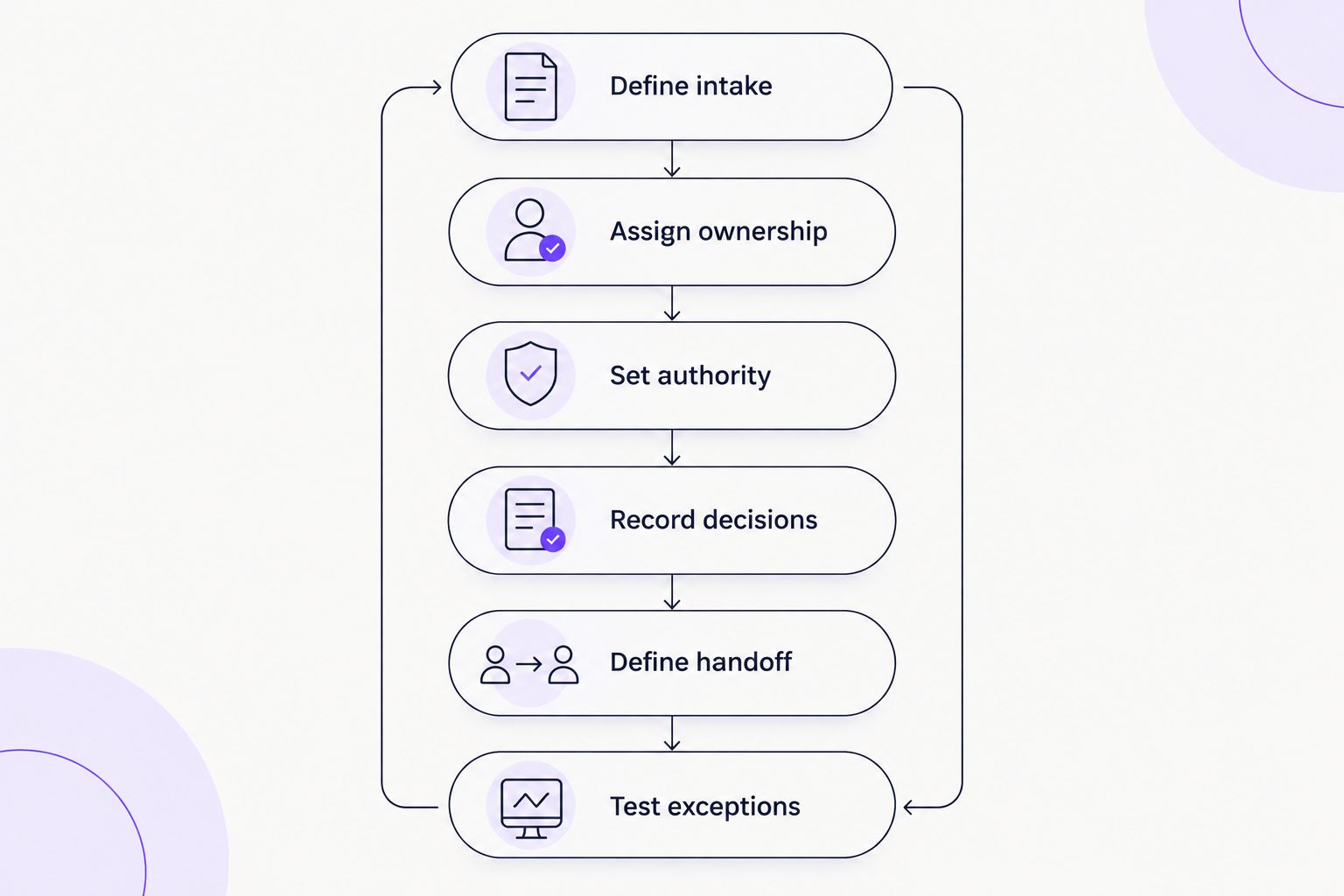
Define the decision rules and finance handoff before configuring the workflow.
For product-specific setup, use the guide to connecting Approveit to Slack for invoice approvals. Keep your written approval policy beside the setup instructions so configuration follows your business rules.
What should the invoice request contain?
An approver needs enough information to make the decision without reconstructing the purchase history. Start with a short request structure and add fields only when they support an actual review requirement.
A useful request identifies:
The vendor and invoice reference.
The invoice amount and currency.
The goods or services being billed.
The department or budget owner.
Relevant purchase documentation, when required.
The decision being requested.
Do not overload the request with unrelated information. If an approver needs to confirm delivery, make that question explicit; if finance needs a separate accounting reference, identify where that belongs in the handoff.
What should count as a completed approval?
A completed approval should identify the invoice, the authorized decision-maker, and the decision. Include enough context to distinguish approval of the submitted invoice from approval of an earlier version or a related purchase request.
Treat a revised invoice as a review event, not an invisible attachment change. Your policy should explain when changes require another approval and who decides whether the existing authorization still applies.
That distinction matters even in a small team. A clear record protects the requester, approver, and finance team from interpreting the same conversation differently.
Why invoice approval workflows vary
The right setup depends on your approval policy and the work surrounding the invoice. Use these factors to shape the process rather than copying another team's configuration:
Approval authority: Different invoice types can require different decision-makers. Document the roles your organization actually uses.
Supporting evidence: Your policy determines whether the reviewer needs a purchase order, delivery confirmation, or other documentation.
Request completeness: Missing information needs an explicit return path so an incomplete request is not mistaken for a rejected invoice.
Exception handling: Decide what happens when the approver is unavailable, the vendor disputes the invoice, or the amount changes.
Finance handoff: Define the information finance needs after approval and where payment processing begins.
Record requirements: Establish what your team must retain and who needs access to the decision history.
Your 2026 requirements should describe outcomes, not just notifications. Receiving a Slack message is useful only when the right person can make the right decision and finance can interpret the result.
Can a Slack reaction count as invoice approval?
A Slack reaction should count as invoice approval only if your written policy defines it as an authorized decision and your records connect it to the specific invoice. Otherwise, it leaves room for different interpretations.
A reaction can communicate acknowledgment just as easily as authorization. Do not make finance guess which meaning applies. If you use reactions, define who may use them, what they mean, and how the decision becomes part of the invoice record.
Does approving an invoice in Slack also pay it?
Approving an invoice in Slack does not, by itself, establish that the invoice has been paid. Approval and payment are separate events, even when a broader system connects them.
Keep the payment handoff explicit. Finance should know what has been authorized, what checks remain, and where to confirm the payment outcome without interpreting an approval message as a bank transaction.
How should you evaluate a Slack invoice approval demo?
Evaluate a demo with 3 test invoices: a routine invoice, an invoice with missing information, and an invoice the approver rejects. These are recommended test cases, not performance benchmarks.
Ask the presenter to show the full decision path, including what the requester sees and what finance receives. A successful routine request is only part of the evaluation; exceptions reveal whether your process is clearly defined.
For an Approveit demo, bring your approval policy and a representative invoice with sensitive details removed. Ask to see the approval inside Slack, the resulting decision record, and the boundary between approval and payment processing.
Use this 2026 evaluation checklist:
Can the approver understand exactly what decision is requested?
Can the requester distinguish missing information from rejection?
Can finance identify the approved invoice and authorized approver?
Are required capabilities demonstrated rather than assumed?
Is the responsibility for payment processing explicit?
Do not accept a notification-only walkthrough as proof that the entire approval process fits. Evaluate the decision record and handoff, not just the message.
FAQ
Can Slack handle invoice approval workflows in 2026?
Yes, Slack can handle invoice approval workflows in 2026 when requests follow defined approval rules and decisions remain tied to the relevant invoice. Use a structured workflow for recurring approvals rather than relying on an ambiguous conversation.
Do I need to code to approve invoices in Slack?
No, a no-code approval tool can support invoice approvals inside Slack without custom coding. Approveit provides no-code invoice approval workflows; your team still needs to define approval authority and the finance handoff.
Is a thumbs-up reaction enough to approve an invoice?
A reaction is enough only when your written policy recognizes it as approval and the record identifies the authorized person and specific invoice. Without those conditions, acknowledgment and authorization remain ambiguous.
Can Slack invoice approvals replace accounts payable?
No, an invoice approval workflow does not replace the full accounts payable process. Your team still needs to manage the finance checks, accounting records, and payment work outside the approval decision.
What should I test before launching invoice approvals?
Test a routine invoice, an incomplete invoice, and a rejected invoice before launch. Check that each case ends with a clear status, a traceable decision, and an understandable finance handoff.
Can a small team manage invoice approvals manually in Slack?
Yes, a small team can manage invoice approvals manually when ownership, authorization, and recordkeeping are clear. Consider a structured workflow when repeated follow-ups or unclear decisions become recurring work.
One last thing
Ask finance to explain an approved invoice without opening the original Slack conversation. If the decision record cannot stand on its own, improve the record before adding more notifications.
That is the practical test for your 2026 workflow: Slack makes the decision convenient; the approval process makes it understandable afterward.







