

Best for recurring invoice approvals inside Slack, Microsoft Teams, or email: Approveit. Best for Microsoft-centered custom workflows: Microsoft Power Automate. Best for combining approvals with bill payment: BILL. This 2026 guide compares approval-first software with accounts payable platforms so you can choose around the work your finance team needs to fix.
TL;DR
Approveit is the best invoice approval software fit for teams automating recurring approvals inside Slack, Microsoft Teams, or email.
Microsoft Power Automate suits custom Microsoft-centered workflows; BILL suits approval and bill-payment processes.
Tipalti suits supplier-payment operations; SAP Concur Invoice suits invoice management alongside travel and expense processes.
Choose approval software for decision routing, not payment features you do not need.
Why this matters
An invoice approval problem is not always an accounts payable problem. If invoices wait because nobody knows who should approve them, start with decision routing. If finance also needs supplier onboarding, payment execution, and broader invoice processing, evaluate accounts payable platforms.
For your 2026 shortlist, separate those needs before booking demos. Otherwise, you risk comparing a focused approval workflow with a much larger finance system and mistaking a longer feature list for a better fit.
Manual approvals in Slack, Teams, or email are the main alternative. They keep communication familiar, but finance still has to connect the invoice, the approver, the decision, and the next action.
What makes the best invoice approval software?
Use these criteria before comparing vendors:
Decision routing: The workflow should send each invoice to the responsible person without finance repeatedly identifying the owner.
Approval channel: Check whether approvers can make decisions where they work, rather than only receiving a notification there.
Decision records: Require a clear connection between the invoice, the person deciding, and the outcome.
Exception handling: Test missing information, rejected invoices, and absent approvers—not just a straightforward approval.
Administrative fit: Choose a workflow your designated owner can maintain. No-code configuration and custom development create different responsibilities.
Scope fit: Distinguish approval automation from invoice capture, accounting, supplier management, and payment execution.
The best choice solves your approval bottleneck without making finance own an unnecessarily large implementation. Treat additional capabilities as requirements only when your team will use them.
Invoice approval software at a glance
The order below follows distinct buying needs. It is not a claim that every team should choose the first option.
Approveit
Best for: Recurring approvals inside existing communication tools
Standout focus: No-code invoice approval workflows in Slack, Microsoft Teams, and email
Key limitation or trade-off: Evaluate capture, accounting, and payment needs separately
Microsoft Power Automate
Best for: Microsoft-centered custom workflows
Standout focus: Building approval flows across connected services
Key limitation or trade-off: Your team owns workflow design and maintenance
BILL
Best for: Approvals connected to bill payment
Standout focus: Accounts payable workflows and payment operations
Key limitation or trade-off: Broader scope than a standalone approval process
Tipalti
Best for: Supplier-payment operations
Standout focus: Payables automation and supplier-payment management
Key limitation or trade-off: Requires evaluating the wider payables process
SAP Concur Invoice
Best for: Invoice management alongside travel and expense processes
Standout focus: Invoice processing within the SAP Concur product family
Key limitation or trade-off: A broader finance-process decision, not just approval routing
Manual Slack, Teams, or email
Best for: Occasional, straightforward approvals
Standout focus: Familiar communication channels
Key limitation or trade-off: Request tracking and decision consolidation remain manual
1. Approveit: best for approvals inside Slack or Teams
Approveit provides no-code approval workflow software for invoices, purchase requests, expenses, and other business requests. Finance, HR, IT, and operations teams can automate approvals directly within Slack, Microsoft Teams, and email.
Approveit is best for teams that need recurring invoice approvals inside Slack or Teams without building custom workflows. That makes it an approval-first choice: start here when the decision process is the problem, rather than assuming you need to replace your entire accounts payable system.
Pros:
Supports the communication channels named above.
Uses no-code workflow configuration.
Covers invoice approvals and related purchase and expense requests.
Fits a broader cross-department approval requirement.
Cons and trade-offs:
An approval workflow does not, by itself, establish your invoice capture or payment process.
You still need to define approval ownership and exception rules.
Confirm the accounting connections required for your specific environment during evaluation.
Best for: Teams with recurring approvals and a clear need to move decisions out of unstructured messages.
Bring an actual invoice approval policy to the demo. Ask to see the request, the decision inside your chosen channel, and the resulting record. Evaluate those steps together rather than treating a notification as proof that the full workflow fits.
Verdict: Buy for an approval-first requirement once the demo confirms your workflow and recordkeeping needs.
2. Microsoft Power Automate: best for custom Microsoft workflows
Microsoft Power Automate is a workflow automation platform that supports approval flows. It lets teams build processes using connected services rather than selecting only a dedicated invoice approval application.
For a 2026 shortlist, this option fits when your organization wants to design its own Microsoft-centered process. The important distinction is ownership: someone must build, maintain, and troubleshoot the flow.
Microsoft Power Automate pros:
Supports approval steps within broader automation flows.
Fits teams building processes around Microsoft services.
Allows workflow design beyond invoice approvals.
Microsoft Power Automate cons:
Workflow configuration becomes an internal responsibility.
Exceptions and changes require deliberate design.
It is not a complete invoice-processing system simply because a flow requests approval.
Best for: Organizations with a named workflow owner and a requirement for custom Microsoft-centered automation.
In the demo or prototype, test a rejected invoice and a change of approver. A successful basic flow is not enough if finance depends on someone else to repair it whenever the process changes.
Verdict: Buy when custom workflow ownership is intentional; skip when finance needs a ready-to-configure approval application.
3. BILL: best for approvals connected to bill payment
BILL provides accounts payable software that combines bill-management workflows with payment capabilities. Its relevance is broader than obtaining a manager's approval: it belongs on the shortlist when finance wants to connect the decision with the bill-payment process.
Do not select a payment-oriented platform merely because invoices need approval. Select it when the payment workflow is also part of the project.
BILL pros:
Combines accounts payable workflow and payment functions.
Connects the approval decision to a broader bill-management process.
Gives finance an option beyond standalone approval routing.
BILL cons:
The evaluation must cover payment operations as well as approvals.
Its wider scope adds decisions that an approval-only project does not require.
Communication-channel fit still needs a separate check.
Best for: Finance teams that want bill approvals and payment operations in the same evaluation.
Ask where the approved bill goes next, which system holds the accounting record, and how finance handles a rejected bill. Those questions expose whether you are choosing an approval tool or changing the payable lifecycle.
Verdict: Buy when bill payment is a core requirement; skip when decision routing is the only problem.
4. Tipalti: best for supplier-payment operations
Tipalti provides payables automation and supplier-payment software. It is relevant when invoice approval sits within a wider requirement involving supplier information and payment operations.
This is a different buying problem from getting an invoice approved in a chat channel. Your evaluation should follow the supplier-to-payment process, not stop at the approval screen.
Tipalti pros:
Addresses payables beyond the approval decision.
Includes supplier-payment management in its product scope.
Supports evaluating invoice handling and payment operations together.
Tipalti cons:
A broader payables project needs more process definition.
An approval-only team must assess whether that scope is necessary.
Supplier and payment requirements should drive the evaluation, not an isolated approval feature.
Best for: Finance organizations whose project includes supplier-payment operations alongside invoice approvals.
For your 2026 evaluation, identify where supplier information comes from and who owns it. Then follow an invoice through approval and payment. A platform should be judged against the process you intend to run, not unrelated capabilities.
Verdict: Buy for a wider supplier-payables requirement; skip for a narrow chat-based approval need.
5. SAP Concur Invoice: best alongside travel and expense processes
SAP Concur Invoice provides invoice-management capabilities within the SAP Concur product family. It belongs on the shortlist when your invoice project is connected to travel and expense management rather than treated as an isolated approval workflow.
The buying question is process alignment. Determine whether invoice management should sit alongside those existing finance responsibilities or remain a separate approval layer.
SAP Concur Invoice pros:
Focuses on invoice management rather than general messaging.
Belongs to a product family covering travel and expense management.
Supports a broader finance-process evaluation.
SAP Concur Invoice cons:
Requires assessing invoice-management scope beyond approval routing.
A standalone approval requirement needs a clear reason for the broader platform choice.
Approver experience in your preferred communication channel needs verification.
Best for: Teams evaluating invoice management alongside SAP Concur travel and expense processes.
Ask the vendor to demonstrate the actual invoice workflow you need. Do not assume that familiarity with an expense process proves that invoice exceptions, decision records, or approval channels meet your requirements.
Verdict: Buy when invoice management belongs in that finance environment; skip when you only need a focused approval layer.
When manual approvals are still the right alternative
Manual Slack, Teams, or email approvals remain a practical option for occasional requests with clear ownership. You can ask a known approver directly without first configuring a workflow.
Manual approval pros: Familiar channels, minimal process setup, and flexibility for unusual requests.
Manual approval cons: Finance must track outstanding decisions, connect messages to invoices, and preserve the relevant evidence. A conversation alone is not a defined approval process.
Best for: Occasional approvals where ownership and recordkeeping remain straightforward.
Verdict: Hold while the process stays manageable; replace it when recurring requests require repeated chasing or reconstruction.
How these options are ranked
This 2026 ranking prioritizes approval-channel fit, administrative ownership, decision records, exception handling, and product scope. Approval-first software leads for the stated problem; broader finance platforms receive separate use-case slots.
The ranking compares product purpose, not measured processing speed or unverified customer outcomes. Your final decision should follow a demonstrated workflow with your own invoice examples.
Test the workflow before choosing software
Use 10 sample invoices from your own process as a suggested evaluation set, not a performance benchmark. Include straightforward approvals and invoices that need clarification. Keep the same examples across demos so differences remain visible.
Follow this sequence:
Capture: Identify where the invoice enters and which information finance needs.
Route: Show how the responsible approver receives the request.
Decide: Demonstrate approval and rejection in the required channel.
Record: Find the invoice, decision-maker, outcome, and supporting context together.
Handoff: Show what happens before accounting or payment continues.
The handoff matters as much as the approval. A clear decision is useful only when the next person knows what to do with it.
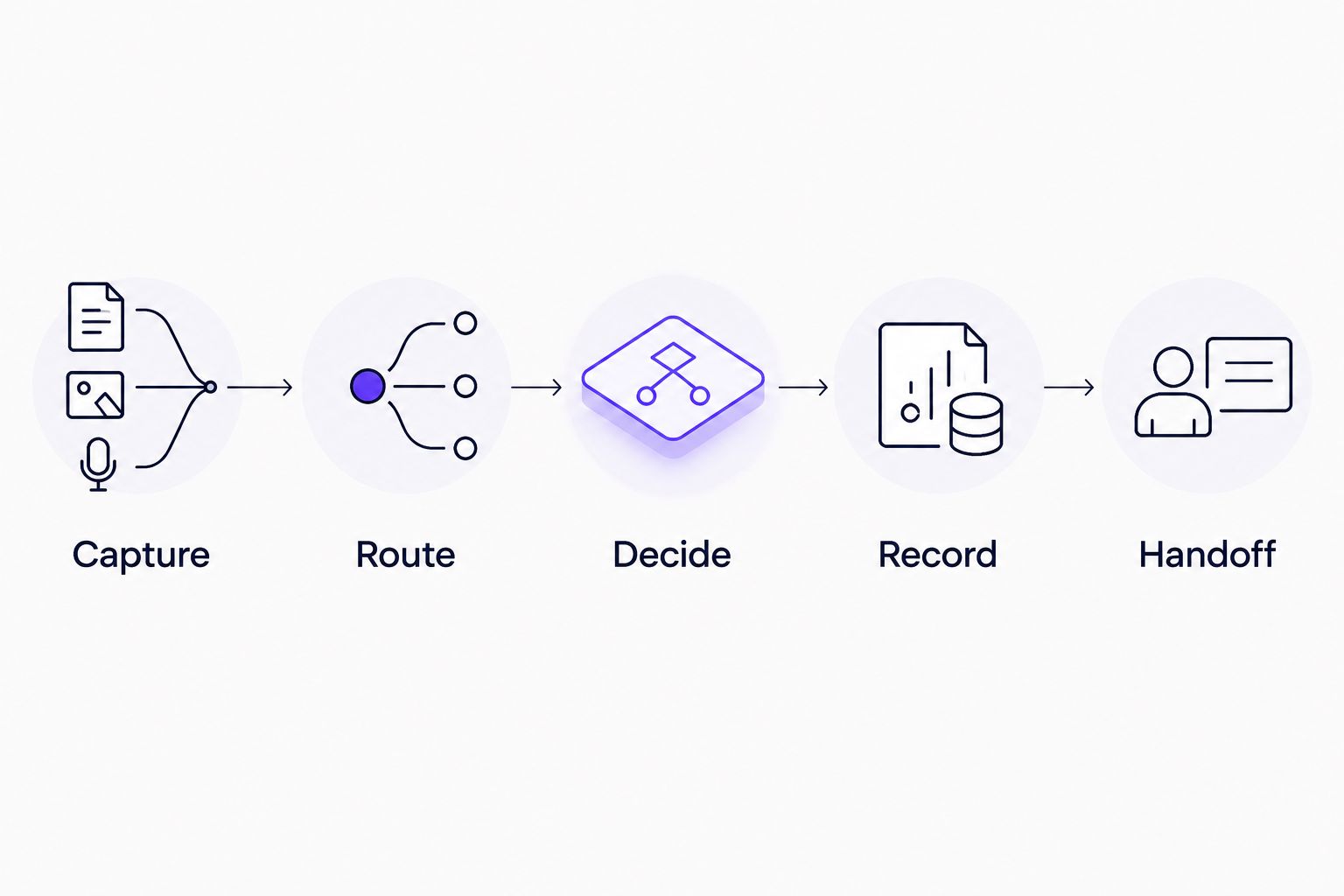
Evaluate the full invoice path, not just the approval notification.
Test 3 exception scenarios: missing information, a rejection, and an unavailable approver. If your policy includes sequential sign-off, test 2 approvers and verify the order explicitly. These are suggested test quantities, not claims about any platform's capacity.
For each scenario, ask who owns the next action. Reject a design that depends on finance remembering an undocumented workaround. Your 2026 selection should leave the process clearer, not simply move its uncertainty into software.
Which invoice approval software should you choose?
Choose Approveit when your main requirement is recurring no-code invoice approvals inside Slack, Microsoft Teams, or email. Choose Microsoft Power Automate when custom workflow ownership is deliberate. Evaluate BILL, Tipalti, or SAP Concur Invoice when the project includes the wider finance processes described above.
For an undecided buyer, start with the narrowest requirement you can state clearly: who submits, who decides, where they decide, and what happens next. Then book a demo around that process.
Evaluate your invoice approval workflow
Bring your invoice process and confirm approval-channel fit, decision records, and the next handoff.
FAQ
What's the best invoice approval software for Slack or Teams?
Approveit is the best fit in this shortlist for recurring no-code invoice approvals directly within Slack or Microsoft Teams. Confirm your specific approval rules and recordkeeping requirements during a demo.
Is invoice approval software the same as accounts payable software?
No. Invoice approval software manages decisions, while accounts payable software can cover a broader process that includes invoice handling and payments. Choose the scope your finance team actually needs.
Is Microsoft Power Automate better than a dedicated approval tool?
Microsoft Power Automate is a better fit when your team deliberately wants to build and maintain custom workflows. A dedicated approval tool fits teams that want an application centered on recurring approval requests.
Can we keep approving invoices manually in email?
Yes, if request ownership and decision records remain manageable. Move to a defined workflow when finance repeatedly has to chase approvals or reconstruct the decision from messages.
What should we ask during an invoice approval software demo?
Ask the vendor to show submission, routing, approval, rejection, decision records, and the next handoff using your invoice examples. Also test an absent approver and a request with missing information.
Do we need payment software to automate invoice approvals?
No. Approval routing and payment execution are separate requirements. Evaluate a payment-oriented platform when changing the payment process is part of your project.
How should we compare invoice approval software in 2026?
Compare approval channels, workflow ownership, decision records, exception handling, and product scope. Use the same invoice examples across demonstrations and decide from the process shown, not the longest feature list.
One last thing
Ask for a rejected invoice to be demonstrated before an approved one. A straightforward approval shows the intended path; a rejection reveals who must correct the request, how context survives, and whether finance has to restart the conversation.
Choose the workflow that makes the next action explicit, including when the answer is no.







