

Best overall: Approveit is the best approval software for Slack for teams with recurring finance, HR, IT, and operations requests. Best for basic intake: Slack Workflow Builder; best for occasional internal decisions: manual Slack approvals; best for reviewers outside Slack: email approvals.
TL;DR
The best approval software for Slack puts recurring decisions inside Slack while preserving a traceable approval record.
Slack Workflow Builder fits basic request intake; evaluate decision tracking separately from form submission.
Manual Slack approvals fit occasional decisions, not recurring purchase-order approvals with multiple reviewers.
Email approvals fit reviewers outside Slack, but you must maintain request status and decision records.
Why this matters
A message saying approved is not the same as a managed approval process. You also need to know which request was approved, who made the decision, and whether another reviewer must act before work begins.
For a 2026 shortlist, start with the workflow rather than the app directory. An invoice approval needs a clear payment decision. A time-off request needs dates and an accountable reviewer. An access request needs a named resource and an explicit decision about access.
The main choice is structured approval software versus manual coordination in tools your team already uses. Keep a manual process when requests are occasional and ownership is obvious. Choose dedicated software when recurring requests need consistent routing and a retrievable decision record.
What makes the best approval software for Slack
Use these criteria before comparing options. A Slack notification alone does not establish that a tool manages approvals.
Decision location: Can the reviewer approve inside Slack, or does the message only direct them elsewhere?
Request structure: Does the process collect the information needed to decide, rather than accepting an incomplete message?
Routing clarity: Can you identify the responsible approver and distinguish sequential review from parallel discussion?
Decision records: Can you retrieve the request, reviewer, decision, and supporting context without reconstructing a conversation?
Setup effort: Can the process owner maintain the workflow without writing code?
Exception handling: What happens when information is missing, a request is rejected, or the assigned reviewer changes?
For your 2026 evaluation, ask each candidate to demonstrate an actual request from submission through its final decision. Screenshots of notifications do not answer these questions. A working example does.
Slack approval options at a glance
This ranking separates approval management from intake and communication. Each option serves a different use case; the lower-ranked options remain useful when you do not need a dedicated approval system.
Approveit
Best for: Recurring cross-functional approvals
Standout feature: No-code approval workflows inside Slack, Microsoft Teams, and email
Key limitation: A defined workflow still needs a process owner
Slack Workflow Builder
Best for: Basic request intake
Standout feature: Forms and workflow steps within Slack
Key limitation: Intake automation does not establish a complete approval record
Manual Slack approvals
Best for: Occasional internal decisions
Standout feature: Reviewers discuss and respond in the existing conversation
Key limitation: You must track ownership, status, and decisions manually
Email approvals
Best for: Reviewers outside Slack
Standout feature: Requests reach people through email
Key limitation: Threads require manual coordination and recordkeeping
The table is a 2026 buying guide, not a performance benchmark. The ranking follows the suitability of each approach for recurring approvals, with manual alternatives retained for simpler cases.
1. Approveit: best Slack approval software for recurring requests
This no-code approval workflow software handles invoice, purchase, expense, and other requests directly within Slack, Microsoft Teams, and email. Finance, HR, IT, and operations teams can use it to replace repeated message chasing with a defined approval process.
The strongest fit is a team that already knows which requests recur and who should decide. Keep the decision in the communication tool, but give the request a structure and a traceable record. That is a different job from simply posting an alert in a channel.
Approveit pros:
Supports recurring approval work across finance, HR, IT, and operations.
Lets reviewers act within Slack rather than making a separate tool the required destination for every decision.
Provides no-code workflow setup.
Supports traceable decisions and audit records.
Approveit cons:
You still need to define request information, approvers, and exceptions before automating the process.
A dedicated approval workflow is unnecessary for a rare, informal decision that needs no ongoing tracking.
Best for: Teams with recurring invoice, purchase, expense, employee, and access requests that need consistent handling.
Bring a real invoice or purchase request to a demonstration. Ask to see the request submitted, routed, decided, and retrieved afterward. Check that the decision record contains the context your team needs, not just a completion status.
Verdict: Buy for recurring approvals that need defined ownership and traceable decisions inside Slack.
2. Slack Workflow Builder: best for basic request intake
Slack Workflow Builder lets you create workflows using forms and steps in Slack. It fits a request process where the immediate problem is collecting consistent information and sending it to the right place.
Treat intake and approval as separate requirements. A form submission creates a request; it does not, by itself, prove that an authorized reviewer approved it. Evaluate how your proposed workflow records that distinction.
Slack Workflow Builder pros:
Keeps request intake in the Slack environment.
Uses forms to collect structured information.
Connects workflow steps without requiring every requester to compose a new message format.
Slack Workflow Builder cons:
A request-intake workflow still needs an explicit method for recording decisions.
The usefulness of the approval process depends on the steps and controls you configure.
Best for: Teams standardizing a simple internal request before deciding whether dedicated approval software is necessary.
For example, collect the requested software, business reason, and intended user. Then examine what happens after submission. If someone must search the thread and update a separate tracker, you have improved intake without resolving approval management.
Verdict: Hold for basic intake; choose it only after confirming how the complete decision process works.
3. Manual Slack approvals: best for occasional internal decisions
Manual Slack approvals use a message or thread to present a request and collect a response. They suit an occasional decision where the requester and reviewer already understand the context.
Use explicit decision wording. A reaction or acknowledgment does not explain whether the reviewer approved the request, approved only part of it, or asked for a change.
Manual Slack approvals pros:
Keep the request and discussion in an existing channel or conversation.
Let reviewers ask clarifying questions in the same thread.
Require no separate workflow configuration.
Manual Slack approvals cons:
Someone must maintain request status and follow up with the responsible reviewer.
Decision context becomes harder to reconstruct when messages, revisions, and follow-up questions are scattered.
A conversation does not enforce a defined approval sequence.
Best for: Infrequent internal requests with a clear reviewer and no need for repeatable routing.
Set a message template even for this simple approach. Include the request, the business reason, the requested decision, and the reviewer. Require an explicit approval or rejection tied to that request.
Verdict: Hold for occasional decisions; skip it as the default for recurring, multi-reviewer approvals.
4. Email approvals: best for reviewers outside Slack
Email approvals send a request and supporting information to a reviewer through email. They fit situations where the person making the decision does not participate in your Slack workspace.
The channel solves access to the conversation, not workflow ownership. Your team still needs a method for identifying the current reviewer, recording the decision, and separating the final request from earlier versions.
Email approvals pros:
Let reviewers respond without joining a Slack conversation.
Keep written explanations and supporting attachments with the discussion.
Support direct requests to a named decision-maker.
Email approvals cons:
Forwarding and reply chains can split the request context across threads.
You must track pending requests and final decisions separately when the thread does not provide a usable status record.
Sequential review requires someone to coordinate the handoff.
Best for: Occasional requests involving reviewers who work outside your Slack environment.
Use a clear subject and ask for a specific decision. When the scope changes, state what changed before asking for approval again. Do not treat approval of an earlier version as approval of a revised request.
Verdict: Hold for outside reviewers; skip unmanaged email threads as your recurring internal approval system.
How we ranked these Slack approval options
The ranking prioritizes decision location, request structure, routing clarity, decision records, setup effort, and exception handling. Dedicated approval software takes the default position because it addresses recurring approval management rather than only intake or discussion.
Slack Workflow Builder takes the basic-intake slot. Manual Slack takes the occasional internal-decision slot. Email takes the outside-reviewer slot. Those distinctions matter more than a general feature checklist.
For a 2026 purchase decision, apply the criteria to your own request. Do not choose the most elaborate process if your actual requirement is a single occasional decision.
Use an invoice workflow to test the shortlist
A realistic example exposes the difference between a notification and an approval process. Use an invoice with 2 approval stages: a budget owner confirms the purchase context, then finance authorizes the next step under your policy. These are example roles, not a required product configuration.
Collect 5 intake fields for this exercise: supplier, invoice reference, amount, business purpose, and supporting document. The point is not the field count. It is whether the reviewer receives enough information to decide without restarting the conversation.
Run the example through these stages:
Request intake: Submit the invoice with its supporting context.
Budget review: Ask the budget owner for an explicit decision.
Finance review: Route the approved request to finance for the next decision.
Decision record: Retrieve the request and its approval history.
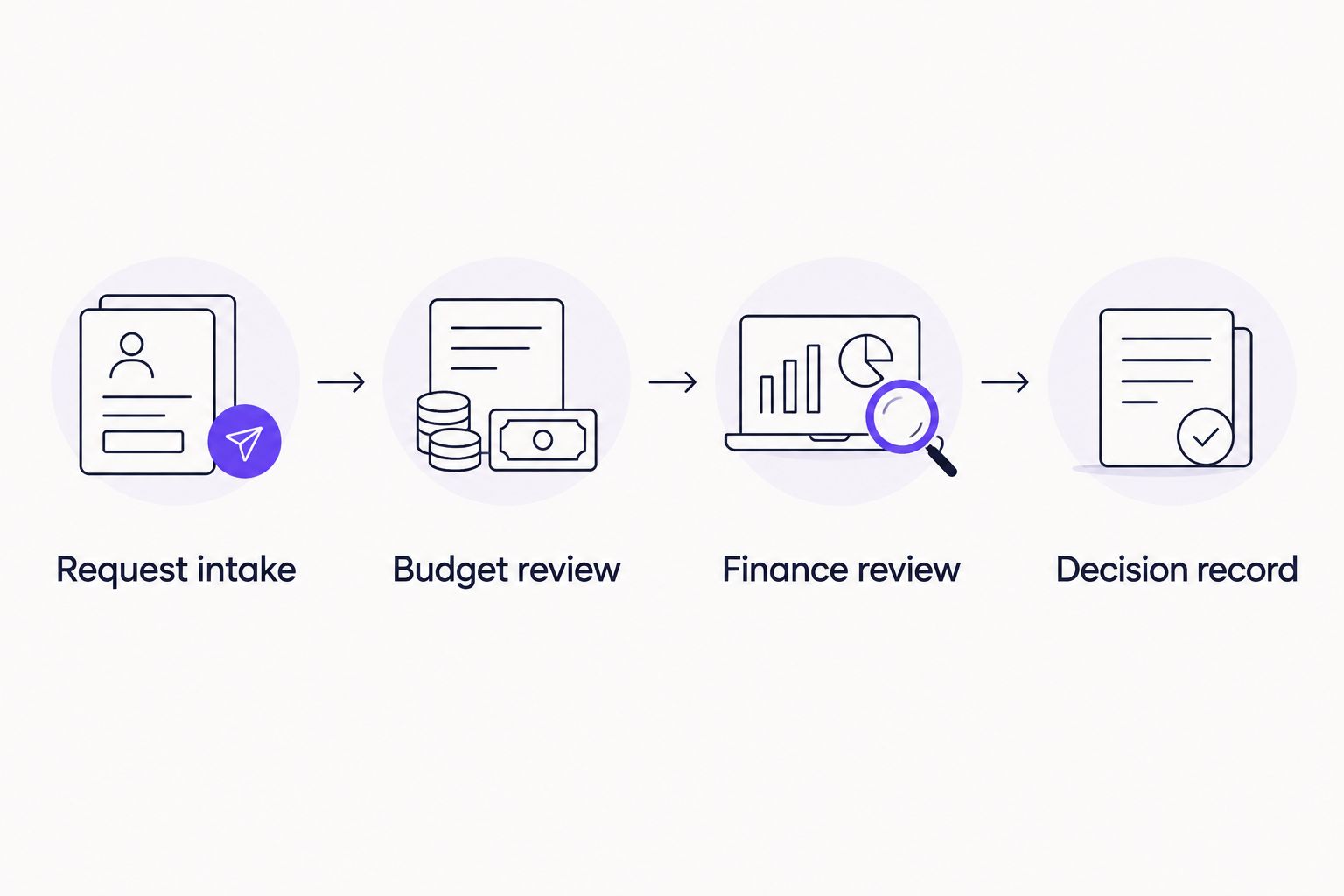
An approval process must preserve the decision, not just deliver the request.
Then test 3 exception cases: missing documentation, rejection, and a revised request. Ask who owns each case and what the requester sees. Keep these questions tied to your policy rather than assuming every workflow should behave identically.
For purchase requests, use the same exercise before a commitment is made. The purchase-order approval software guide covers that specific buying decision. Keep invoice review and purchase authorization distinct when your policy assigns them different purposes.
Which Slack approval option should you choose?
Choose Approveit for recurring Slack approval workflows that need no-code setup and traceable decisions. It is the default recommendation for finance, HR, IT, and operations teams replacing repeated manual coordination.
Choose Slack Workflow Builder when consistent intake is the main problem and you can demonstrate an adequate decision process around it. Keep manual Slack for occasional internal decisions. Use email when the reviewer is outside Slack, with a named owner responsible for the record.
For your 2026 rollout, start with one recurring request type. Document who submits it, who approves it, and what happens after rejection. Expand only after the complete process works for that request.
Review your approval workflow
Explore no-code approvals for recurring finance, HR, IT, and operations requests inside Slack.
FAQ
What's the best approval software for Slack in 2026?
Dedicated no-code approval software is the best fit for recurring requests that need routing and traceable decisions inside Slack. Use a real invoice, purchase, or employee request to evaluate the complete process, including rejection and record retrieval.
Can I manage approvals manually in Slack?
Yes, manual Slack approvals work for occasional internal decisions with a clear reviewer. Use an explicit written decision and keep it tied to the request; someone still needs to track status and follow-up.
Is Slack Workflow Builder enough for invoice approvals?
Slack Workflow Builder is enough only when your configured process meets your invoice approval requirements. Forms and workflow steps help with intake, but you must separately verify decision recording, reviewer ownership, and exception handling.
What's the difference between an approval notification and an approval workflow?
An approval notification tells someone that a request needs attention; an approval workflow manages the request through a defined decision process. Evaluate who can decide, what happens next, and how the decision is recorded.
Should purchase orders and invoices use the same approval process?
Purchase orders and invoices should follow the responsibilities and decision points defined in your purchasing policy. Purchase authorization and invoice review serve different purposes, so do not combine them solely because both involve spending.
How do I choose approval software for HR and IT requests?
Choose approval software by testing a real time-off, employee, access, or software request from submission to decision. Confirm that the process captures the necessary context and assigns the decision to the correct reviewer.
What should I bring to a Slack approval software demo?
Bring a recurring request, its required information, the approver sequence, and an exception example. Ask to see submission, approval, rejection, and retrieval of the decision record rather than only the Slack notification.
One last thing
Test a rejection before you celebrate an approval. A successful request follows the expected path; a rejected request reveals whether ownership, feedback, and resubmission are clear.
Ask a reviewer to reject the example invoice because its supporting document is missing. Then check whether the requester knows what to fix and whether the next decision refers to the corrected request. That exercise tests the process you will actually depend on.







