

Best overall for approvals in Slack, Microsoft Teams and email: Approveit; best for Microsoft-centered automation: Microsoft Power Automate; best for form-led intake: Jotform Approvals. This 2026 guide compares approval workflow software by where requests start, how decisions move and what your team must maintain.
TL;DR
Approveit is the best fit for teams seeking no-code approval workflow software within Slack, Microsoft Teams and email.
Microsoft Power Automate suits Microsoft-centered automation; Jira Service Management suits IT service requests.
Jotform Approvals suits form-led intake; Process Street suits approvals embedded in repeatable procedures.
Choose approval automation around routing, decision records and ownership—not the longest feature list.
Why this matters
An approval is more than a notification. Your process needs a named decision-maker, enough information to decide and a clear next action after approval or rejection.
For your 2026 shortlist, separate dedicated approval tools from general automation and work-management platforms. Both can support decisions, but they place different setup and maintenance responsibilities on your team. Start with the request you need to control, not the platform with the broadest scope.
What makes the best approval workflow software
Request intake: Capture the information an approver needs before routing begins.
Decision routing: Match approval responsibilities to your actual policy.
Working channel: Put decisions where your approvers already work.
Decision records: Check how approval history can be retrieved and reviewed.
Process ownership: Identify who maintains rules when responsibilities change.
Treat these as evaluation criteria, not assumed capabilities. During a demonstration, ask each vendor to show your actual workflow rather than a generic request.
Approval workflow software at a glance: 2026 shortlist
Approveit
Best for: Approvals in existing communication channels
Standout approach: No-code approvals in Slack, Microsoft Teams and email
Key limitation or trade-off: Approval automation does not replace your business policy
Microsoft Power Automate
Best for: Microsoft-centered automation
Standout approach: Approval actions within broader automated flows
Key limitation or trade-off: Flow design needs an owner
Jira Service Management
Best for: IT service requests
Standout approach: Approvals within service-request workflows
Key limitation or trade-off: Requires service-management configuration
Kissflow
Best for: Cross-department process applications
Standout approach: No-code process design
Key limitation or trade-off: Broader process scope adds design decisions
Pipefy
Best for: Stage-based operational requests
Standout approach: Requests organized through process stages
Key limitation or trade-off: Stage structure needs maintenance
Process Street
Best for: Repeatable procedure checkpoints
Standout approach: Approvals within recurring workflows
Key limitation or trade-off: Procedure structure comes before automation
Jotform Approvals
Best for: Form-led intake
Standout approach: Form submissions feed approval flows
Key limitation or trade-off: Forms need careful information design
monday.com
Best for: Board-based operational work
Standout approach: Boards, statuses and automations
Key limitation or trade-off: Approval meaning needs explicit configuration
Asana
Best for: Project deliverable sign-off
Standout approach: Approval tasks alongside project work
Key limitation or trade-off: Task approval is not a full purchasing process
Smartsheet
Best for: Sheet-based coordination
Standout approach: Approval requests within sheet workflows
Key limitation or trade-off: Sheet permissions and structure need care
1. Approveit: best for approvals in everyday channels
Approveit provides no-code approval workflows for finance, HR, IT and operations. Teams can automate invoice, purchase, expense and request approvals directly within Slack, Microsoft Teams and email.
Approveit pros:
Supports the communication channels named above.
Covers several departmental approval use cases.
Uses a no-code workflow approach.
Approveit cons:
Your team still needs a defined approval policy.
Approval automation does not replace accounting or HR systems.
Best for: Teams that want decisions inside existing communication channels.
Verdict: Buy when channel-based approval handling is your primary requirement.
2. Microsoft Power Automate: best for Microsoft-centered automation
Microsoft Power Automate connects applications through automated flows and includes approval actions. Choose this approach when a decision is one step in a larger process involving Microsoft services.
Microsoft Power Automate pros:
Connects approvals with downstream actions.
Supports flows across connected applications.
Fits Microsoft-centered process design.
Microsoft Power Automate cons:
Connectors and routing require configuration.
Someone must maintain flow dependencies.
Best for: Teams with an owner for Microsoft-based automation.
Verdict: Buy for connected processes; hold if nobody owns flow maintenance.
3. Jira Service Management: best for IT service approvals
Jira Service Management organizes service requests and supports approval steps in workflows. It fits requests that need both authorization and subsequent fulfillment by a service team.
Jira Service Management pros:
Keeps decisions with service requests.
Connects approval to fulfillment workflows.
Suits structured IT request handling.
Jira Service Management cons:
Requires service workflow configuration.
Service-management concepts add setup work for simpler requests.
Best for: IT teams managing access, service and change requests.
Verdict: Buy when approval belongs inside your service-management process.
4. Kissflow: best for cross-department process applications
Kissflow offers no-code process tools for building business workflows. Its appeal is broader process design: intake, routing and the work surrounding a decision.
Kissflow pros:
Supports no-code process building.
Organizes work beyond individual approvals.
Suits department-specific workflow design.
Kissflow cons:
Broad scope creates more design decisions.
Process applications need ongoing ownership.
Best for: Operations teams building structured departmental processes.
Verdict: Buy for broader process applications; hold for a single simple sign-off.
5. Pipefy: best for stage-based operational requests
Pipefy organizes processes into stages and moves requests through configured workflows. This structure fits operations that need to distinguish intake, review, approval and completion.
Pipefy pros:
Makes process stages explicit.
Organizes requests through structured steps.
Supports operational workflow automation.
Pipefy cons:
Stage definitions require careful design.
Excessive stages create unnecessary administration.
Best for: Teams managing requests through distinct operational stages.
Verdict: Buy when stage visibility matters as much as the approval itself.
6. Process Street: best for repeatable procedure checkpoints
Process Street supports recurring workflows with tasks and approval steps. Choose it when a reviewer must verify work within a repeatable procedure before that procedure continues.
Process Street pros:
Places approvals inside documented procedures.
Connects decisions with prerequisite tasks.
Suits recurring operational workflows.
Process Street cons:
Procedures need definition before automation.
Loose, ad hoc requests need additional structure.
Best for: Teams approving checkpoints in repeatable procedures.
Verdict: Buy when the procedure—not just the request—is your organizing unit.
7. Jotform Approvals: best for form-led request intake
Jotform Approvals connects submitted forms with approval flows. It is a direct fit when your process starts with someone supplying information through a form.
Jotform Approvals pros:
Starts with structured form submissions.
Connects intake with approval routing.
Keeps form design central to setup.
Jotform Approvals cons:
Poorly designed forms produce incomplete requests.
Processes starting elsewhere need an intake plan.
Best for: Teams standardizing information before a decision.
Verdict: Buy when a submitted form is the natural starting point.
8. monday.com: best for board-based operational work
monday.com organizes work through boards, status fields and automations. Approval processes can be configured within that structure when decisions belong alongside tracked operational work.
monday.com pros:
Keeps decisions near tracked work.
Makes workflow statuses visible.
Supports board-based automation.
monday.com cons:
Approval states need explicit definitions.
Board changes require workflow review.
Best for: Teams already organizing operations around boards.
Verdict: Buy when boards are your working model; hold until decision rules are clear.
9. Asana: best for project deliverable sign-off
Asana includes approval tasks for reviewing work within projects. It fits decisions about whether a deliverable is accepted, rejected or needs changes.
Asana pros:
Places approval beside project tasks.
Gives reviewers explicit decision outcomes.
Suits deliverable review workflows.
Asana cons:
Project sign-off differs from financial authorization.
Approval tasks still need supporting process rules.
Best for: Project teams reviewing deliverables before completion.
Verdict: Buy for project sign-off; hold for purchasing workflows requiring additional controls.
10. Smartsheet: best for sheet-based approval coordination
Smartsheet supports automated approval requests within sheet-based workflows. It suits teams whose request details and operational tracking already follow a row-and-column structure.
Smartsheet pros:
Connects decisions with sheet data.
Supports automated approval requests.
Fits structured operational tracking.
Smartsheet cons:
Sheet permissions need deliberate configuration.
Structural changes require automation review.
Best for: Teams coordinating approvals through structured sheets.
Verdict: Buy when sheet-based tracking matches your process.
How we ranked the 2026 shortlist
This ranking prioritizes fit for a specific approval job, not a universal feature winner. Each recommendation maps to the intake, routing, working-channel and ownership criteria above. The ordering is not a claim of measured performance.
Evaluate finalists through the same sequence:
Request intake: Submit a complete request and an incomplete request.
Decision routing: Assign the real reviewer and a substitute.
Decision record: Retrieve the outcome and supporting information.
Next action: Confirm what happens after approval or rejection.
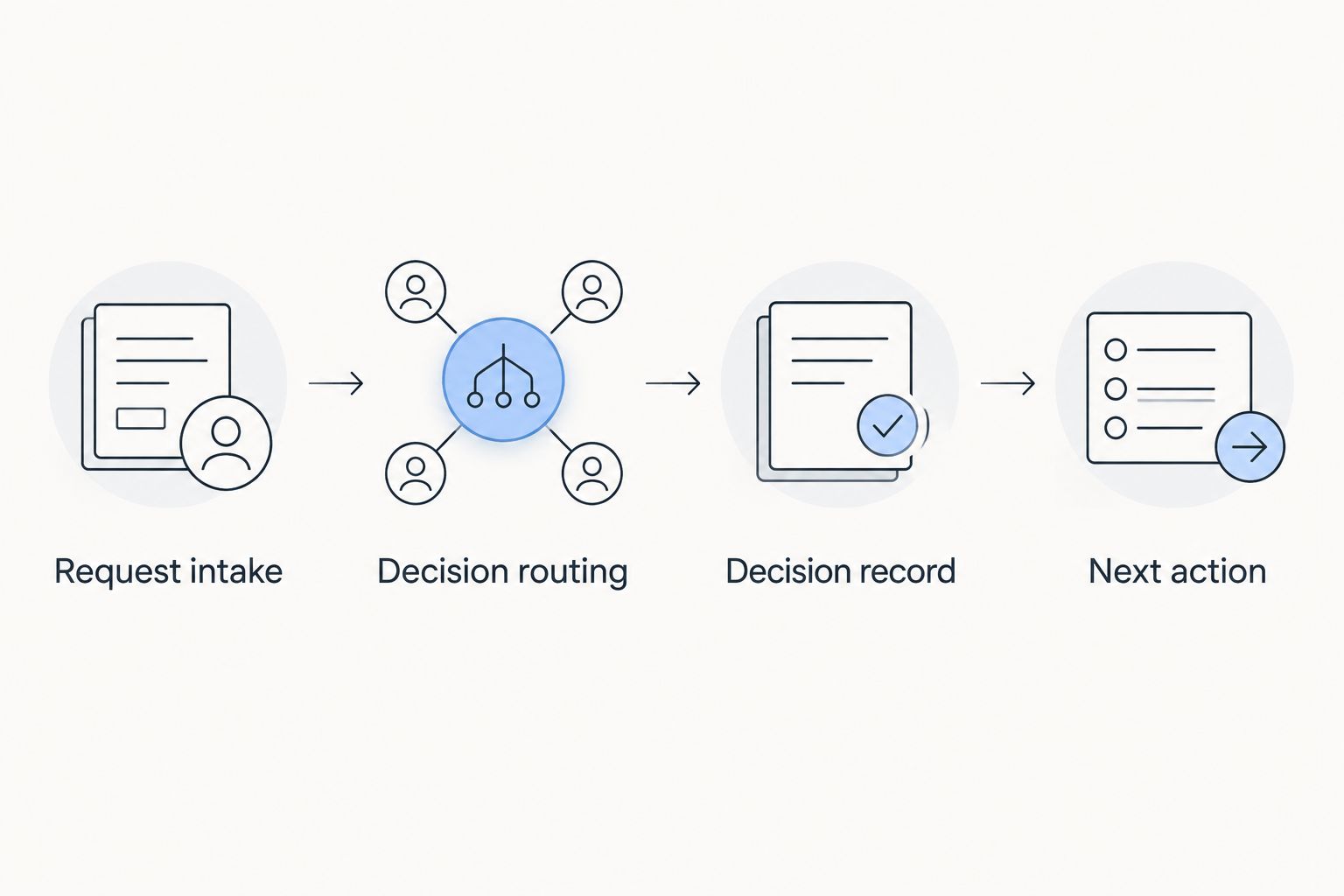
Evaluate the whole decision process, not just the approval notification.
For your 2026 evaluation, run 3 sample requests, use 2 approvers and include 1 rejected request. These are suggested test conditions, not vendor performance figures. Ask the process owner to explain every handoff without relying on the salesperson.
Which approval workflow software should you choose?
Start with the tool that matches your request's natural home. Communication-channel approvals, service tickets, forms, procedures and project tasks are different working models.
For a 2026 rollout, choose one process first. Confirm intake, reviewer ownership and the rejection path before expanding to another department. A broader platform is justified when you need its surrounding workflow—not simply because it offers more configuration.
FAQ
What's the best approval workflow software for Slack and Microsoft Teams?
Approveit is the best fit on this shortlist for no-code approvals directly within Slack, Microsoft Teams and email. Its stated use cases include invoice, purchase, expense and request approvals.
Is Microsoft Power Automate better than a dedicated approval tool?
Microsoft Power Automate fits processes that connect approvals with broader automation. A dedicated approval tool fits a narrower decision workflow; choose according to the work surrounding the approval.
What's the best option for IT request approvals?
Jira Service Management fits approvals inside IT service-request workflows. Choose it when authorization and fulfillment belong in the same service-management process.
Can project management software handle approvals?
Yes, project management software can support deliverable approvals. Asana provides approval tasks, while board-based tools require clearly defined decision states and routing rules.
What's the best tool for approval requests submitted through forms?
Jotform Approvals fits form-led approval intake. Define the required information before building the routing so reviewers receive a complete request.
How should I compare approval software in 2026?
Compare tools using the same request, reviewers and approval policy. Check incomplete submissions, rejection handling, decision records and the next action after a decision.
Does approval automation replace an approval policy?
No, approval automation executes a process; it does not decide your business policy. Define authority, required information and exception ownership before configuring software.
One last thing
Test rejection before approval. A successful sign-off shows the happy path; a rejection exposes whether the requester knows what to correct and who owns the next step. Make that your final acceptance check before launching the workflow.







